Continuous Integration Testing: A Complete Guide


Continuous integration testing prevents multiple developers who are committing to the same codebase from creating chaos. Without it, a team merging code from multiple developers into a central repository just moves the risk of conflicting changes further down the line, where it's harder and more expensive to untangle.
This guide covers what continuous integration testing actually is, why it matters, the types of tests that make up a typical CI pipeline, the tools involved, and how it fits alongside the broader idea of automated testing.
It ends with a few best practices and an honest look at what a passing pipeline can't tell you on its own.
What is continuous integration testing?
Continuous integration testing (CI testing) is the practice of automatically building and testing every change committed to a shared repository. Rather than waiting for a dedicated QA phase near the end of a release cycle, a build automation process compiles the new code, and an automated test suite runs against it immediately, flagging problems while the change is still small and easy to trace back to its source.
CI testing is specifically designed to make integration a smoother process. When developers work in isolation on long-lived feature branches, then try to merge weeks of divergent changes into the main branch at once, the resulting conflicts and integration issues can take days to resolve. Continuous integration solves this by encouraging frequent, small commits.
CI testing is what makes that frequency safe, since every commit gets validated the moment it lands rather than at the end of a sprint.
There are two separate definitions here. Continuous integration is the practice of merging code often, while continuous integration testing is the automated verification layer that makes doing so trustworthy, rather than just fast.
Why is continuous integration testing important?
Early detection is the core benefit of CI testing. A test that fails ten minutes after a commit is a quick fix. The same bug discovered three weeks later, after five other developers have built on top of it, is a much bigger job.
Beyond catching bugs early, CI testing tightens the feedback loop between a person writing the code and knowing whether it works. Developers get immediate feedback on their own change rather than discovering it during a separate testing pass days or weeks later, when it's harder to track down the context.
It also changes how development and operations teams work together. Build health becomes visible to everyone the moment a test fails, rather than something one team discovers and reports to another.
Thanks to that shared visibility, CI testing sits at the centre of most modern software development practice, not just as a nice-to-have bolted onto an existing process.
Testing in continuous integration
An effective CI pipeline runs a number of tests, roughly in order of speed, so the fastest and cheapest checks catch problems before slower, more expensive ones even start.
- Unit tests – Fast, isolated checks that verify a single function or method behaves correctly on its own, making up the bulk of most automated test suites, since they're cheap to run and to maintain.
- Static code analysis – Linters and static analysis tools scan the source code for style violations, unused variables, and common bug patterns, all without actually running the application.
- Integration tests – These tests confirm that different modules or services work together as expected, and are the layer most directly aimed at catching integration issues arising from the work of multiple developers.
- Functional and performance tests – Heavier tests that check real-world behaviour and how the system holds up under load, often running less frequently than unit tests, since they need closer-to-production test environments and take longer to complete.
Each stage acts as a quality gate against predefined criteria: if a test passes, the build moves forward; if a test fails, the build breaks, and the developer responsible gets notified straight away. A simple CI configuration makes that gating explicit. Here's a minimal example for a Node.js project, using GitHub Actions:
name: CI

on:
  push:
    branches: [main]
  pull_request:
    branches: [main]

jobs:
  test:
    runs-on: ubuntu-latest
    steps:
      - uses: actions/checkout@v4
      - uses: actions/setup-node@v4
        with:
          node-version: '20'
      - run: npm ci
      - run: npm run lint
      - run: npm test
Every push to the main branch or pull request targeting it runs linting and the test suite automatically. No one has to remember to run these checks by hand, and, with the checks set as required in your branch protection rules, a failing step blocks the pull request from merging.
Continuous integration testing tools
Most CI testing setups draw on a handful of tool categories rather than a single product:
- A CI server or platform, such as GitHub Actions, GitLab CI, CircleCI, or Jenkins, orchestrates the pipeline, triggering builds and tests whenever new code lands.
- A version control system, almost always Git, is what triggers the whole process. Every commit or pull request against the shared repository is the event the rest of the pipeline reacts to.
- A build automation tool, appropriate to the language in use, compiles the source code and produces something the test suite can actually run against.
- A test runner or framework executes the automated test suite and reports results back to the CI platform, which is what surfaces a failure as something developers can act on immediately.
Most modern CI platforms bundle static analysis, test reporting, and pull request integration out of the box, so teams rarely need to stitch every one of these pieces together from scratch.
Which specific tools make sense depends heavily on your language, existing infrastructure, and team size. There's no single right answer, and it's worth resisting the urge to adopt every available tool before your basic build-and-test loop is solid.
How continuous integration reduces manual testing
By automatically testing every commit, CI removes the need for a person to manually re-run the same checks each time the codebase changes. Where a tester might once have worked through a checklist by hand for every pull request, that same set of checks now runs identically, every time, without anyone needing to trigger it.
The benefit goes beyond effort, too. Manual, repetitive testing is where human errors creep in, e.g., a skipped step, a check run against the wrong branch, or a result recorded incorrectly under deadline pressure.
Automate it, and you remove that category of mistake entirely, freeing testers to spend their time on exploratory testing and judgement calls a script genuinely can't make, like whether a new interface actually feels intuitive to use.
CI testing reduces manual testing considerably, but it doesn't eliminate the need for human judgement, particularly for anything involving real user experience or genuinely novel edge cases that no one has written a test for yet.
Continuous integration and automated testing
Put the previous sections together, and a healthy CI pipeline looks like this: developers commit small, frequent changes to a central repository, an automated build compiles the change, and an automated test suite runs against it within minutes. Test results report back immediately, and a failing test blocks that change from advancing until it's fixed.
Automation at this scale does introduce one recurring problem, though: flaky tests – tests that fail intermittently for reasons unrelated to the actual code change, often due to timing issues or shared state between test runs.
Left unmanaged, flaky tests erode trust in the whole pipeline. Once a team starts assuming a red build might just be noise, they stop reacting to failures quickly, which defeats the entire purpose of automatically testing every change in the first place.
Continuous integration testing best practices
A few habits separate a CI pipeline that teams actually trust from one they route around:
- Commit small changes often – Frequent, small commits are easier to test, easier to review, and far easier to trace a failure back to when something breaks.
- Keep builds self-testing – Every build should run its own tests automatically, with no manual step required to find out whether it's safe to build on.
- Fix broken builds immediately – A broken build should be the team's top priority. Left unfixed, it blocks everyone else's work and quickly turns into a bigger problem than the original bug.
- Run your fastest tests first – Ordering checks from fastest to slowest gets a failing build flagged as early as possible, saving time and compute on tests that would have failed anyway.
- Use on-demand test environments – Spinning up a fresh, isolated test environment for each run avoids one test's leftover state affecting the next.
What CI testing can't tell you
A green pipeline is a genuinely useful signal, but not proof that everything is working as it should.
By passing CI testing, code is confirmed as behaving correctly against the test environments and test suites you've built. It doesn't confirm that the change is safe for every real user, on every device, in every edge case your test suite didn't anticipate.
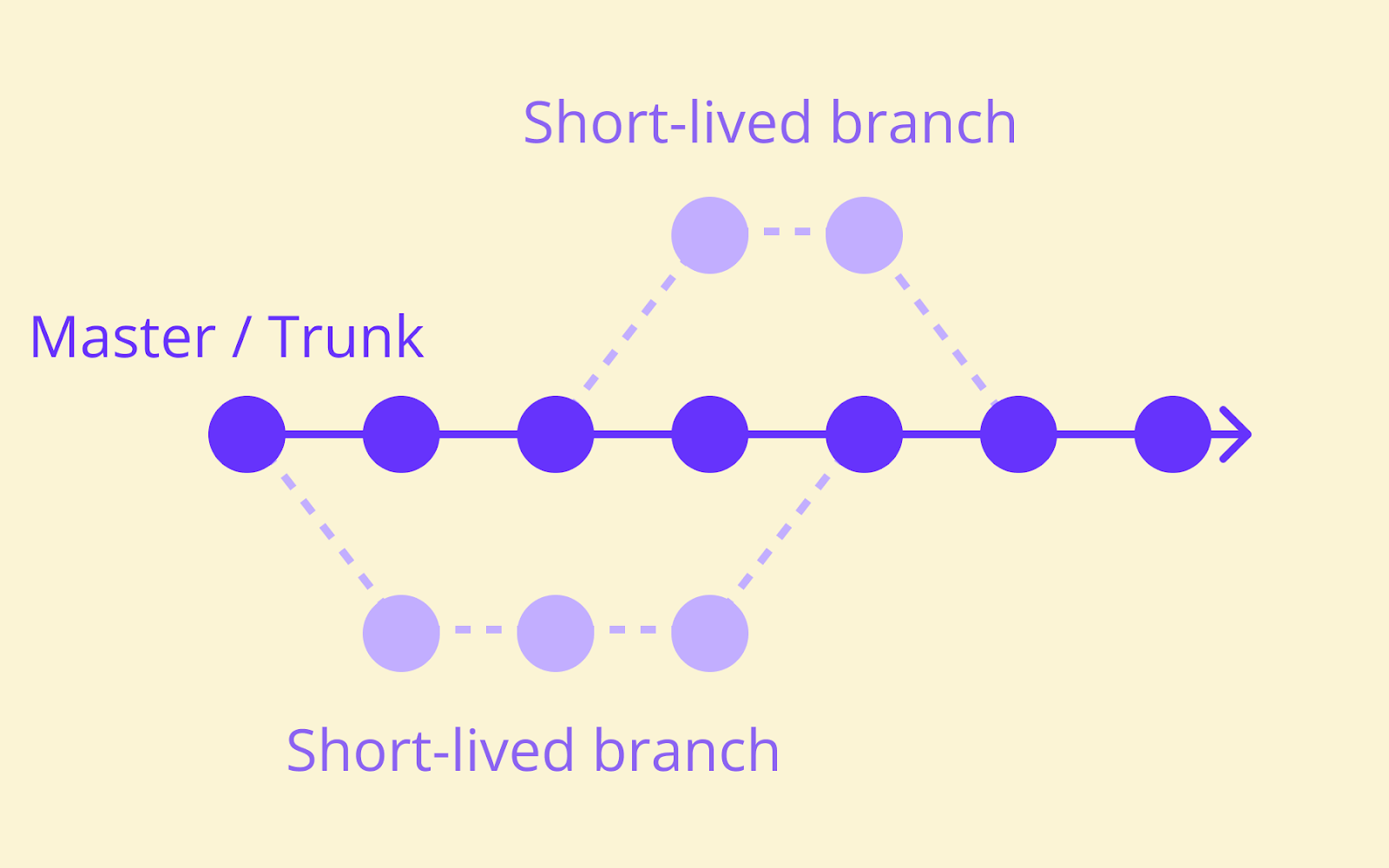
To fill that gap, consider Trunk-based development and feature flags.
Trunk-based development, where developers commit directly to the main branch rather than working on long-lived feature branches, depends entirely on CI testing to keep that shared branch releasable at all times. Feature flags extend that further: a change can merge into main and pass every automated check, then sit behind a flag until you're ready to expose it to real users gradually, rather than to everyone at once.
When something passes a CI pipeline, you learn that a change works in a controlled environment. Roll it out gradually behind a flag instead, and you learn how it behaves for actual segments of your real audience, before it reaches everyone.
Flagsmith sits downstream of testing entirely, controlling who's exposed to code that's already passed your automated checks. For larger or regulated engineering teams, that downstream layer has real value: knowing who toggled a flag and when, backed by role-based access and an audit trail, adds a layer of accountability that testing on its own was never designed to provide.
To enable more testing, Flagsmith is working on Experimentation, currently in beta. Get in touch if you're interested in joining.
Conclusion
By automatically building and testing every change against a shared repository the moment it lands, continuous integration testing makes frequent commits from multiple developers survivable rather than risky.
Get the fundamentals right, from fast unit tests through to fixing broken builds immediately, and the rest of your software development lifecycle gets noticeably calmer.
Once your CI pipeline is solid, sign up for Flagsmith to see how feature flags let you control exposure to code that's already passed testing, so a change that behaves unexpectedly for a subset of users never has to become everyone's problem at once.
Continuous integration testing FAQs
What testing is used with continuous integration?
A typical CI pipeline runs unit tests first, since they're fast and isolated, followed by static code analysis, integration tests, and then heavier functional or performance tests further down the pipeline. Which mix you use depends on your codebase, but unit tests and static analysis are pretty much universal starting points.
How is continuous integration testing different from continuous testing?
Continuous integration testing is specifically the automated build-and-test cycle that runs inside a CI pipeline, triggered by every commit.
Continuous testing is a broader practice that extends automated testing across the entire delivery pipeline, including stages after CI, such as staging environments and production monitoring.



























































OpenTelemetry, without the vendor lock-in: Introducing full observability for Open Source and Self-Hosted Flagsmith customers