

Why You Should Be Testing in Production and The Best Practices


For the longest time, testing in production was considered an absolute no-go. Developers would rather test in development and staging environments and deploy only once everything works perfectly.
Yet that approach is holding teams back. Today's software landscape:
- Deploys code multiple times a day
- Runs on a microservices architecture with hundreds of dependencies
- Pieces together third-party integrations that are hard to replicate in a staging environment
- Provides users with continuous improvement without interruption.
Case in point: in 2021, we had our first API outage, lasting 44 minutes. We'd tested the code in a staging environment with an identical tech stack and got green checks all the way. It came down to a data discrepancy between staging and live, and things broke down.
We learned our lesson, but it's still a problem for many engineering leaders, which is why you need to test in production with the proper guardrails in place.
In this article, we'll explore what testing in production means, the best practices that keep it safe, and how to do it with feature flags.
What is testing in production?
Testing in production refers to the practice of validating software behaviour, performance, and functionality in the live environment—the same production environment where users interact with your application every day.
Many teams use three environments: development, staging, and production. Testing in a production environment means deploying code without staging it first, or deploying to staging and then deliberately continuing to test once the code reaches production.
Honestly, this is a scary thing to do. Many developers have real and valid concerns.
- Risk of disruption: The fear that production testing could disrupt real users, through anything from outright downtime to a quietly degraded experience, is entirely valid. No one wants to be responsible for breaking the customer experience.
- Data integrity: Testing activities could pollute production data if they're not properly isolated.
- Pressure and accountability: When testing happens in production, mistakes are visible to everyone watching, from customers to teammates.
- Replication challenges: Paradoxically, many software engineers also struggle with issues that only manifest in production and can't be reproduced anywhere else.
- Regulatory and compliance risk: In regulated industries, production testing could violate compliance requirements, and exposing sensitive data during tests is a genuine security concern.
Despite these risks, testing in a pre-production environment isn't necessarily the safer option anymore.
"Traditional testing is becoming harder. You used to have one server, one database, one web service or application, and possibly an API connection to a payment gateway," explains Ben Rometsch, Flagsmith's co-founder. "Applications now have a bunch of APIs they're connected to, maybe two or three data stores they're working on, three or four runtime services they're running. This is great—they're more capable, flexible, easy to develop, and powerful. But it means that the difficulty of getting a replica of that environment as closely as possible is increasing every day."
Feature flags let you test in production safely, giving you the ability to control the visibility of features at runtime and make changes without redeploying code. You can:
- Deploy code without immediately exposing it to users.
- Test features in production with only internal teams.
- Roll out features gradually to increasingly larger segments of your user base.
- Turn off problematic features immediately without rolling back deployments.
They decouple deployment from release, giving you fine-grained control over who sees what and when. Even if you keep your staging environment—and there are good reasons to—production testing is still worth adding to your process.
Testing in a production environment vs. traditional testing methods
Previously, software testing followed a linear progression: you wrote the code, tested it, and deployed it across a series of environments.
Testing in a live environment doesn't work this way. Here are the differences:
What are the benefits of testing in production with feature flags?
Instead of viewing production as the finish line where testing ends, treat it as a critical stage in your testing strategy. Here's why.
You can test with real user conditions and data volumes
Production environments are messy. You'll see a range of user behaviours, edge cases, and data patterns that even a well-built staging environment will never fully represent. Only testing in a production environment will surface them.
Your team can uncover edge cases and rare conditions that a staging environment will never reveal, and the sheer data volume and velocity will bring up issues you hadn't considered, letting you monitor application behaviour under real conditions while controlling the final user impact.
Your tests will be more accurate and reliable
No matter how closely you mimic your production environment, there's a good chance you'll miss something. With testing in production—sometimes shortened to TIP, or called production testing—you run tests under real network conditions, with actual system load and authentic user behaviour.
As issues appear, you know they're real issues that would have affected your users. If a feature flag is controlling that test, say by exposing a feature to a small subset of users through a phased rollout, you contain the impact by toggling it off. Your team gathers more real-world data and builds higher quality assurance into every release.
You'll iterate faster and reduce your time to market
Typically, software engineers pass code through multiple environments before it reaches users, adding time to every release cycle. Testing code in production shortens that feedback loop.
You can deploy new code to production while keeping it invisible to users during testing, then roll it out to a small segment, evaluate the behaviour, and expand from there.

This process is called progressive delivery, and it works at more than one level of granularity:
- A flat percentage rollout exposes a feature to a set share of traffic, regardless of who those users are.
- Segment-based targeting exposes it to a specific group instead, such as your own team or a named beta cohort.
- Multivariate flags go further still, serving more than one variant at once so you can compare performance before picking a winner.
Instead of testing, fixing, and then deploying in sequence, you're doing it all at once—a genuine competitive edge for teams operating at scale, and one that shows up directly in deployment frequency.
You can take advantage of trunk-based development
Testing in production with feature flags complements trunk-based development. Rather than creating long-lived feature branches that end in complex merges, you work on small, incremental changes that integrate into the main branch frequently, fitting neatly into continuous integration workflows.

Feature flag testing keeps incomplete work hidden from users while it's deployed to production and tested in the live environment, reducing merge conflicts, encouraging smaller code changes, and avoiding the integration headaches of long-running branches, all while keeping full control over which features production users can access.
You can reduce mean time to recovery (MTTR)
Production incidents happen all the time. Running tests in production with feature flags helps you identify them faster and stop them before they spread.
Feature flags give you an immediate rollback option. Rather than running a full rollback involving multiple changes, you turn off the problematic feature and reduce the incident's MTTR—one of the DORA metrics.
You can also use a staged response: disable a problematic feature for all users, gradually re-enable it for internal testing, then for specific user segments, and finally for the entire user base once the issue is resolved.
Performance testing in production
Performance testing in production measures response time, throughput, and resource usage under real user traffic and real data volumes, rather than simulated load against a testing environment.
You can run a load test in a staging environment, but you would be testing against synthetic traffic patterns and a smaller, often unrepresentative dataset.
Real user traffic doesn't arrive evenly, and real data doesn't behave like a seed script. Cache hit rates, query patterns, and third-party API latency all look different once actual users are involved, which is a big reason performance issues so often surface only after a release ships.
Feature flags make performance testing in production safe intentionally. You can:
- Route a small percentage of real production traffic to a new code path and compare its latency and error rates against the previous version.
- Watch resource usage under an actual load pattern before deciding whether the change is ready for everyone.
- Roll the change back instantly if response times degrade, without waiting for a new deployment.
Treat performance testing in production as a companion to your existing load testing, not a replacement for it. Load testing in a controlled environment still catches gross regressions before release. Testing performance in production catches the subtler ones that only show up under real conditions.
How to catch issues when testing in production?
Proper production testing can prevent catastrophic failures. The 2024 CrowdStrike outage was one example: a faulty update to its Falcon sensor crashed Windows systems worldwide, causing global IT outages across airlines, banks, healthcare systems, and critical infrastructure.
Had the CrowdStrike team gradually rolled out the update using feature flags, they'd likely have caught the problem before it hit their entire customer base.
Uptime Institute's Annual Outage Analysis 2026 found that 57% of organisations' most recent major outage cost more than $100,000, and one in five topped $1 million—exactly the kind of cost a contained, flag-gated rollout is designed to avoid.
Here are a few ways to avoid a similar incident.
1. Try to minimise negative impact on end users
Testing in production is often conflated with skipping quality checks and exposing every feature to everyone at once. It isn't—progressive delivery with feature flags lets you roll out to a small segment, test, validate, and then expand:
- Phased rollouts expose new features to larger user segments gradually, limiting the blast radius before an issue becomes a revenue-draining problem.
- Canary deployments, or canary releases, direct a small percentage of traffic—often 1–5%—to the new version, creating an early warning system that detects issues before they affect most of your user base.
- A/B and multivariate testing compare two or more implementations with real users and gather user feedback, so you can pick the winning version to keep live.
- Synthetic users simulate real behaviour through automated scripts, enabling you to test a feature behind a flag without exposing it to paying customers.
- Shadow testing, or dark launching, processes production traffic through new code paths without returning results to users, comparing old and new responses to spot differences.
- Chaos engineering deliberately injects failures—killing an instance, adding latency—behind a flag, so you find out how the system copes before a real outage does it for you.
- Smoke testing runs a small, fast set of checks immediately after a deploy—if the app loads, if a user can log in, or if they can complete checkout—to catch a broken build before anyone else does.
2. Use monitoring and alerting to detect issues in real time
You can't achieve 100% risk mitigation, which is why you need robust monitoring.
- Track response time, error rates, resource utilisation, and traffic volume to spot performance degradation early.
- Measure how users interact with the application through session recordings or real user monitoring (RUM).
- Use tracing to follow requests across microservices and pinpoint root causes.
- Implement an observability platform, like Grafana, to flag unusual patterns before they become disruptions.
With the right alerting thresholds and escalation paths, your team can turn off flags before a small issue becomes a major one.
3. Ensure data privacy and security during testing
Feature flags give you the control you need, but they create real problems without the right security measures around them.
Engineering teams use role-based access control (RBAC) to restrict who can create, modify, and toggle flags—in practice, that usually means separating who can create a flag from who can toggle it live, so a developer testing a feature can't accidentally release it to your entire user base.
Maintain detailed logs of every flag change, too. Make sure you have an audit trail when you're troubleshooting a problem, which is often required under frameworks like SOC 2 or GDPR once real user data is in scope.
How to test code in production using feature flags
The first thing you need to do is set up a feature flag. Next, think about the lifecycle of the feature flag. Remove flags once testing is complete, unless they serve as kill switches or long-lived flags, keeping your codebase clean and avoiding the technical debt that comes with these flags, including the risk of a rogue flag being turned on by accident.
You should also understand what actually happens when you toggle a flag. Most server-side SDKs poll for the latest flag state on an interval, commonly around 60 seconds by default, rather than getting pushed an update the instant you flip a toggle, and client-side SDKs can cache a flag's value locally until the next fetch.
During that window, an instance that hasn't polled yet, or a stale client-side cache, can still serve the previous version.
That delay is rarely a problem, but it's still best not to assume a toggle takes effect everywhere the moment you click it, especially if you're rolling back something urgent. Real-time streaming updates are available on some plans and tools.
When you have a process down for testing, automate the flag controls. You can do that by:
- Generating feature flags when you create new branches.
- Tying the flag state to specific deployments.
- Triggering tests based on specific criteria and rolling them out to test users.
- Automatically increasing feature exposure when your tests reach a performance threshold.
Using this approach, you'll turn a seemingly risky software development practice into a competitive advantage.
Testing in production best practices
Now that you know how to test in production, here's how to get the most out of it.
1. Establish clear testing objectives and success criteria
Define your testing objectives before you implement this process. Document what you're testing and why. It gives your team guidance on how to approach testing and what key metrics to measure. For example, performance testing focuses on response times, while feature validation focuses on user completion rates.
Make sure your success criteria and your failure conditions are specific and measurable.
- Not: "This feature should help the user achieve their goal."
- But: "API response times remain under 200ms at the 95th percentile."
It removes ambiguity when deciding whether it's time to deploy the feature to the entire user base.
2. Implement version control and rollback mechanisms
Always version your feature flags and code to maintain alignment between flag configurations and the code they control. Treat the flag definition as code and store it in your version control system.
Well-documented rollback plans use toggles to roll back features automatically when needed, whether through automated rollbacks triggered by monitoring alerts or a break-glass procedure for emergencies. A solid break-glass process covers:
- Who has the authority to trigger emergency disablement, under your RBAC policy.
- How to disable the feature, including direct database access if necessary.
- Communication templates for notifying stakeholders.
- Post-incident analysis procedures.
Version control and a clear rollback mechanism make root cause analysis faster and create more structure for the next time something goes wrong.
3. Collaborate with cross-functional teams and stakeholders
Before and during testing, get alignment on who can access and make changes to the code and flags. Typically, these teams are involved:
- Developers are responsible for implementing feature flags.
- Quality assurance (your QA team) is responsible for validation testing.
- Operations is responsible for monitoring production metrics.
- Product is consulted on rollout decisions.
Build operating procedures around this and implement access controls accordingly. Regular touchpoints, like daily standups or status checks during active testing periods, help prevent you from missing an observation or concern, and you can adjust testing plans as needed.
Self-hosted testing in production environments
Not every team can send production data to a third-party SaaS platform, even a well-secured one. If you're in banking, healthcare, or another regulated industry, testing in production with sensitive data often comes with rules about where that data can live and who's allowed to touch it.
Consider a self-hosted or private cloud deployment of your feature management platform if this is the case.
Instead of routing flag evaluation and configuration through a third party's infrastructure, you keep it inside your own environment, alongside the production data it's controlling access to.
Flagsmith supports these deployment options, alongside a managed cloud offering, specifically for teams that need that control.
Matching your testing in production setup to whatever data residency, air-gapping, or audit requirements your industry already holds you to keeps production testing from becoming the exception your compliance team has to work around, rather than reflecting any distrust of SaaS tooling in general.
Tools for testing in production
Testing in production doesn't happen in a vacuum. It requires the right combination of tools working together. Here's what a modern production testing stack typically looks like.
Feature flags
Feature flags are the foundation of safe production testing. Without them, you're choosing between deploying to everyone or no one. With them, you control exposure with precision: a specific user segment, a percentage of production traffic, or a single internal user for initial validation.
Flagsmith supports everything from simple boolean toggles to complex multivariate flags, with cloud, private cloud, and self-hosted deployment options, letting you manage flags across environments and integrate with your monitoring stack without redeploying code.
Observability and monitoring
Observability and monitoring tools give you visibility into what's happening once you're live: real-time data on error rates, latency, and system behaviour, paired with distributed tracing to follow requests across microservices and pinpoint where issues originate.
Flagsmith integrates with several observability platforms.
Automated testing
Automated testing is an essential companion to production testing. Test automation systems, including unit tests, integration tests, and end-to-end test suites, give you confidence before code reaches production users, and wire into your CI/CD pipeline for continuous validation.
The most mature teams layer the two: automated tests validate new code in pre-production, then feature flags control the gradual exposure to real user traffic once it's deployed.
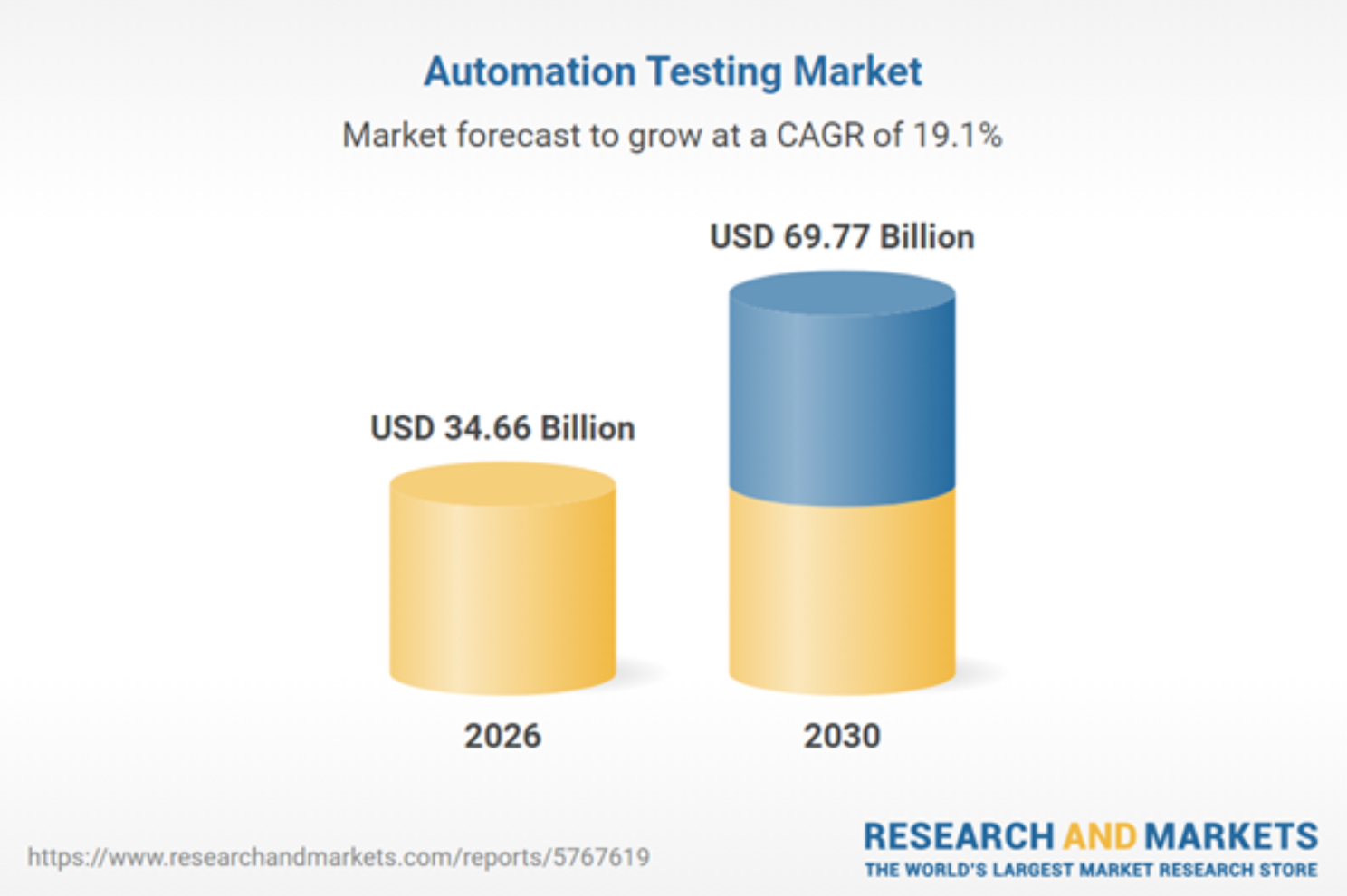
It's no surprise that the automated testing market is predicted to grow to $69.77 billion by 2030.
Traffic mirroring
Also known as shadow testing, traffic mirroring routes a copy of live user traffic to a new code version without those users seeing the results, while production keeps serving the previous version.
It's particularly effective for backend changes and infrastructure migrations, where the impact on real user behaviour is subtle and hard to reproduce in a test environment.
Visual testing
Visual testing validates your UI's appearance across browsers, devices, and screen sizes, catching regressions functional tests miss, like a button shifted two pixels or a font rendered incorrectly in one browser.
It can run against canary deployments or small rollout segments to confirm a new feature looks right before it reaches everyone.
These tools work best wired together: a feature flag gating a rollout to 10% of traffic, an observability platform watching error rates and latency on that segment, an alert firing the moment either moves outside its threshold, and a documented rollback step that whoever's on call can execute without a new deployment.
Deploy features with confidence by testing code in production
No staging environment can perfectly replicate production conditions, no matter how carefully you build it.
If you want to move past that ceiling, consider testing in production with feature flags. You'll be able to decouple deployment from release and control how every feature reaches your users, without hesitation.
Software quality increasingly gets decided through controlled testing in the one environment that actually matters—production, not a simulated stand-in for it.
Sign up for Flagsmith to start testing your next feature safely, with real users, real data, and a rollback plan you'll hopefully never need.































































OpenTelemetry, without the vendor lock-in: Introducing full observability for Open Source and Self-Hosted Flagsmith customers















































