A/B Testing vs. Canary: The Main Differences and When to Use Each


You will start both A/B testing and canary testing in the same way: you show a change to some users and hold it back from everyone else.
That similarity is why these two terms can be confused. In reality, you would use each of these two techniques to answer different questions:
- A/B testing helps you understand which version performs better
- Canary testing reveals whether a new version is safe to ship at all
This guide separates the two, walks through how each one actually works, and shows you where they overlap enough to run together. By the end, you'll know exactly which one, or which combination, fits the decision in front of you.
What is A/B testing vs. canary testing?
What is A/B testing?
A/B testing splits your users into a control group and a treatment group and shows each one a different version of the same feature. One group sees the old version, the other sees the new one, and you measure a specific metric across both, such as conversion rate, signups, or time on page.
Once you have enough data to reach statistical significance, you will know which version actually performs better, with real confidence behind the answer. A/B testing is primarily a controlled experiment, rather than a rollout mechanism.
What is canary testing?
Canary testing, sometimes called a canary deployment or canary release, exposes a new version of a feature to a small canary group, then you monitor primarily system health, with user behaviour a secondary concern.
If error rates, latency, crash counts, or resource usage stay flat, you expand the release to more users in stages until everyone's on the new version. If something breaks, you roll the canary group back before the wider user base ever sees the problem.
Canary testing takes its name from the canaries coal miners once carried underground—an early warning system that reacted to danger before the miners could detect it themselves. Canary testing is a safety check first, and rarely anything more than that.
How A/B testing works
To run an A/B test, you start by picking one metric that will have the most impact on the decision you have to make. You then randomly assign users to a control group and one or more treatment groups, using a proper random split rather than convenience groupings, like everyone in a particular timezone.
Randomisation enables you to effectively attribute a difference in outcomes to the change itself rather than to who happened to see it.
Then, you run the test long enough to collect a sample size that gives you statistical significance, not just a result as soon as it suits your hypothesis. Ending a test early because the numbers look promising is one of the most common ways A/B tests produce false winners.
Most teams don't build this measurement logic from scratch; they pick an A/B testing tool that handles randomisation, tracking, and significance calculations for them, and focus their own effort on picking the right hypothesis to test.
A/B testing doesn't have to stop at two versions, either. Testing multiple ideas against the same control group at once, usually called multivariate testing as opposed to A/B testing, lets you compare several variants in a single run – provided you have enough traffic to reach significance on each one.
A/B testing suits changes where the outcome is genuinely uncertain and measurable: pricing pages, onboarding flows, checkout steps, or a redesigned dashboard. It's less useful when you're planning changes where the risk is technical rather than behavioural, since it isn't built to catch a memory leak or a broken API call, only a difference in how users respond.
How canary testing works
Canary testing starts by carving off a small, low-risk slice of your production traffic, often 1% to 10%, and routing it to the new version while everyone else stays on the version you know works. You watch operational metrics: error rates, response times, and CPU and memory usage, alongside any alerts your monitoring already fires on.
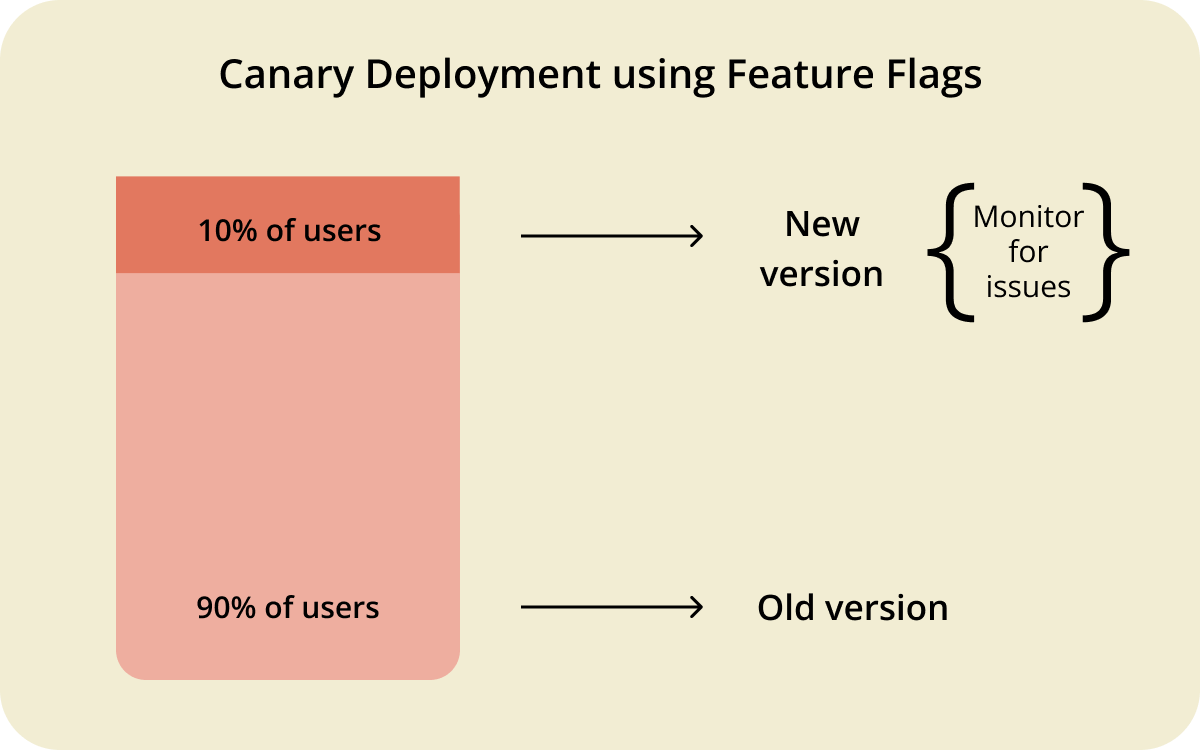
Automated monitoring catches most regressions, but it doesn't replace manual verification altogether. Ensure theres a human reviewing the canary group's dashboards before every expansion step to catch user experience issues that don't trip any alert threshold – canary testing works best alongside quality assurance, not instead of it.
You control that staged rollout through feature toggle management, only expanding the release, step by step, once the canary group holds steady, and rolling it straight back the moment it doesn't.
If the canary group holds, you might double the rollout percentage every few hours or days, depending on how much traffic you need to feel confident.
Canary testing is the right tool for infrastructure changes, backend logic, database migrations, and anything running in a production environment where a bad release could take the whole system down rather than just underperform.
A/B testing vs. canary testing: key differences
Line the two up side by side and the differences in canary testing vs. a/b testing become more obvious.
The biggest difference is what happens if you choose to skip canary testing vs. A/B testing.
Skip canary testing and ship a broken backend change straight to everyone, and you've got an outage on your hands.
Skip A/B testing and ship a redesigned checkout flow straight to everyone, and you might end up with a worse conversion rate and no data to explain why.
Canary testing minimizes risk by containing a technical failure to a small subset of users; A/B testing does something different and only tells you which experience people actually prefer.
A/B Testing vs. canary vs. blue-green
Blue-green deployment is another process that often gets pulled into this comparison.
Blue-green deployment keeps two identical production environments running side by side, a blue environment serving live traffic and a green environment holding the new version, then cuts traffic across in one move once the green environment checks out.
It's a deployment strategy built for zero-downtime releases and fast disaster recovery, not for gradually testing anything, which puts it in a different category from both A/B testing and canary testing.
When to use A/B testing vs. canary testing
Start with the question you're actually trying to answer. If you need to know whether a change is safe, run a canary test. If you need to know whether a change is better, run an A/B test.
A visual redesign of your marketing homepage is an A/B testing problem. A rewrite of your authentication service, especially one shipped through a fast-moving CI/CD pipeline, is a canary testing problem.
Team size and infrastructure are considerations. For effective canary testing, you need a way to route specific users or requests to specific code paths, which is straightforward on the server side but harder on mobile apps, where each installed copy sits in its own isolated environment rather than a request you can redirect.
A/B testing carries the same targeting requirement, but you have more time to make a decision, as you're waiting for statistical confidence rather than an operational signal.
If you're still unsure, think about what a failure would actually look like. A failed canary test shows up as a spike in errors you can catch and reverse within minutes. A failed A/B test usually appears as a metric drifting the wrong way over weeks, or even a version that performs worse with no crash and no alert.
Different risks call for different levels of the same underlying discipline, which is to hold a change back from everyone until you understand what it does.
Can you combine A/B testing and canary testing?
You can combine A/B testing and canary testing, and for changes that carry both technical and behavioural risk, combining them is often the best choice.
Release the change to a canary group first, and confirm nothing's broken before you ask the bigger question of whether users actually prefer it.
In practice, that means running a short canary phase to catch anything that would break the system, then converting that same canary group, or a fresh and larger sample, into the control and treatment groups for an A/B test. You get stability confirmation before behavioural data, so an operational failure doesn't get mistaken for a losing test variant.
Here's a concrete example of a checkout service rewritten to call a new payment processor that carries both kinds of risk at once. A broken integration could fail transactions outright, and even a technically sound new flow might convert worse than the one it replaces. A staged rollout solves both problems:
- Canary phase – Route 2% to 5% of checkout traffic to the new integration for a few hours, and watch transaction success rate, gateway error rates, latency, and payment retry counts. This step only establishes whether the change works, so any spike in errors triggers an immediate rollback.
- A/B phase – Once the canary holds steady, expand to a larger, randomised sample split into a control group on the old checkout and a treatment group on the new one. Run it for one to two weeks and measure conversion rate, cart abandonment, revenue per session, and average order value.
- Decision – Roll out to everyone only once both questions are answered: the change is stable, and it performs as well as or better than what it replaces.
Skip straight to the A/B test, and a payment gateway bug could tank the treatment group's conversion numbers, leading you to wrongly conclude the new checkout was worse when it was actually just broken.
This staged approach is a form of feature experimentation, and takes more time than either technique by itself. Reserve it for changes where both a system failure and a bad user outcome are genuinely plausible, rather than applying it to every release by default.
How feature flags support both approaches
Both techniques depend on the same underlying capability: routing specific users to specific code paths without redeploying anything.
A feature flag does exactly that.
Toggle it for 5% of your traffic, and you've got a canary group. Split it 50/50 between two variants and you've got an A/B test.
Flagsmith enables you to manage that targeting from one place instead of building bespoke routing logic for each rollout.
You can define a segment, adjust the percentage of users who see a change, and roll it back instantly if something goes wrong, all without a deploy. That's granular control over both a canary release and an A/B test, run from the same dashboard rather than two separate systems.
Flagsmith is open-source, so you can run it as a hosted service or self-host it inside your own infrastructure if that's what works best for your setup. That flexibility has the biggest impact when you're running the combined approach above, since it means the switch between canary and A/B phases is a configuration change, not an engineering project.
Conclusion
A/B testing and canary testing solve different problems, even though they start from the same instinct: don't expose everyone to a change at once.
A/B testing tells you which version wins; canary testing tells you whether a version is safe to ship. Knowing which question you're asking and trying to answer is the biggest indicator of which one you should choose.
If you want to run either one, or both back to back, without building custom routing for every release, sign up for Flagsmith and set up your first canary group or A/B test in minutes.
A/B testing vs. canary FAQs
Is canary testing a type of A/B test?
No. Canary testing and A/B testing both expose a change to a subset of users, but canary testing measures system stability while A/B testing measures user behaviour and business metrics. A canary group isn't randomised the way an A/B testing control group is, since the goal is operational safety rather than statistical comparison.
Can you run A/B testing and canary testing at the same time?
Yes. A common release methodology is to canary test a change first to confirm it's stable, then run an A/B test on the same or a larger audience to measure its impact. Running them in the wrong order risks treating a system failure as a losing test result.
Which is better for mobile apps: A/B testing or canary testing?
Both are harder on mobile than on the web, since each installed app is its own environment rather than a request you can route server-side.
Using feature flags solves this by allowing you to control what a specific app instance sees remotely, making canary rollouts and A/B tests both possible without you having to ship a new app version for every stage.





























































OpenTelemetry, without the vendor lock-in: Introducing full observability for Open Source and Self-Hosted Flagsmith customers