

How to Build a Software Rollback Strategy for Your Deployments


A rollback strategy tells your team exactly what to do when a deployment goes wrong, before it goes wrong. Without one, you're often deciding on the fly whether to redeploy, flip a flag, or touch the database, while a production issue gets worse. A strategy you've built and rehearsed in advance turns that scramble into a short, well-understood sequence of steps.
This article walks through what a rollback strategy actually covers, the layers it needs to work across application code and databases, and a practical process for building one your team can trust.
You'll come away with a clear picture of where feature flags, automated rollback triggers, and database rollback strategies each fit, and how to decide which one to try first when a deployment doesn't go to plan.
What is a software rollback?
A software rollback is the act of reverting a system to a previous, known-good state after a deployment introduces a problem. That reversal could mean redeploying an earlier version of your application code, disabling a feature, or reversing a database change.
It's worth distinguishing a rollback from rolling forward, which is fixing the problem with a new deployment rather than reverting to the old one. Both are valid responses to a failed release.
You should have a rollback strategy in place so that you're not deciding between a rollback and rolling forward, and how to execute whichever you choose, in the middle of an incident.
Why you need a rollback strategy
Every deployment carries some risk, however thorough your testing. Bugs slip past staging, dependencies behave differently under production load, and configuration drifts between environments in ways no test catches.
How fast you recover is as important as how well you built the feature in the first place.
With a well-prepared rollback plan, you limit how long users feel the impact. You also cut the human error that creeps in when you're improvising a fix under pressure, at 3 AM, with stakeholders asking for updates.
According to Splunk's Hidden Costs of Downtime report, Global 2000 companies lose an average of $300 million a year to unplanned outages, with a single incident triggering an average 3.4% stock price drop.
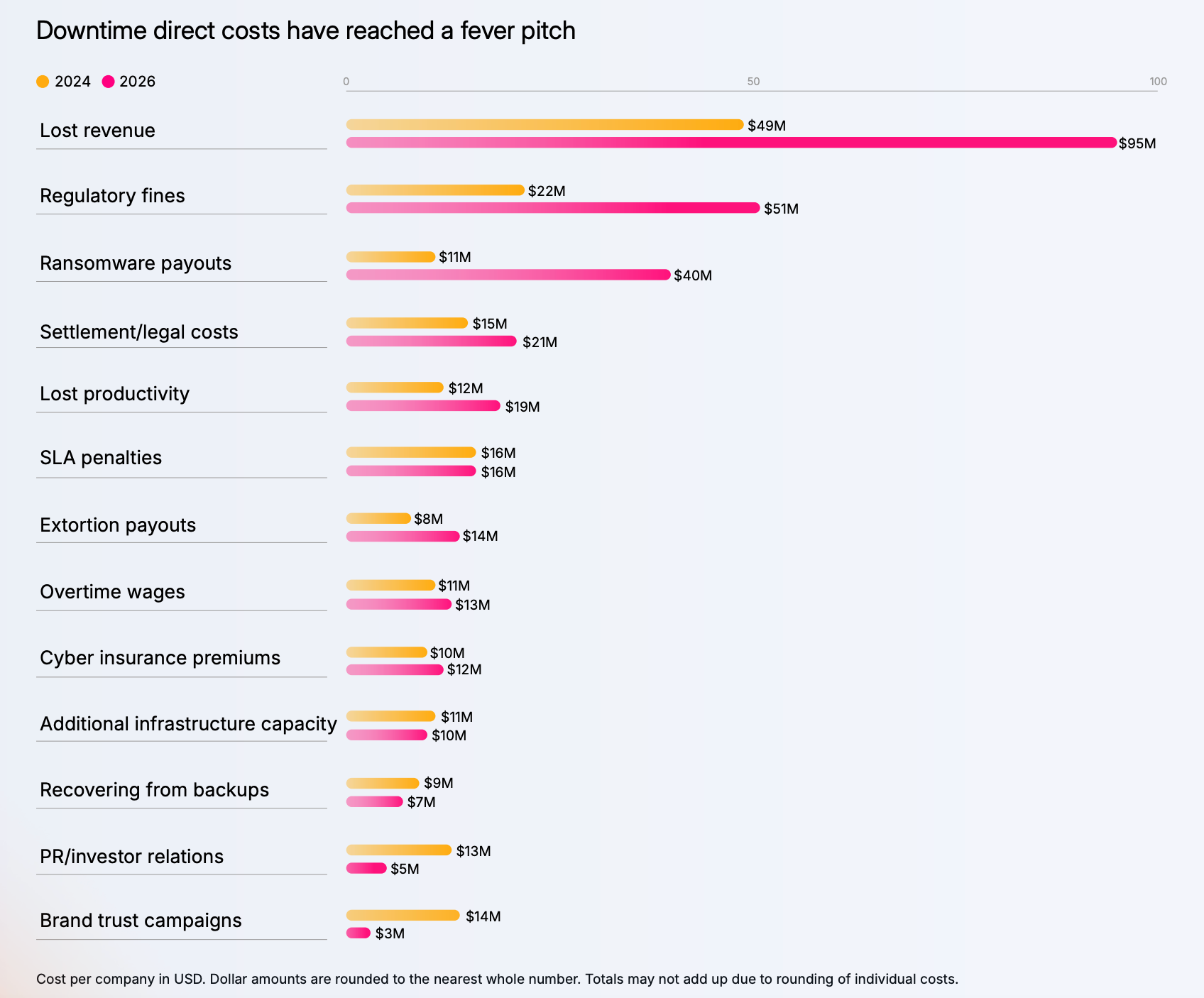
Beyond the immediate incident, a rollback strategy helps maintain business continuity. Regulated industries in particular need to show that changes to production systems can be reversed cleanly and that every rollback is logged for audit purposes, not just resolved quietly.
Crisis management during an outage is a skill you can practise in advance or learn the hard way in front of customers.
Without a rollback strategy, you tend to default to manual intervention: someone SSHs into a server and guesses at a fix, hoping it holds. That approach is error-prone even when it works, and it leaves no clear record of what changed or why.
A documented rollback process turns a stressful, ad hoc response into a repeatable one, so your team improves after every incident instead of relearning the same lessons each time.
There's also a customer-facing cost to extended downtime or a visibly broken feature. Repeated incidents erode trust and are a real driver of customer churn in competitive markets. In a recent study, 69% of e-commerce decision-makers cited increased customer churn as the most common outcome of internet disruptions.
Getting a system back to a stable state is quickly as possible is as much a retention safeguard as an engineering practice.
The core components of a robust rollback strategy
A rollback strategy is a stack of mechanisms, ordered roughly from fastest and lowest-risk to slowest and highest-risk. Understanding each layer helps you pick the right one for a given failure instead of just going for a full redeploy by default.
Version control and a stable previous version
Every rollback strategy starts here. Your version control system needs to make it easy to identify the last known-good release and redeploy it cleanly, without manual reconstruction of what that version actually contained.
Tag releases, not just commits, so you know exactly what previous version to roll back to.
You could even take this further with a blue-green deployment setup, keeping the previous version live in a parallel environment so a rollback becomes a traffic switch rather than a fresh redeploy.
Feature flags for fast, application-layer rollback
Toggling a feature flag off is usually faster and lower-risk than a full redeploy: you're changing configuration, not shipping new code.
If a new checkout flow is causing errors, flipping the flag that gates it can resolve the issue in seconds, while the underlying code stays in production, disabled, ready to be fixed and re-enabled later.
That coverage only extends to application behaviour, though. A flag can hide a broken feature from users, but it can't undo a database migration that already ran. Treat flag-based rollback as your fastest layer, not your only one.
Production flag changes are also worth governing rather than leaving open to anyone.
Flagsmith's audit logs record who changed a flag and when, and role-based permissions (available on Enterprise plans) let you restrict who can flip a flag in production versus development, so a fast rollback doesn't come at the cost of accountability.
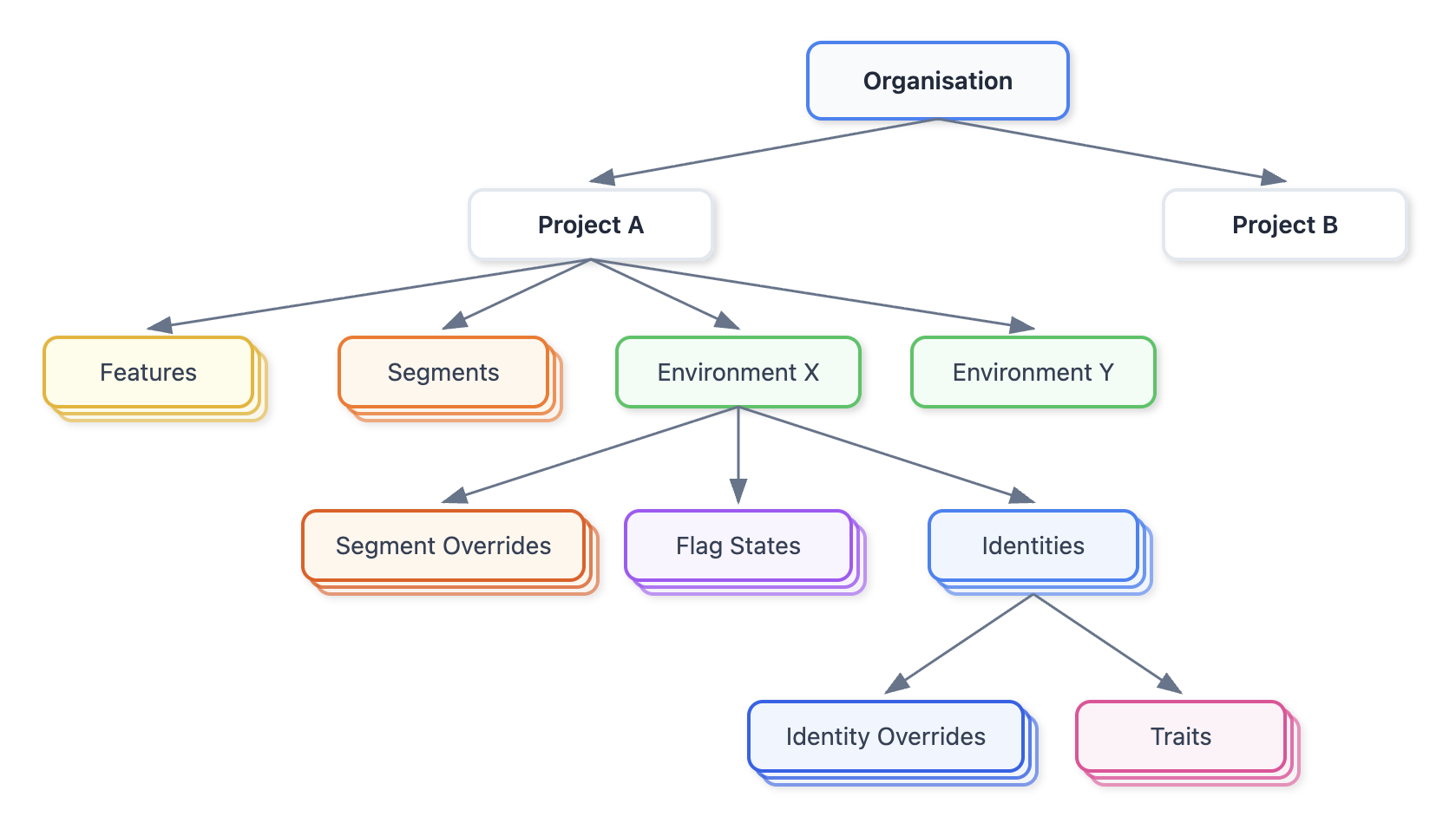
Flag values can be set per environment, so a change made to fix a production incident doesn't touch your staging or development configuration at all.
Here's a high-level overview of the Flagsmith data model and where environments fit into it.
Automated rollback triggers and monitoring
Not every rollback should wait for a human to notice something's wrong.
Automated rollback triggers, tied to error rate thresholds, failed health checks, or a sudden spike in latency, can revert a deployment before it affects most of your users.
Automatic rollback suits failure scenarios with a clear, measurable signals, such as a spike in 500 errors immediately after a deploy. Manual rollback still has a place for judgement calls, like a feature technically working but confusing users in ways monitoring can't detect.
Robust monitoring makes both options possible. Without visibility into system health, error rates, transaction logs, and performance trends, you're relying on user complaints to tell you a deployment failed, and by then, the damage is already done. Set your thresholds before you deploy, not while you're staring at a dashboard wondering if what you're seeing is normal.
Database changes need their own rollback plan
Code and configuration can usually be reverted in seconds. Database changes are different, and rushing them is one of the more common ways a rollback makes things worse instead of better. We'll come back to this in more depth later in the article.
Staging environments and testing the rollback itself
Teams test their deployments thoroughly and then never test the rollback path.
A rollback script that's never been run in staging is a liability, not a safety net. You find out it doesn't work at the worst possible moment.
Rehearse rollbacks under conditions that resemble production, including realistic data volumes and load testing where relevant, not just a clean local environment.
How to create a rollback strategy
Build a rollback strategy sequence you trust, and then revisit it as your systems change.
- Identify failure scenarios and rollback triggers. List the ways a deployment could go wrong for your specific system: error rate spikes, failed health checks, data corruption, performance bottlenecks. Decide in advance which of these should trigger an automatic rollback and which need a human decision.
- Assign rollback ownership and communication. Decide who has the authority to call a rollback, who executes it, and who needs to be told it's happening. Write this down. An unclear chain of command is one of the most common reasons rollback decisions stall during an actual incident.
- Write and store rollback procedures alongside the deployment they cover. A rollback script or set of steps that lives in someone's memory or an outdated wiki page isn't a solid rollback plan. Version it with the code it applies to.
- Decouple database changes from application deploys wherever possible. The less your rollback strategy depends on reversing a database migration under time pressure, the safer it is. More on this below.
- Rehearse the rollback in staging. Actually run it. Confirm the steps work, confirm the timing is acceptable, confirm the monitoring is working, and then fix anything that surprises you before it's a live incident.
- Document the steps for someone with zero context. Anyone should be able to execute solid rollback plan when on call, not just the engineer who wrote the original deployment.
Feature flags fit into this process as your fastest first response for application-layer failures: something in the new feature is misbehaving, you turn it off, and you've bought yourself time to fix the underlying issue without a redeploy.
Flagsmith's feature flags let you toggle features per environment without touching code, and pairing that with a change request workflow means a production toggle still gets a second pair of eyes before it goes live.
Database rollback strategies
Database rollback strategies deserve separate treatment. The risks are different: rolling back application code is reversible; rolling back a database that's already had data written to a new schema, or already run a migration script against production, can cause data loss or leave the system in an inconsistent state that's harder to fix than the original problem.
Here are the main database rollback strategies, roughly in order of increasing safety and setup cost:
- Basic rollback scripts. A paired "up" and "down" script for every migration. Simple to write, but often untested, and can fail in ways that leave the schema in an unknown state, particularly if the forward migration partially completed before failing.
- Decoupling schema changes from application deploys. Rather than relying on a rollback script to undo a schema change, make sure you structure changes so the application can tolerate both the old and new schema during a transition window. That approach removes the pressure to reverse a migration quickly under load.
- The expand-contract pattern. Add new schema elements without removing the old ones, migrate the application and its data across gradually, then remove the old elements once the new version is fully validated. Nothing destructive happens until the contract phase, so rolling back at any point before that is straightforward: you simply stop using the new schema.
- Bidirectional sync. For systems that can't tolerate any downtime during a migration, you write changes to both the old and new schema simultaneously, keeping them in sync until the cutover is complete. It's the most complex option on this list and the most resilient, reserved for critical components where even a brief interruption is unacceptable.
Automated testing has a place across all of these, checking that a migration script behaves correctly against a copy of production data before it ever reaches the real database, and that a rollback script restores the previous stable state cleanly rather than leaving orphaned data behind.
More sophisticated database rollback strategies cost more time to set up and maintain. A small team with infrequent schema changes might reasonably stick with well-tested rollback scripts.
A team running frequent migrations against a large production database benefits more from expand-contract, even though it takes longer to implement. Match the sophistication of your database rollback strategy to your actual risk, rather than over-engineering it from day one.
Common rollback strategy mistakes to avoid
- Untested rollback scripts. Writing a down script you never run is worse than not having one. It creates a false sense of confidence you haven't earned.
- Rolling back the database when only the application needed it. If a bug lives entirely in application code, reverting the database as well adds risk and downtime for no benefit.
- No clear owner for the rollback decision. When it's unclear who can call a rollback, teams hesitate, and hesitation is often more costly than the rollback itself.
- Skipping post-rollback analysis. A rollback resolves the immediate incident. Without reviewing why the failure happened, the same failure scenario tends to recur during a future deployment.
- Treating rollback as a substitute for testing. A rollback strategy limits the damage from a bad deployment. It's not a reason to skip the load testing and staging checks that would have caught the problem before it reached production in the first place.
- Letting application configurations drift between environments. If staging and production don't match, a rollback tested successfully in staging can still fail in production. The two environments were never really equivalent in the first place.
Conclusion
A rollback strategy gets rid of improvisation once things have already gone wrong, providing you with a plan built in advance, tested before you need it, and layered so you reach for a fast, low-risk fix like a feature flag before you touch anything as sensitive as your database.
Get the fundamentals right—version control, clear ownership, tested procedures, and a database approach that matches your risk tolerance—and a bad deployment becomes a short interruption instead of a crisis.
If feature flags are missing from your current rollback strategy, Flagsmith gives you that fast application-layer control, with the audit trail and permissions to back it up.
Rollback strategy FAQs
What's the difference between rolling back and rolling forward?
Rolling back refers to reverting to a previous, known-good version. Rolling forward refers to fixing the problem with a new deployment rather than undoing the last one. Teams often default to whichever is faster and lower-risk for the specific failure they are dealing with at the time.
Should you always roll back the database with the application?
No. If the failure is isolated to application code or configuration, rolling back the database as well adds unnecessary risk and downtime. Only revert database changes when the fault actually lives in the schema or the data itself.
How do you decide between an automatic and a manual rollback?
Automatic rollback suits failures with a clear, measurable signal, such as an error rate spike or a failed health check. Manual rollback is better suited to judgement calls that monitoring can't fully capture, such as a feature that works technically but behaves in a way that confuses or frustrates users.





























































OpenTelemetry, without the vendor lock-in: Introducing full observability for Open Source and Self-Hosted Flagsmith customers
















































