What Is Continuous Testing: The Ultimate Guide for Dev Teams


Software teams are shipping faster than at any point in history, which means they need more control than ever before. When bugs make it through to staging or, worse, to production, the cost compounds quickly.
It’s this problem that continuous testing is built to solve.
Rather than treating quality as a gate at the end of the software delivery pipeline, continuous testing embeds automated checks throughout it, so feedback arrives when you need it. Done well, continuous testing surfaces bugs in minutes, rather than days after a release.
Read this guide to discover what continuous testing is and how it differs from simply running a few automated tests in CI. Explore the tools teams use to automate end-to-end, the best practices that make it work in agile environments, and—critically—the role that feature flags play in extending continuous testing safely into production.
What is continuous testing?
Continuous testing is the practice of running automated tests at every stage of the software delivery pipeline, not just before a release.
In a traditional testing model, teams run quality assurance as a phase during development—teams write code, hand it off, and wait for a QA cycle to surface issues. Continuous testing replaces that batched, late-stage feedback with continuous updates that track each code change from the moment it’s committed.
Unlike traditional testing, where test results often surface days or weeks after code is written, continuous testing shifts that feedback closer to the point of development, where fixes are cheaper and context is fresh.
Every push triggers automated quality gates: unit tests, integration tests, smoke tests, and more, depending on the stage. As a result, quality is assessed continuously during the software development lifecycle.
As mentioned, continuous testing can help you surface bugs quickly and reduce costs overall, especially given that poor quality software costs companies in the US $2.41 trillion annually, according to a CISQ Report.
Capgemini’s World Quality Report 2024–25, meanwhile, found that despite growing investment in test automation, many organisations still struggle to close the gap between release frequency and quality assurance maturity.
What is continuous integration testing?
Continuous integration testing refers specifically to the automated tests that run when code is merged into a shared branch. This typically includes unit tests, integration tests, and static analysis—fast checks that validate each commit against the existing codebase without requiring a full deployment. When a test fails, the merge is blocked and the developer gets immediate feedback.
Continuous testing is the broader discipline. It encompasses CI testing but extends well beyond it, covering end-to-end tests in staging, performance and security testing further along the pipeline, and even controlled testing in production environments.
Though often used interchangeably, the two terms describe different levels: CI testing is one layer within a continuous testing strategy, not a synonym for it. In a CI/CD workflow, CI testing handles the commit stage; continuous testing governs the whole journey from code change to production.
The benefits of continuous testing
The DORA 2024 State of DevOps Report found that elite engineering teams—those deploying multiple times per day with a change failure rate below 5%—have similar technical practices. Continuous testing is central to those practices.
Here are the benefits of effective continuous testing.
Faster feedback loops
When automated tests run on every push, developers learn within minutes whether their change has broken something.
That immediacy changes behaviour: issues get fixed by someone who has the same context in which they were introduced, rather than being triaged days later by a team member who’s moved on to the next task. Rapid feedback reliably improves development team velocity.
Earlier defect detection
Bugs found at the commit stage cost a fraction of what they cost to fix in staging, and a smaller fraction still of what they cost in production.
Continuous testing systematically moves defect detection left across the software development lifecycle, reducing both the cost and the disruption of fixing them.
Higher deployment confidence
Teams that trust their test suite deploy more often and with more confidence.
With automated quality gates, you get objective evidence that a release candidate is safe to ship.
That leads to higher deployment frequency, which in turn leads to smaller, lower-risk changes, which are easier to test, review, and roll back if needed.
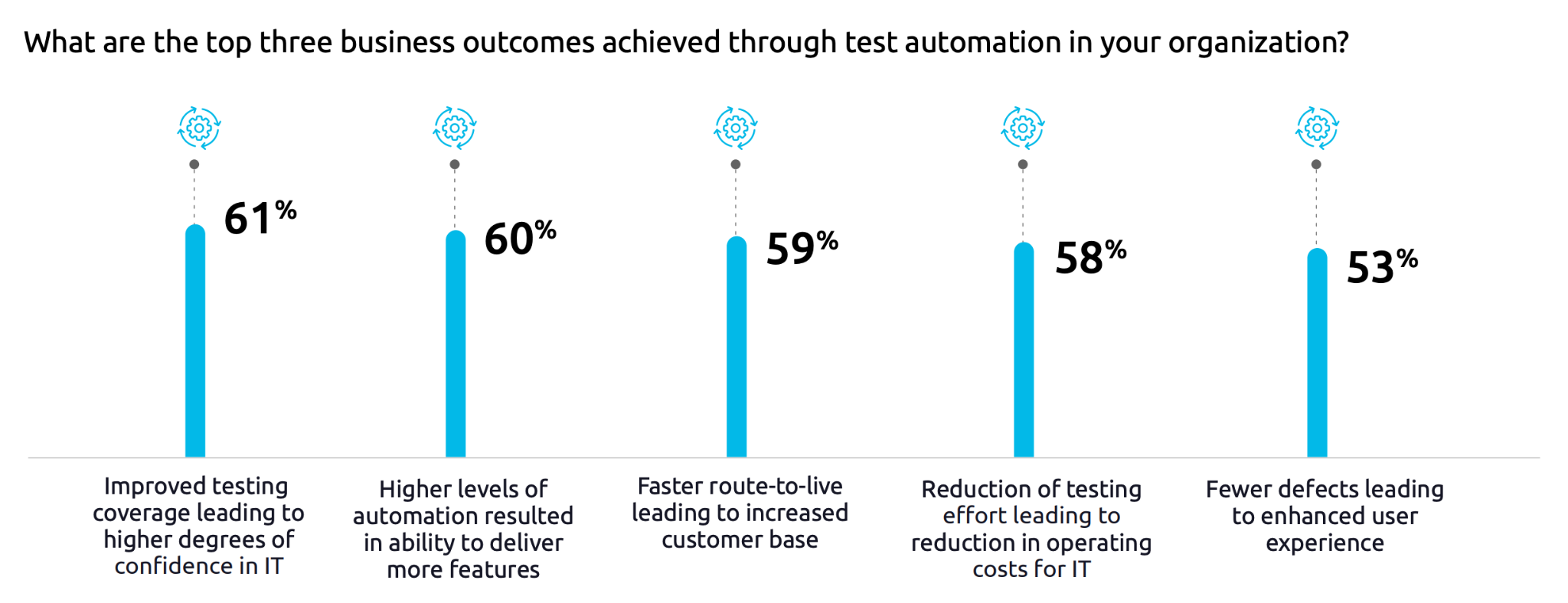
Capgemini’s World Quality Report 2024–25 noted that organisations with mature continuous testing and test automation practices report higher confidence in their software releases.
Lower change failure rates
According to DORA research, elite performers maintain change failure rates below 5%, while lower-performing teams see rates of 15% or higher.
Continuous testing is one thing that separates those cohorts. Automated regression testing catches the unintended side effects of new changes before they reach users, protecting existing functionality without requiring manual verification on every release.
Reduced cost of quality at scale
As codebases grow, manual testing becomes unsustainable. Continuous testing replaces manual testing overhead with automated test execution that scales without proportional cost.
Rather than investing time in executing tests manually, you build and maintain an automated test suite.
How continuous testing works in a CI/CD pipeline
Continuous testing is a layered approach where different types of automated tests sit at different stages of the delivery pipeline, with each stage having a different purpose, a different speed requirement, and a different scope.
Unit and integration tests at the commit stage
The first line of defence is speed.
Unit tests verify that individual functions or components behave correctly in isolation; integration tests check that those components work together as expected. Both should run on every push and complete in seconds to minutes—slow tests at this stage erode developer trust and get skipped.
Developers need near-instant feedback; they should know within a few minutes whether their code change has introduced a regression. Teams usually run static analysis and linting here too, catching code quality issues before they compound.
End-to-end tests in staging
Once code passes the commit stage, broader end-to-end tests simulate real user journeys across the full application stack. These tests need to be slower, as they spin up environments, connect services, and exercise complete workflows. Tools like Playwright, Cypress, and Selenium are widely used here.
It’s at this stage that you’re most likely to catch integration-level failures: bugs that only appear when multiple components interact under realistic conditions. End-to-end tests in staging are the closest approximation of production behaviour available to dev teams before actual deployment.
Performance and security testing
Automated load testing, which involves running simulated traffic against the application at the pipeline level, catches performance issues before they reach production.
Security testing, including dependency scanning and vulnerability analysis, can be incorporated into the same pipeline, turning security from a periodic audit into a continuous concern.
Neither of these needs to happen on every commit, but both should run regularly as part of a mature continuous testing strategy.
Continuous testing tools for end-to-end automation
There are a lot of tools available that can help you with continuous testing, which may seem daunting, but if you categorise them, it can help you find the best tools for your needs. Ask yourself, what does each type of tool do, and how does it fit into the pipeline?
Test runners and frameworks
Test runners and frameworks form the foundation of any automated testing setup. Jest, Pytest, and JUnit are widely used for unit and integration testing across JavaScript, Python, and JVM-based languages, respectively.
They handle test execution and reporting, and integrate with most CI platforms directly. Without a reliable test runner at this layer, the rest of the pipeline has nothing to execute against.
End-to-end testing tools
For end-to-end test automation, Playwright, Cypress, and Selenium are the dominant choices.
Playwright and Cypress offer modern developer experiences with fast feedback and good debugging tools, while Selenium has broader browser coverage and a larger ecosystem.
An automation solution like Browserless is worth considering here too—it provides hosted, scalable browser infrastructure that removes the overhead of managing Chrome instances yourself, making it a good fit for teams running large volumes of end-to-end tests in CI.
These tools simulate real user journeys across the full application stack, and are an effective way to catch integration-level failures before production. The right choice depends on your current stack and team familiarity.
CI platforms and orchestration
CI platforms—GitHub Actions, CircleCI, Jenkins, and others—are the orchestration layer. They trigger test execution on code changes, manage environments, and enforce quality gates that block deployments when tests fail.
A CI platform is the connective tissue that turns your individual automated tests into a continuous testing process. Without it, even a comprehensive test suite needs manual input, which defeats the purpose.
Observability and production feedback
Observability tools close the loop.
Application performance monitoring, error tracking, and log aggregation feed real-user data back into the testing loop, so production becomes a source of signal instead of just a deployment target.
It’s at this stage that continuous testing extends into live environments—and where the combination with feature flags becomes particularly valuable.
Make sure the tools you choose are integrated into a pipeline where tests run automatically on every change, results are visible, and failures block progress.
Read how we solved our database capacity problems for more evidence of the value of observability tools combined with feature flags.
Best practices for continuous testing in agile development
Continuous testing is a discipline. Getting the pipeline right is the first step from a technical perspective, but the surrounding practices determine whether teams actually realise the benefits.
Shift testing left
In agile development, testing belongs in every sprint, not in a separate QA phase at the end of a release cycle, which means developers write tests as they write code—not as an afterthought, and not as a handoff to a QA team that sees the feature for the first time after it’s been built.
Shift-left testing ensures that issues are found while the developer still has full context. It also changes team culture: quality becomes a shared responsibility rather than someone else’s job.
Keep the test suite fast and reliable
A test that passes sometimes and fails sometimes, for reasons unrelated to the code under test, produces false positives that teams start to ignore.
Once developers begin ignoring test results, the continuous testing process has failed, regardless of how sophisticated the tooling is.
Prioritise speed and reliability in your test suite. Prune tests that don’t deliver a genuine signal, and invest in fixing flaky tests immediately—they’re not a minor annoyance, they’re a threat to the integrity of the entire testing process.
Test in production-like environments
Environment drift between staging and production is one of the most common causes of bugs that slip through.
If the test environment differs meaningfully from production—different configurations, different data volumes, different infrastructure—some failures will only appear after deployment.
Infrastructure-as-code reduces drift by making environments reproducible and version-controlled. You need a stable test environment to trust your results.
Use feature flags to decouple deployment from release
Feature flags make it possible for you to decouple deployment from release: new code is deployed to production behind a flag, but only activated for specific users or segments when the team is ready.
Teams can run automated tests in production—against real infrastructure, real data, and real traffic patterns—without exposing incomplete features to all users.
Monitor and act on test results
Automated tests only deliver value if their results are acted upon. Failed tests should block deployments automatically—not generate a notification that someone has to interpret and act on manually.
Automated quality gates make your continuous testing strategy a reality. You should also monitor test pass rates over time: a declining pass rate or rising test maintenance burden signals that the test suite needs attention, not just the code it’s testing.
Feature flags and continuous testing
Traditional pipeline testing stops at production.
Even with mature CI/CD and comprehensive end-to-end tests in staging, there are failures that only appear with real traffic, real users, and against a live infrastructure.
Feature flags extend the continuous testing process into the live environment, enabling you to deploy code continuously, but control who sees it.
A feature flag wraps new functionality so that it’s present in production but only activated for a defined subset of users—perhaps 1% of your customer base, a specific internal team, or beta testers who’ve opted in.
With feature flags, you can run canary releases and percentage-based phased rollouts, where the production environment becomes a test environment, with real user behaviour serving as the feedback signal—also known as testing in production.
Combine your feature flag platform with observability tools, like Grafana Feature Health with Prometheus Alertmanager.
You can then monitor when a flagged feature is causing elevated error rates or degraded performance, without having to immediately respond with new code deployment.
Instead, the flag is toggled off, the feature is instantly invisible to users, and the team has time to investigate without a production incident burning in the background. That rollback takes seconds, not the minutes or hours that a traditional hotfix deployment requires.
This workflow also supports user acceptance testing in production conditions—a subset of real users can validate a feature against actual workflows before it’s rolled out to everyone. Feedback is of a higher quality than you can get during staging, because it reflects genuine usage patterns rather than simulated ones.
Flagsmith offers feature flag infrastructure. With SDK integrations across web, mobile, and server-side environments, teams can set their applications up to support controlled rollouts, instant rollback, and production-level testing without rebuilding their deployment pipeline.
Make continuous testing work for your team
Continuous testing is a discipline that runs through every stage of your team’s software development process.
First, you need the right pipeline, one that enables fast unit and integration tests at the commit stage, broader end-to-end tests in staging, and performance and security checks as regular pipeline steps.
Then, you need a solid test strategy prioritising speed and reliability, pruning flaky tests, and maintaining environments that reflect production reality.
Feature flags extend continuous testing into the one environment that no staging setup can replicate faithfully: production. Canary releases, percentage-based rollouts, instant rollback without deployment—these are practical, accessible methods that any engineering team can adopt. With feature flags, deployment is not a release.
If your team wants to start testing in production safely—with controlled rollouts, real user feedback, and instant rollback when something goes wrong—Flagsmith gives you the feature flag infrastructure to do it. Try Flagsmith free.





























































OpenTelemetry, without the vendor lock-in: Introducing full observability for Open Source and Self-Hosted Flagsmith customers