Regression Testing: Your Safety Net Before Code Reaches Users


Engineering teams ship faster than ever. Release cycles that once took months now compress into weeks, days, or a handful of commits on a busy Tuesday.
That velocity is hard-won, but it introduces a persistent tension: every change to a codebase, however careful, carries the risk of breaking something that worked perfectly before. Not always the thing you changed. Often something adjacent, downstream, or seemingly unrelated.
Regression testing is the discipline that keeps that risk in check. It's the systematic practice of re-running tests against existing functionality after code changes, to confirm that nothing previously working has broken. Done well, it's what lets teams move fast without treating every release as a gamble.
This guide covers regression testing in depth: what it is, how it works, the different types, and how to integrate it into a modern CI/CD pipeline.
We also look at where feature flags sit in relation to regression testing—not as a replacement for it, but as a practical fallback for the regressions that occasionally slip through anyway.
What is regression testing?
Regression testing is the practice of re-executing a defined set of tests against software after a code change, to verify that existing functionality continues to behave as expected. It's a check to make sure that what worked before still works.
That sounds straightforward, but, in practice, it's one of the more demanding disciplines in software testing, because the possibilities of what could go wrong multiply with every line of code added to a system.
It's also worth distinguishing regression testing from retesting:
- Retesting is targeted. You've fixed a known bug, and you retest specifically to confirm that the fix is effective.
- Regression testing is broader. It's asking whether the fix (or any other recent change) has introduced unintended side effects elsewhere.
Retesting looks at what you intended to change. Regression testing looks at what you didn't.
Regression testing is performed after any code change that could plausibly affect existing behaviour. That includes bug fixes, new features, refactoring, dependency updates, and configuration changes.
Essentially, regression testing is a near-constant activity for teams with active codebases.
Regression testing helps keep costs down, as defects found later in the software development life cycle are significantly more expensive to resolve than those caught early.
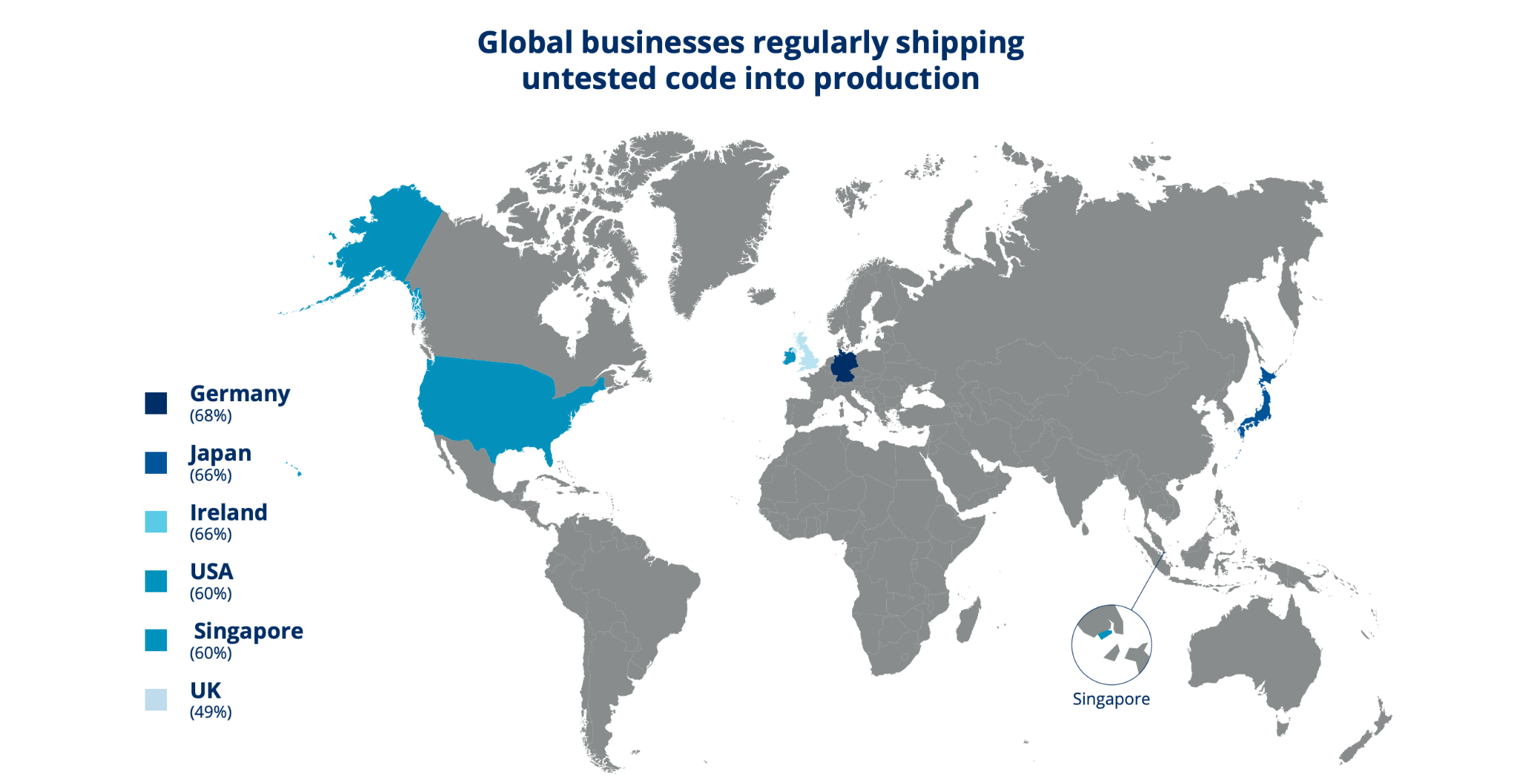
Recent Tricentis/Censuswide research found that poor software quality costs 20% of organisations more than $1 million annually, while another 45% estimate annual losses between $500,000 and $1 million.
Despite that, many businesses continue to ship untested code into production.
Why regression testing matters
Every code change creates risk. Even a two-line fix can have knock-on effects in a codebase that's grown complex over time.
As your team’s software development process matures and your company’s codebase expands, so does the number of components that could be affected by any given change.
The blast radius of a careless release tends to expand as a product grows and becomes more complex.
Release frequency compounds the risk factor.
A team shipping daily or weekly has more exposure to regression risk than one releasing monthly, simply because there are more changes moving through the system in the same timeframe.
However, research shows that frequent releases, done well, are a sign of engineering health. Elite engineering organisations with structured delivery practices deploy frequently with low failure rates, according to the DORA State of DevOps 2024 report.
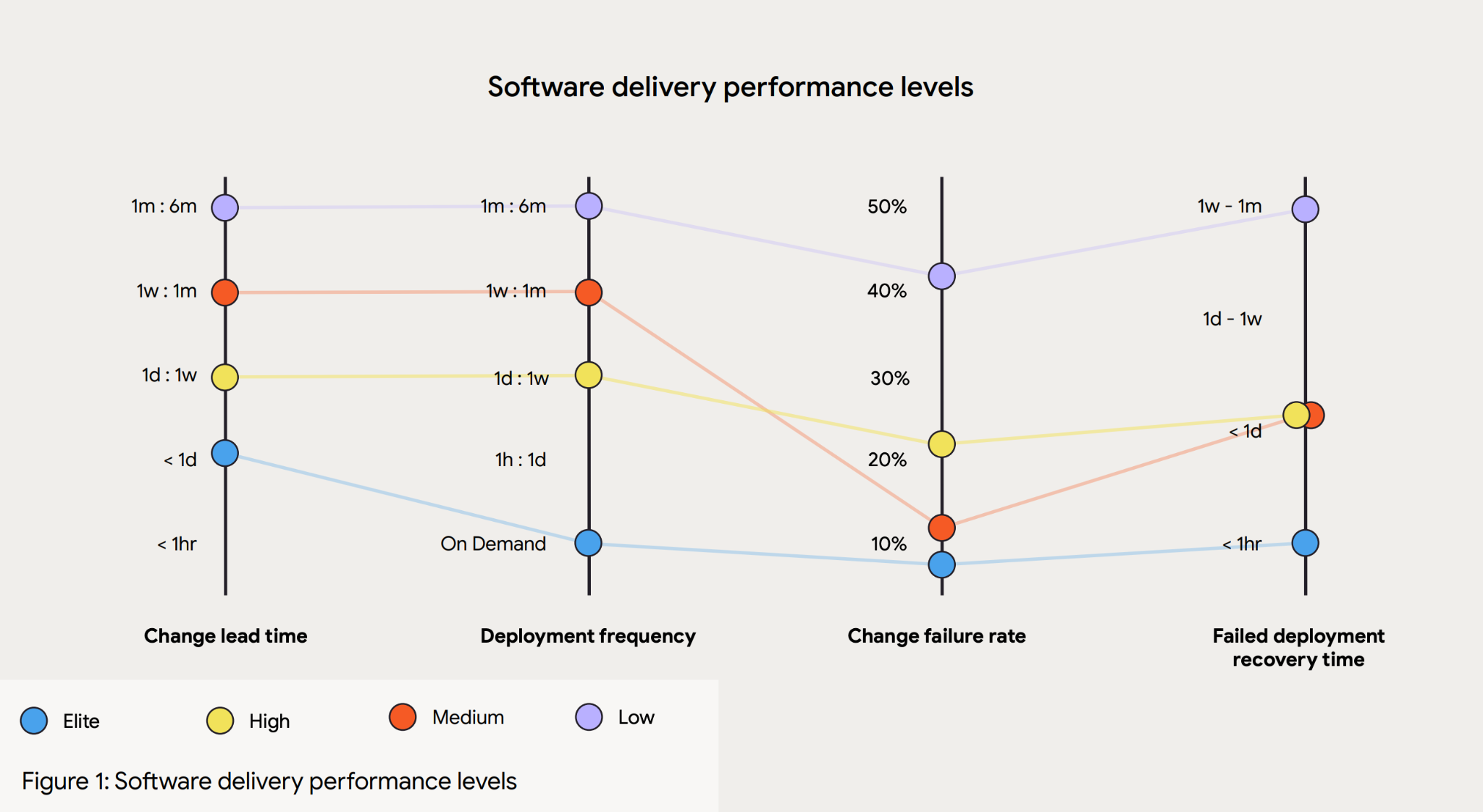
The issue is frequency without solid regression coverage.
Regression testing not only helps you avoid embarrassing bugs, but it also helps you maintain the trust that existing users place in software they depend on.
Core functionality that breaks silently—a checkout flow, an authentication step, a data export—can do real damage to user confidence before anyone on the engineering team notices. There are also cost implications to the downtime caused.
Splunk, in partnership with Oxford Economics, estimated that unplanned downtime now costs Global 2000 companies $600 billion annually, up 50% from 2024.
Regression testing creates a systematic check against that outcome.
Teams that treat regression testing as a QA checkbox rather than a strategic discipline are more likely to put their workflows at risk.
How regression testing works
The regression testing process follows a fairly consistent pattern, even if the specifics vary between teams and tooling.
First, you need to understand what changed. Before any tests run, scope the relevant change:
- What code was modified?
- What functionality could plausibly be affected?
- What dependencies connect those parts of the system?
Without these answers, test selection becomes either too narrow (missing real risks) or too broad (running the entire test suite on every minor fix).
Next, select or prioritise test cases. Teams have different approaches here:
- Test all regression test cases, running the full regression suite every time—thorough but expensive in time, and not always feasible for large codebases with long-running test suites.
- Select relevant test cases based on the scope of the change and the criticality of what's being tested—the more common approach. Prioritising test cases by business risk and change impact is more efficient than treating all tests as equal.
Next, execute the selected tests, potentially via automated tooling integrated into the development workflow.
Analyse the results: determine whether failures represent genuine regressions or issues with the tests themselves (flaky tests are a real problem in any large regression suite). Genuine failures trigger fixes, and you should re-run affected tests to confirm the regression has been resolved.
The cycle continues. Regression testing isn't a one-time event—it's a recurring part of the software development life cycle, particularly for teams with active release pipelines.
Types of regression testing
There's no single type of regression testing that suits every situation. Most engineering teams end up using a combination, depending on the scope of a change and the resources available.
Unit regression testing
Unit regression testing focuses on individual functions or components after a change. Unit testing focuses on verifying isolated behaviour in specific units of code, and unit regression takes that same lens: running unit tests to confirm that a change to one component hasn't altered its expected output. It's fast, targeted, and a natural first line of defence. The limitation is that it only covers what's within the unit boundary, so integration points aren't validated.
Partial regression testing
Partial regression testing, sometimes called selective regression in narrower contexts, limits the test run to the subset of functionality directly affected by a specific change.
Rather than executing the entire test suite, the team identifies which test cases are relevant given what changed, and runs only those.
This method keeps regression cycles fast without abandoning meaningful coverage. It requires good judgment about dependencies, because a change can affect more than what's immediately obvious.
Complete regression testing
Complete regression testing means running the full regression suite—every existing test case, against the full application. This resource-intensive and time-consuming method is typically reserved for major releases, significant architectural changes, or situations where the scope of changes is broad enough that partial selection would be unreliable.
It provides the most comprehensive coverage, but it's not something most teams can afford to run on every commit.
Progressive regression testing
As a product grows, the test suite needs to grow with it. Progressive regression testing is the practice of incrementally adding new test cases as new features are developed, keeping the regression suite current with the application's state.
Without this discipline, a test suite drifts: existing tests cover old functionality well, but newer features accumulate with little to no coverage. Progressive regression testing is as much a process habit as a testing technique.
Selective regression testing
Selective regression testing is when you choose a prioritised subset of test cases based on risk and change impact, making it a more structured version of partial regression.
Your goal is to balance coverage against the practical constraints of time and compute.
Analytical approaches like impact analysis help identify which tests are most likely to catch issues given a particular change. Done well, selective regression testing delivers a high defect-detection rate without requiring the full suite to run on every cycle.
Manual vs. automated regression testing
For most engineering teams, the choice between manual and automated regression testing is a question of where each approach is most valuable, and can change on a case-by-case basis.
Why manual regression testing
Manual regression testing is flexible.
A human tester can explore edge cases, adapt to unexpected behaviour, and apply judgment in ways that scripted tests can't.
For exploratory testing, for UI-heavy scenarios where visual rendering matters, or for genuinely novel functionality that doesn't yet have established test cases, manual testing has real advantages.
The negatives of manual regression testing
The problem is that it doesn't scale. As a codebase grows, the volume of test cases that need to be executed after each change quickly outpaces what any team can run manually in a reasonable timeframe.
Manual testing becomes a bottleneck, and teams either slow their release pace or accept reduced coverage—neither of which is a satisfying outcome.
Why automated regression testing
Automated regression is scalable.
Automated tests run consistently, at speed, and can be triggered by every commit or pull request without adding to anyone's workload.
They integrate naturally with CI/CD pipelines, giving teams fast feedback on whether a change has introduced a regression before it reaches production. According to Katalon's 2025 State of Software Quality Report, regression testing is the most commonly automated testing activity, with around 45% of testers prioritising it for automation.
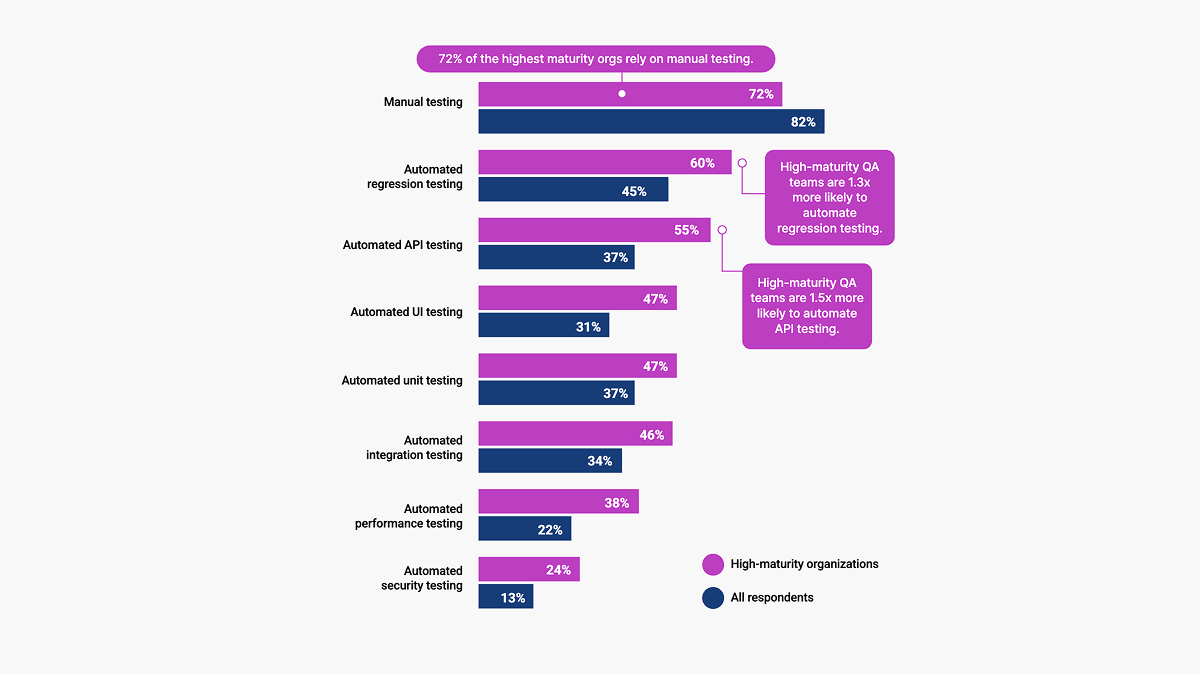
Automated regression testing is particularly useful when you’re conducting repetitive test cases: the ones that need to run reliably every time, without variation. Automated tools handle that workload well.
What they don't handle well is exploratory, ad hoc, or visually subjective testing, which is where manual effort continues to earn its place—hence why so many high-maturity teams said they rely on manual testing in the chart above.
The question of how to automate regression testing generally comes down to tooling categories.
- Test frameworks provide the structure for writing and organising test cases
- CI runners execute those tests automatically on defined triggers
- End-to-end testing tools simulate real user journeys through an application, catching regressions that unit or integration tests might miss
Most modern regression testing strategies combine elements of all three.
Regression testing in a CI/CD pipeline
Modern engineering teams don't run regression tests as a separate, scheduled activity. They integrate regression testing directly into their CI/CD pipeline, so tests run automatically on every pull request or merge. As a result, regression testing becomes a real-time quality gate rather than a retrospective check.
The shift-left principle is central to this. Shifting testing left means catching issues as early as possible in the development cycle, before changes propagate through the system or reach production.
A regression caught in a pull request takes minutes to fix and review. The same regression found in production requires incident response, hotfix deployments, and often customer-facing communication. The cost difference is substantial.
Automated regression in a CI/CD pipeline creates a continuous feedback loop.
Engineers get test results against their changes before anything merges, not after, enabling teams to maintain high release frequency without accumulating regression risk. Continuous testing, embedded in the pipeline, is increasingly the standard for teams that ship at pace.
Regression testing best practices
A good regression testing strategy is as much about discipline and maintenance as it is about tooling. Here are the best practices to make sure your regression testing catches real issues instead of just creating noise.
- Prioritise test cases by business risk and change impact, not just code coverage metrics. Coverage numbers can be misleading—a test suite with high coverage can still miss significant regressions if the coverage is concentrated in low-risk areas. Regression test cases should reflect the relative importance of what they're testing.
- Keep the test suite lean. Bloated regression suites slow pipelines and reduce signal quality. When every test run takes an hour, engineers start looking for ways to skip it. A well-maintained suite with fewer, higher-quality tests will catch more regressions in practice than a sprawling suite that nobody trusts.
- Maintain and retire test cases as features change. Stale tests, ones written for functionality that no longer exists or has been significantly reworked, produce false positives and add confusion. Obsolete test cases should be removed or updated.
- Run the most critical tests on every commit, and a broader suite at release gates. Not all regression tests need to run on every change. Fast, targeted tests covering core functionality belong in the CI pipeline. Slower, more comprehensive tests can run at merge to main or at release boundaries.
- Write a regression test for every bug fixed. If a bug made it through to production, the right response, once it's fixed, is to write a test that would have caught it. Without that, the same issue can recur silently with the next relevant change.
Where feature flags fit into regression testing
Production environments have variables that test environments can't fully replicate, like data states, infrastructure quirks, and usage patterns that only emerge at scale. Even rigorous regression coverage isn't a complete guarantee.
Though feature flags are not a regression testing tool, they provide a complementary layer of control.
Regression testing ensures that existing functionality works correctly before code reaches production. It's the safety net you build on the engineering side of a release. Feature flags operate at the release boundary: they control whether deployed code is exposed to users, and in what proportion. They enable you to decouple deployment from release.
Even well-executed regression coverage doesn't catch everything. Production environments have variables that test environments don't: real user data, third-party integrations behaving differently under load, and infrastructure states that are difficult to replicate in staging.
Regressions do occasionally reach production. When they do, how quickly you can contain them matters.
This is where Flagsmith comes in.
Controlled rollouts let teams release to a subset of users first, rather than the entire customer base. A regression that slips through impacts a fraction of users—not everyone. The feedback loop tightens, and the blast radius stays manageable.
With instant rollback, if a regression surfaces in production, the affected feature can be disabled in seconds without a redeployment. There's no hotfix pipeline to coordinate, no deployment window to wait for. The flag goes off, and the previous state is restored immediately.
Environment-specific flag control lets teams enable specific features in staging or pre-production only, so regression tests run against a known, controlled application state. This prevents test environments from accidentally running against half-released features.
None of this replaces the regression test suite. Flagsmith limits the impact of regressions that get through; it doesn't prevent them. The prevention side is regression testing's job.
The two disciplines complement each other:
- Regression testing is the safety net before the release
- Feature flags are the fallback when something slips through anyway.
If you're not already using feature flags alongside your regression testing strategy, you can get started with Flagsmith for free.
Conclusion
You don’t need to choose between speed and quality, but you do need to find the balance. Regression testing is a primary mechanism engineers can use to find a balance. It’s a disciplined, systematic check that existing functionality survives the changes being made around it.
As codebases grow and release frequency increases, the stakes of getting regression testing right grow with them.
The best regression testing strategies combine prioritised test case selection, lean and well-maintained test suites, and tight integration with CI/CD pipelines. They treat regression tests not as a one-time exercise but as a continuous discipline that evolves alongside the product.
And they pair that discipline with a rollback mechanism—because no regression suite, however thorough, catches everything. Feature flags give teams the ability to limit the impact of what gets through: controlled rollouts, instant rollback, and environment-specific control over what users see and when.
Regression testing keeps existing functionality intact. Feature flags keep the blast radius small when that isn't quite enough.
Start using Flagsmith to bring controlled releases and production safety into your release workflow.
Regression testing FAQs
What is the difference between regression testing and retesting?
Retesting is targeted: you've fixed a known bug, and you rerun the relevant tests to confirm the fix works.
Regression testing is broader: it checks whether a code change has introduced unintended side effects elsewhere in the application, not just in the area that was deliberately altered.
When should regression testing be automated?
Consider automating regression testing when the same tests need to be run repeatedly, which, for any active codebase, is most of the time.
Automated regression testing is particularly well-suited to CI/CD pipelines, where tests need to run on every commit or pull request without adding manual overhead.
Manual regression testing is best when used for exploratory scenarios and UI-heavy testing where human judgment is genuinely needed.
How often should regression tests be run?
The most critical regression tests should run on every commit or pull request—that's the shift-left principle in practice.
A broader suite should run at release gates or on merges to the main branch.
Complete regression testing, covering the full suite, is typically reserved for major releases or significant architectural changes.




























































OpenTelemetry, without the vendor lock-in: Introducing full observability for Open Source and Self-Hosted Flagsmith customers