Code References: See Exactly Where Your Feature Flags Live in Your Codebase


TL;DR
- Code References is a new Flagsmith product that connects your feature flags to your GitHub repositories, showing you exactly where each flag appears in your codebase.
- It’s the foundation for a broader set of feature lifecycle tooling—including automated guidance for cleaning up stale flags and reducing technical debt.
- The feature is available for all Flagsmith customers.
We’ve launched Code References—here’s why
Feature flags make your life easier. But when you have dozens of them and no reliable way to know which ones are still in use, where they live in your code, or how much effort it’d take to remove one, life can get harder, fast. That ambiguity is where technical debt quietly accumulates.
Today, we’re announcing Code References: a new Flagsmith feature that links your feature flags directly to your version control system, so you can see exactly where each flag is referenced across your repositories.
What are code references?
A code reference is, at its most basic, a record that says: this feature flag appears here, in this file, on this line. Aggregated across a codebase, those records give you a map of your feature flag footprint—a map that is very useful to have.
One of the biggest criticisms around feature flags is that the ongoing management, tracking, and upkeep of flags lead to technical debt. Without the right visibility tools and feature management processes, a team that has accumulated feature flags over time can lose track of:
- Which ones are still actively evaluated
- Which ones were left behind after a rollout is completed
- Which ones were only used in a previous experiment
- Which ones are wrapped around code that hasn’t been touched in months
If hidden, flags can cause issues down the line, but the answer isn’t to avoid using feature flags; it’s to manage them like production infrastructure, where every flag has an owner, intent, a lifecycle, and a cleanup path.
Code References is a simple way to keep track of every feature flag in your code base, so you have complete certainty of where they are, what they do, and when it’s time to remove them.
What you can do with Code References
Flagsmith’s Code References feature connects your Flagsmith environment to your GitHub repositories and surfaces flag usage data directly inside the dashboard. Here’s what that looks like in practice:
See the reference count for every flag
On your feature flag list, each flag displays a badge with your chosen Git repository logo showing how many times it’s referenced across your connected repositories.
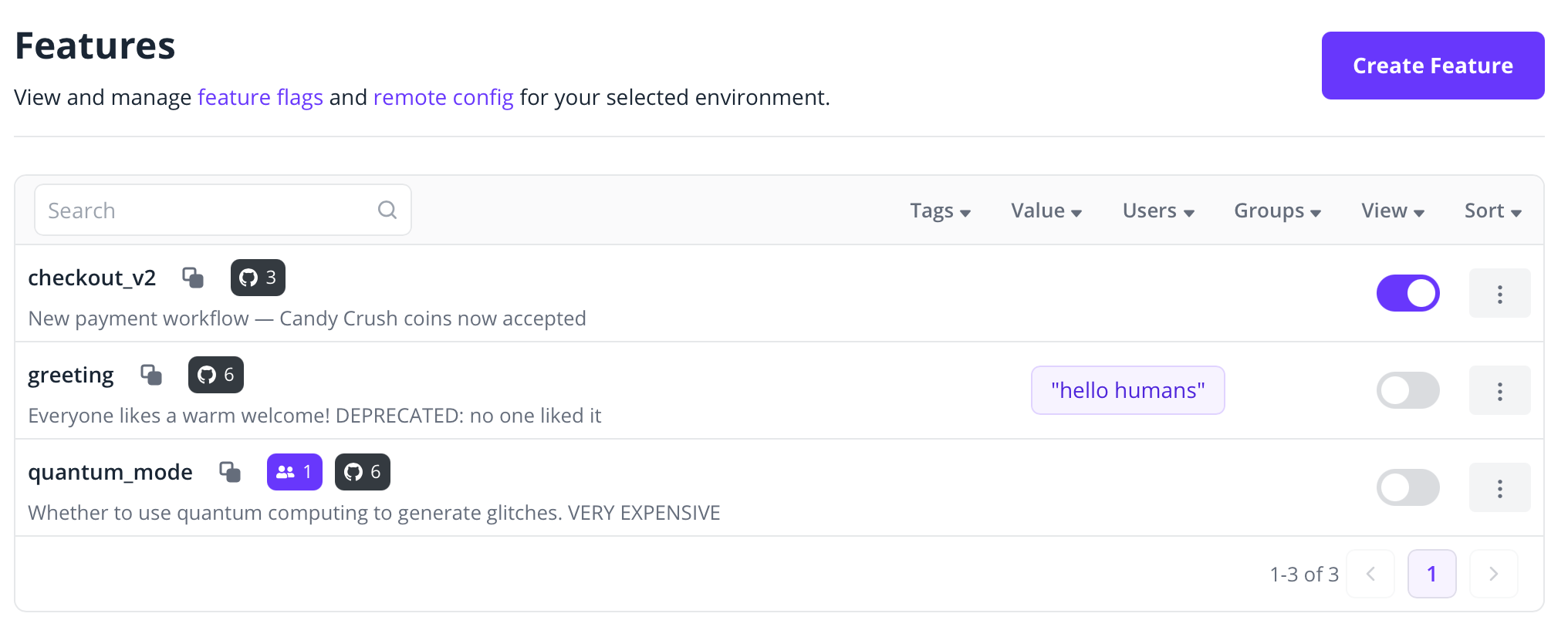
At a glance, you can see which flags are embedded deep in your codebase and which ones are barely touched.
Navigate your business logic from a feature perspective
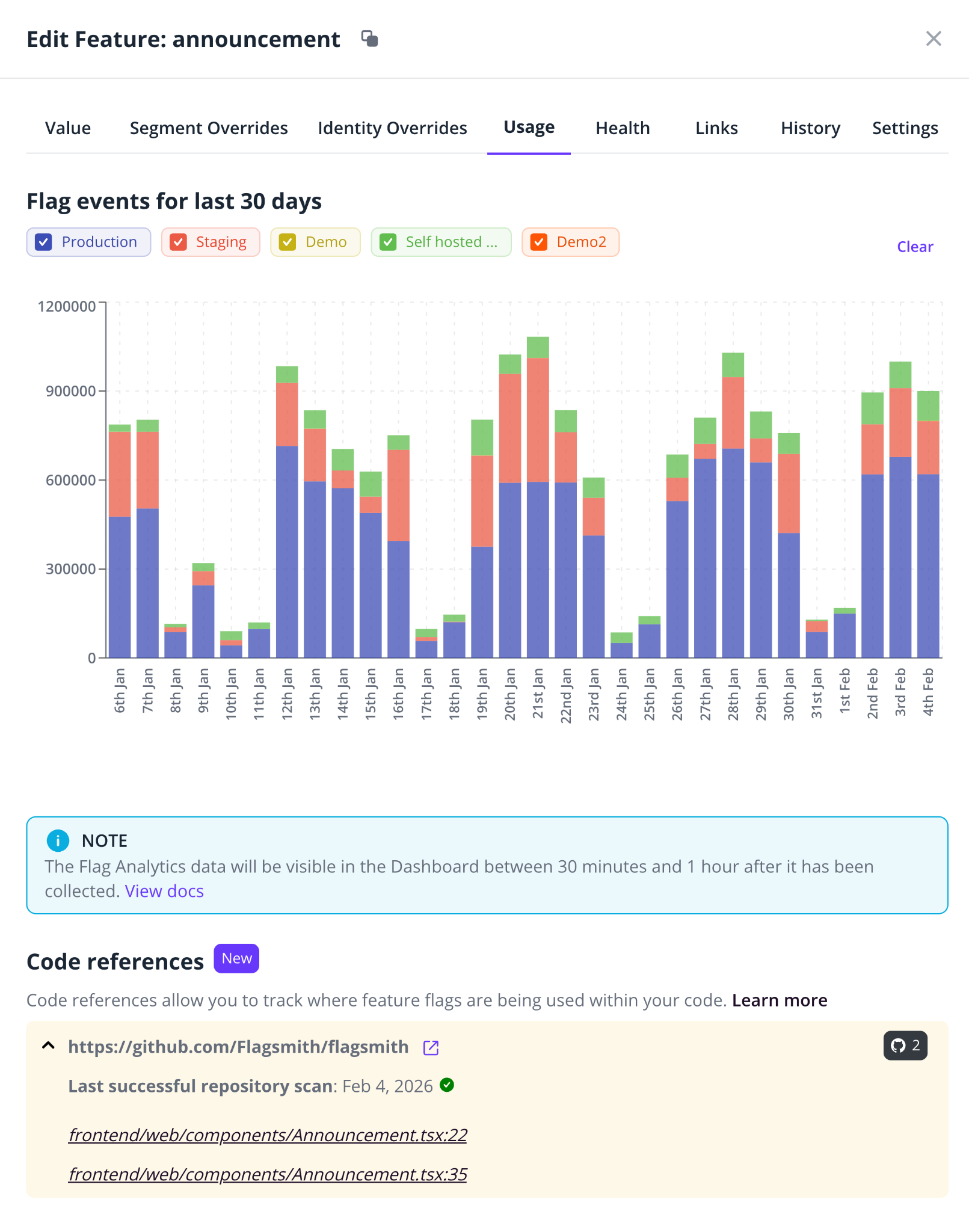
Click into any individual feature flag and, in the Usage tab, you’ll see a breakdown of exactly where that flag appears—by repository and by file.
Click a reference and it takes you directly to the relevant line in GitHub. For anyone who’s ever tried to audit a codebase for a specific flag, this is a meaningful time-saver.
Gauge the effort required to clean up a flag
It’s at this point that the real enterprise value starts to show. If you’re looking at a flag that’s been stale for a while and you want to remove it, you first need to know what you’re dealing with.
Two references in one file is a quick afternoon’s work. Thirty references across eight repositories is a conversation with the team. Code References gives you that picture before you commit to anything.
Our customers, including prospective ones, have told us they need better tooling to help them clean up feature flags. That’s a question of managing technical debt, and it’s one we take seriously.
How to use Code References
1. Get your credentials from Flagsmith
You’ll need two things from your Flagsmith account:
- Your Project ID, which you can find in your Flagsmith dashboard URL (/project/<id>/...)
- An API key, generated from Organisation Settings > API Keys
2. Add a GitHub Actions workflow to each repository
For each repository you want to scan, add a workflow file at .github/workflows/flagsmith-code-references.yml. For most teams, the simple configuration using our reusable workflow is all you need:
name: Flagsmith Code References
on:
  push:
    branches:
      - main
jobs:
  collect-code-references:
    name: Collect
    uses: Flagsmith/ci/.github/workflows/collect-code-references.yml@v1.0.0
    permissions:
      contents: read
    with:
      flagsmith_project_id: ${{ fromJSON(vars.FLAGSMITH_PROJECT_ID) }}
      flagsmith_admin_api_url: https://api.flagsmith.com
    secrets:
      flagsmith_admin_api_key: ${{ secrets.FLAGSMITH_CODE_REFERENCES_API_KEY }}
Add your Project ID as a variable and your API key as a secret in GitHub > Settings > Secrets and variables > Actions.
If you need a more customised setup—for example, combining multiple repositories into a single workflow or adjusting how code is cloned—there’s an advanced configuration option using individual actions.
The full Code References docs cover that in detail.
3. View your results in Flagsmith
Once the workflow runs, you’ll see reference count badges appear on your feature flag list. Click into any flag, navigate to the Usage tab, and you’ll find a breakdown of every location in your connected repositories where that flag appears. Click a reference to jump directly to the relevant line in GitHub.
A note on privacy: Code References doesn’t send your source code to Flagsmith. The scanning happens locally on your CI runner. We only collect file paths and line numbers—nothing more.
GitLab support is already on the roadmap. GitHub covers the lion’s share of our customer base for now, but we’re aware it’s not the whole picture.
Code References is a foundation, not a destination
Earlier this year, our team ran a hackathon project built around code references: a new feature lifecycle tool that surfaces flags by their current status—e.g., new, active, permanent, stale—and helps engineers work through the cleanup process.
The prototype lets you identify a stale flag, see its code references, and open a GitHub issue pre-populated with every file that needs updating and instructions for removal.
That’s not in production yet, but it’s a clear indication of where this is heading. Once you can reliably map where your flags are in code—and combine that with Flagsmith’s existing staleness detection, which automatically flags features that haven’t been queried in a configurable period of time—you have the raw material for genuinely useful automation.
Beyond that, the combination of code references, data, and large language models opens up an interesting space: Automatically generating a pull request that removes a stale flag, rather than just an issue describing the task. It’s not science fiction, but a reasonable next step once the data layer is solid.
We want to build the feature lifecycle tooling that the market is asking for. Code References is what makes that possible.
Code References FAQs
Which version control systems are supported?
GitHub is supported today. GitLab support is in scope and is next on the roadmap.
Where does Code References appear in the dashboard?
Once enabled, you’ll see two things: a reference count badge on each flag in your feature flag list, and a Code References section inside the Usage tab of any individual feature flag. Clicking a reference takes you directly to the relevant location in GitHub.
Do I need to change anything in my codebase to use it?
You’ll need to connect Flagsmith to your GitHub repository. We’ve kept that process intentionally simple—it’s a lighter integration than you might expect.
Does it work with self-hosted Flagsmith?
In most cases, yes, just review our documentation to check it against your specific setup. If you’re unsure, you can confirm with our team. Get in touch and we can advise.
How does Code References relate to stale flag detection?
Flagsmith already detects staleness automatically, based on how long a flag has existed and whether it’s still being actively queried. Code References adds a complementary layer: you can now see not just that a flag is stale, but where it lives in your code and how much work removing it would involve. Used together, they give you a much clearer picture than either provides alone.
How do I give feedback once I’ve tried it?
Directly. We want to hear from early adopters—what’s working, what’s missing, what you’d want to do with this data that you can’t yet. Talk to us.




























































OpenTelemetry, without the vendor lock-in: Introducing full observability for Open Source and Self-Hosted Flagsmith customers