Trunk-Based Development vs. Gitflow: Choosing the Right Branching Strategy


Your branching strategy shapes everything—from how quickly you ship code to how often your team wrestles with merge conflicts. Choose the wrong model and you’ll find yourself stuck in integration purgatory, battling code divergence while competitors iterate past you. Choose wisely and you’ll unlock faster feedback loops, smoother collaboration, and a codebase that stays releasable.
Two approaches dominate the conversation today: trunk-based development and Gitflow. Both have passionate advocates, and both work—but for very different contexts.
- Trunk-based development favours rapid integration and small, frequent merges to a single main branch.
- Gitflow uses multiple long-lived branches to isolate features and control releases with precision.
The right choice depends on your team’s size, your release cadence, and your appetite for risk.
This guide explores the core differences between these branching models, examines the advantages and disadvantages of each, determines what use cases each model suits, and explains how feature flags make trunk-based development practical—even for teams that might otherwise shy away from it.
What is trunk-based development?
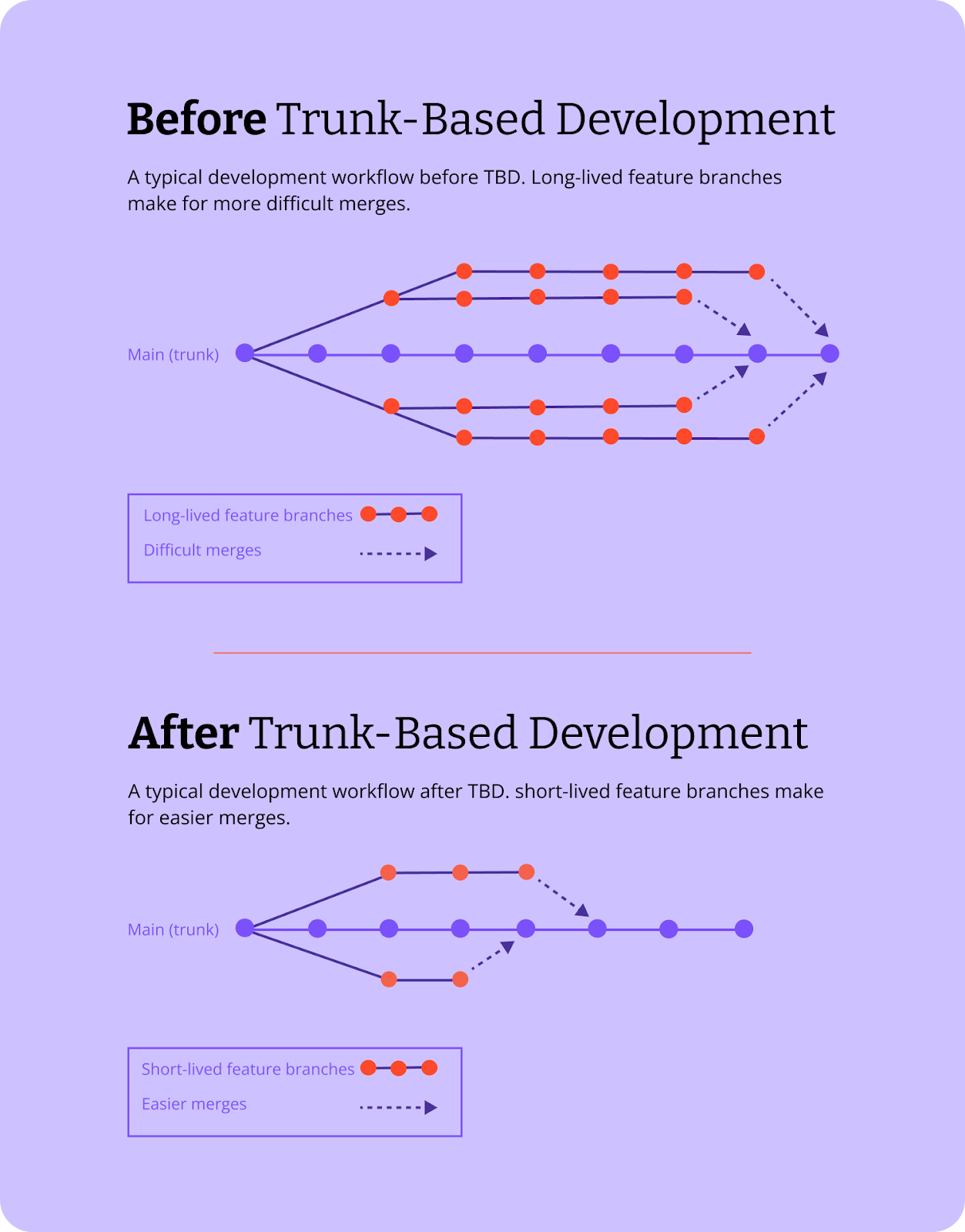
Trunk-based development is a version control practice where all developers work on a single shared branch: the trunk, or main branch. Rather than maintaining multiple parallel branches over extended periods, developers integrate small, frequent changes directly into the trunk, often several times per day.
Short-lived feature branches are permitted in this model, but they’re expected to be merged back within a day or two at most. The emphasis is on keeping branches small enough that merging code remains straightforward and conflicts stay minimal.
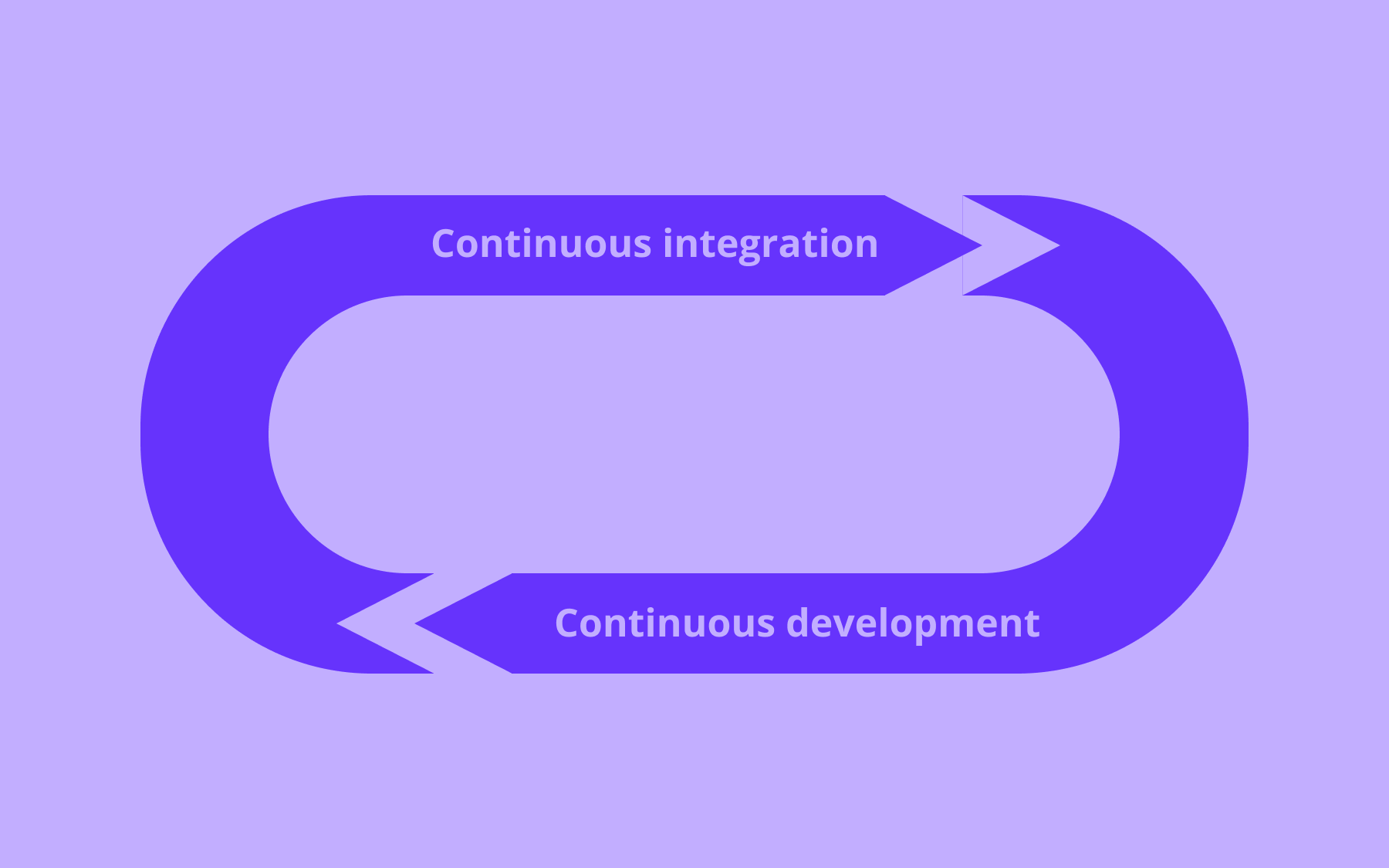
This approach is a key enabler of continuous integration and continuous delivery. When developers commit to the trunk multiple times daily, the codebase remains in a releasable state—always ready for deployment.
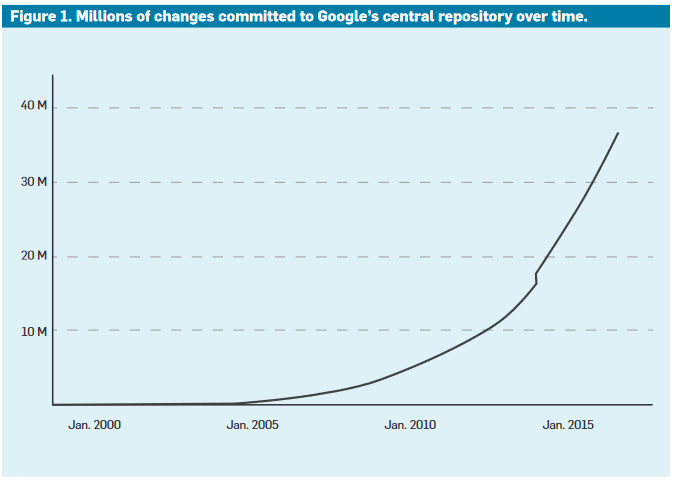
Organisations like Google practice trunk-based development at a remarkable scale, with over 25,000 developers and QA engineers working in a single monorepo trunk. The development process demands discipline, but it delivers the rapid iteration and frequent integration that modern software development requires.
Google, for example, surpassed 35 million commits some time ago, accelerating to that number as the company approached it.
What is Gitflow?
Gitflow is a git branching strategy that was introduced by Vincent Driessen in 2010. It uses multiple long-lived branches to manage the software development lifecycle: main (or master), develop, feature branches, release branches, and hotfix branches. Each branch type serves a specific purpose within a structured workflow designed for versioned releases.
In this branching model, developers create dedicated feature branches from the develop branch and work in isolation until the feature is complete. Once finished, the feature branch merges back into develop.
When the team is ready for a release, a release branch is cut from develop, allowing for final bug fixes and preparation. After the release is stable, it merges into both main and develop. Hotfix branches handle urgent production issues, branching directly from main and merging back to both main and develop once resolved.
This complex structure was designed for scheduled, versioned software releases rather than continuous delivery.
Gitflow provides clear separation between development work, release preparation, and production code. However, that separation comes with overhead: The model requires teams to maintain multiple branches, coordinate merges across different features, and manage a more intricate merging process.
The key differences between trunk-based development and Gitflow
The fundamental distinction lies in philosophy:
- Trunk-based development prioritises rapid integration and keeping the main branch releasable at all times
- Gitflow prioritises isolation and controlled release cycles.
These alternate priorities cascade into differences across branch structure, merge frequency, integration speed, and CI/CD compatibility.
Branch structure and lifespan
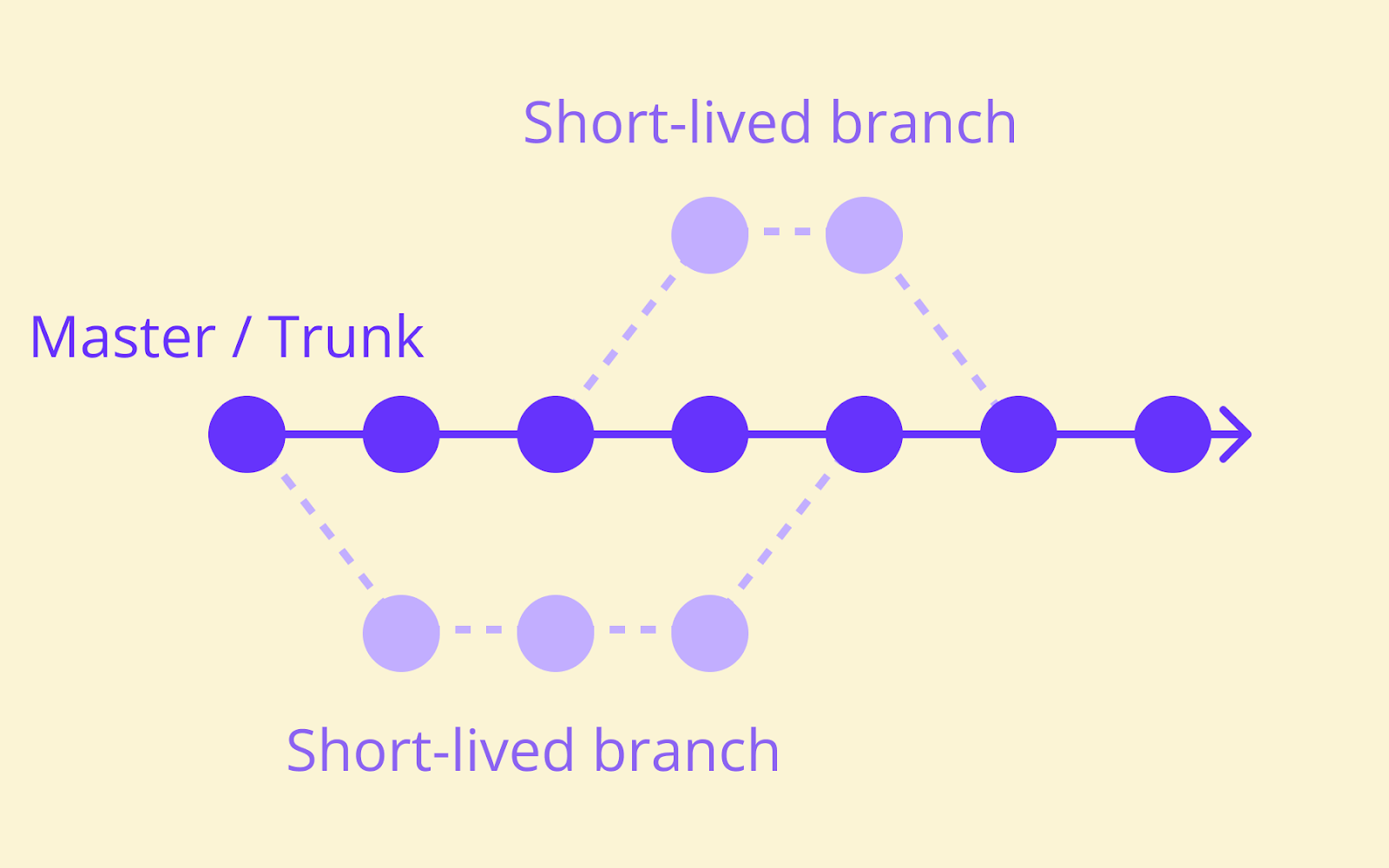
Trunk-based development uses one main branch with optional short-lived feature branches lasting hours to a day or two.
Developers work close to the trunk, never straying far before integrating their changes back. This keeps the codebase unified and reduces the cognitive overhead of tracking multiple active branches.
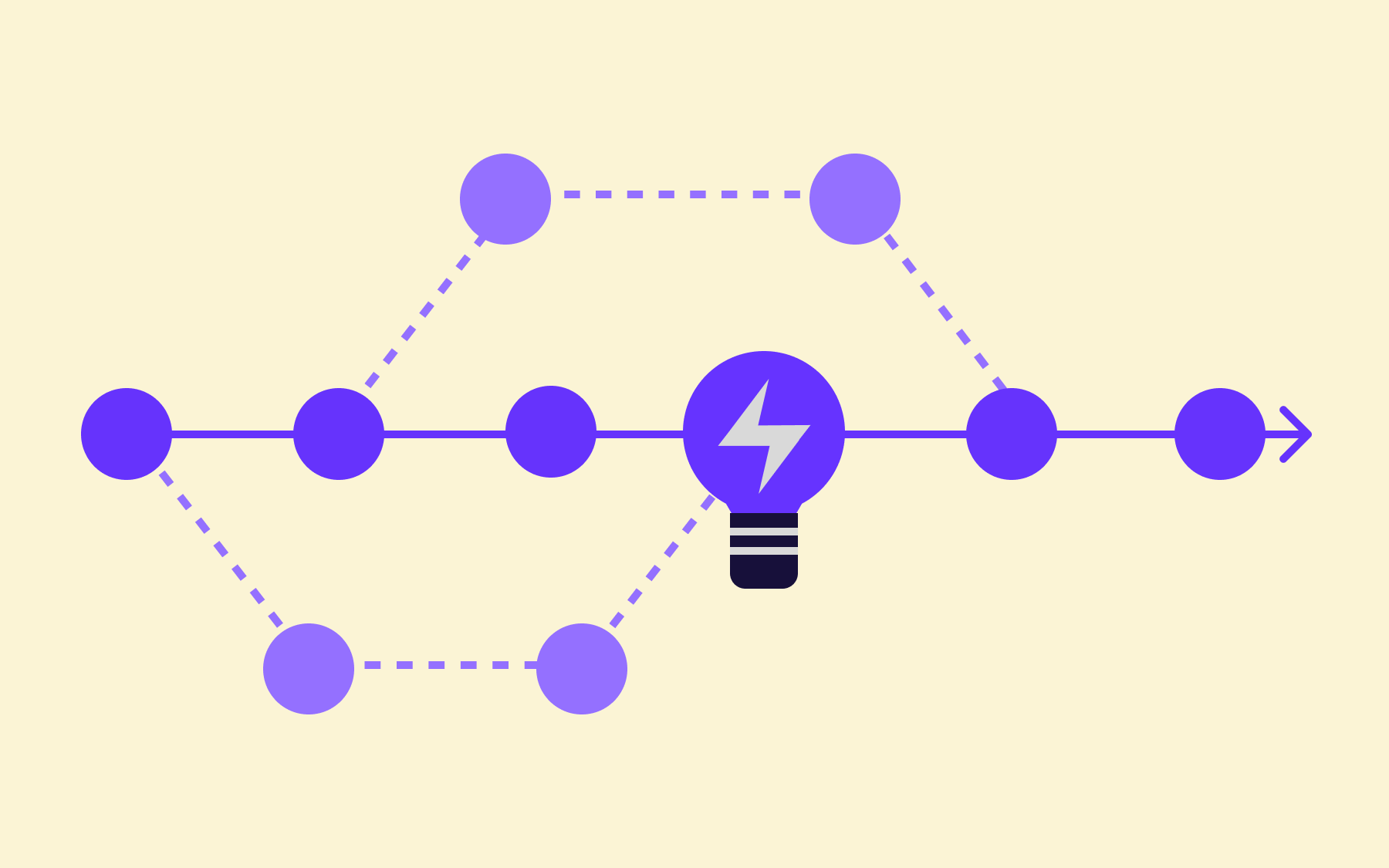
Here’s a visualization of a simple trunk-based development model.
Gitflow uses multiple persistent branches where features can live for weeks or months.
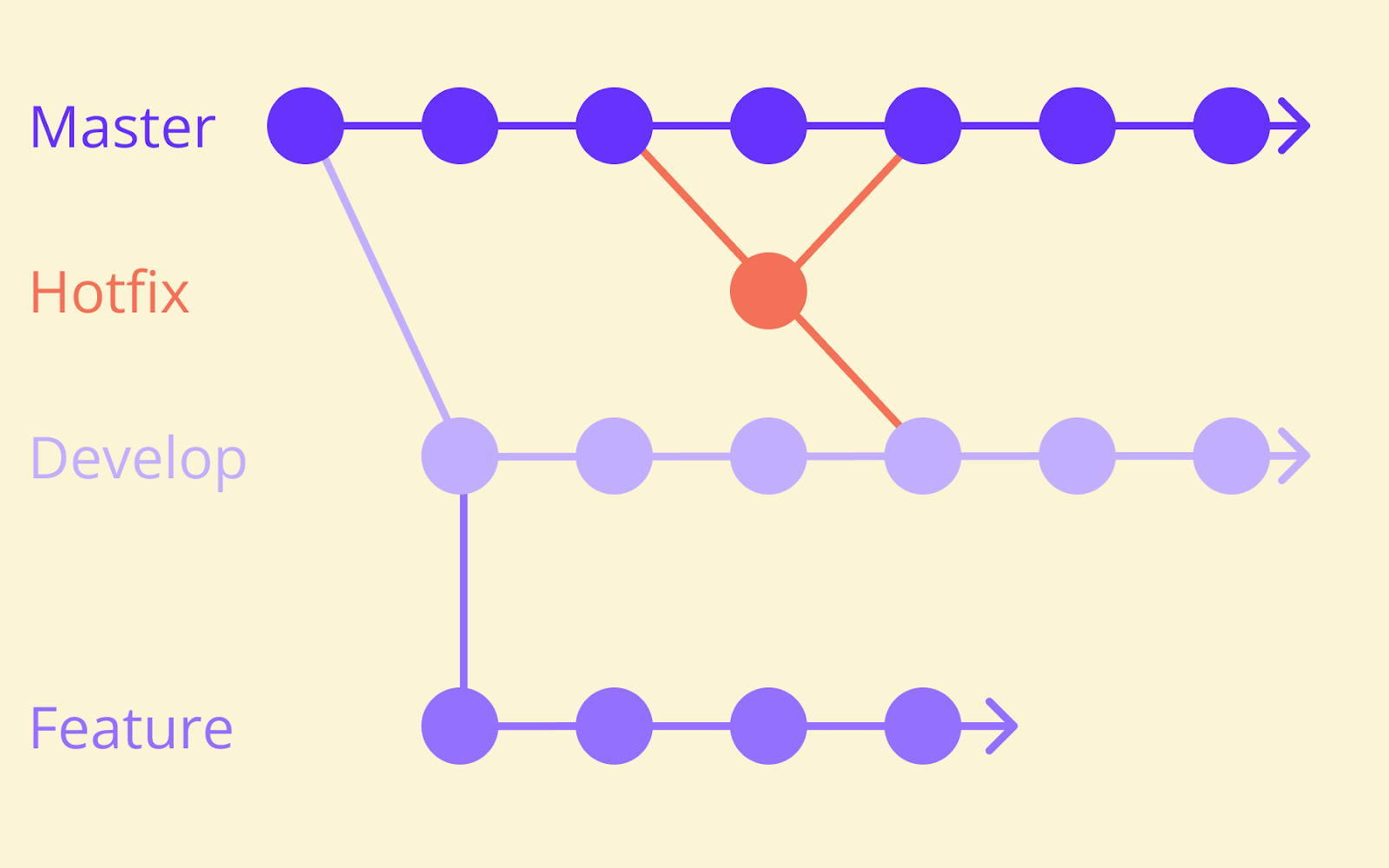
A typical Gitflow setup maintains at least two perpetual branches (main and develop), plus numerous feature branches, release branches, and hotfix branches active at any given time. This provides isolation but increases the complexity of the development environment.
Here’s a visualization of a simple Gitflow model.
Merge frequency and conflict risk
Trunk-based development reduces merge conflicts through constant small merges. When developers integrate changes multiple times daily, the differences between their work and the trunk stay minimal.
Gitflow can lead to larger, more complex merges and increased conflict risk due to code divergence over time.
When a feature branch lives for weeks, it drifts further from the develop branch as other developers continue their work. The eventual merge becomes a significant event, potentially requiring substantial effort to reconcile all the accumulated changes.
CI/CD compatibility
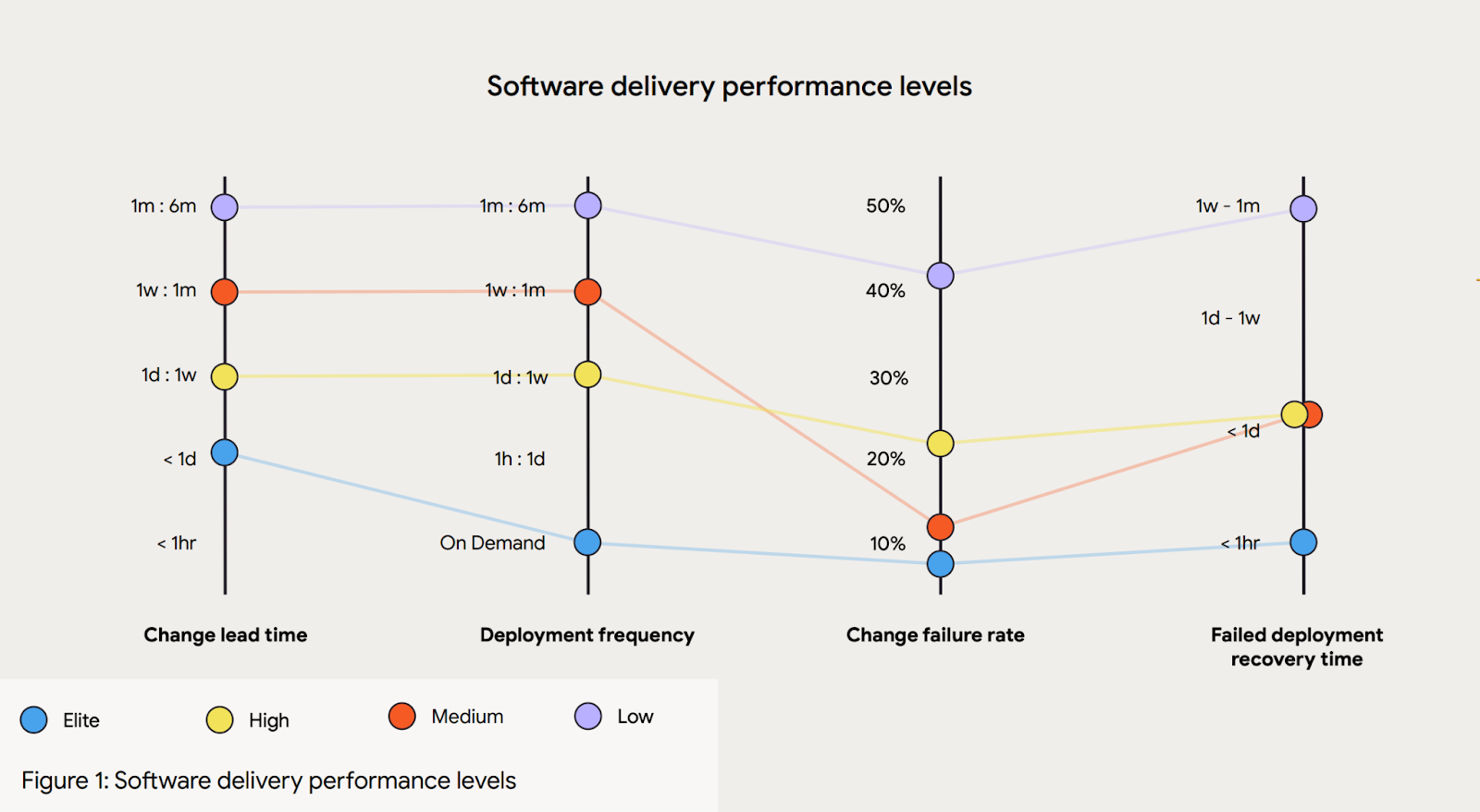
Trunk-based development is a prerequisite for true continuous integration. According to DORA research, elite-performing teams deploy on-demand or multiple times per day—a cadence that trunk-based development supports naturally. The build and test processes run against every commit, catching issues immediately.
Gitflow was designed for scheduled releases and can create friction in CI/CD processes. The longer-lived branches mean code isn’t truly integrated until it flows through the develop branch, potentially delaying the discovery of integration issues.
Teams practising Gitflow often find themselves in stabilisation phases before releases, working through bugs that accumulated during the isolation period.
Trunk-based development vs. Gitflow comparison table
Here’s a quick table to compare the two models against each other:
This comparison hints at why agile teams increasingly favour one approach over the other.
Why agile teams choose trunk-based development over Gitflow
Agile teams often prefer trunk-based development because it aligns with agile principles of continuous improvement and rapid iteration.
The faster feedback loops mean developers learn quickly whether their code works, whether it integrates cleanly, and whether it meets user needs. This acceleration compounds over sprints, leading to significantly faster delivery of working software.
Gitflow’s longer integration cycles and branch management overhead can slow down agile workflows.
When teams spend time managing multiple branch types, coordinating merges, and resolving accumulated conflicts, that’s time not spent building features. The model’s emphasis on isolation runs counter to agile’s emphasis on frequent integration and continuous feedback.
That said, some agile teams operate within constraints—such as regulatory requirements, complex dependencies, or distributed team structures—that make Gitflow’s controlled approach valuable. The key is matching your branching model to your team’s actual needs rather than following convention blindly.
Given this context, let’s examine the specific advantages that make trunk-based development compelling for many teams.
The advantages of trunk-based development
- Faster feedback loops. With code integrating multiple times daily, developers discover problems in hours rather than weeks. This rapid iteration means bugs get fixed while context is fresh, and assumptions get validated before extensive work is built on top of them.
- Reduced merge conflicts. The short-lived branches of trunk-based development stay close to the main branch, minimising divergence.
- Improved collaboration. When everyone works on the same trunk, developers are aware of what others are building. This visibility improves coordination and reduces duplicated effort, while helping teams develop a shared understanding of the codebase’s direction.
- Simpler branch management. Without multiple long-lived branches to track, developers spend less energy on version control and more on writing code. The mental model is straightforward: there’s one trunk, and work flows into it continuously.
- Easier code reviews. Small, frequent changes produce reviewable pull requests. Reviewers can understand a 50-line change; reviewing 700 lines across 50 files becomes a checkbox exercise. A study by SmartBear suggests that reviewing 200-400 lines of code over 60-90 minutes yields 70-90% defect discovery—smaller changes make this standard achievable.
- Alignment with CI/CD practices. The trunk is always releasable, supporting deployment frequency goals. According to DORA’s research, elite-performing teams deploy multiple times per day—a practice that trunk-based development enables.
The disadvantages of trunk-based development
- Disciplined development practices are required. Developers must write small, testable, independent changes. They need to run the build locally before pushing and ensure their commits won’t break the trunk. This discipline doesn’t emerge automatically; teams must cultivate it.
- Demands robust automated testing. When code reaches the trunk immediately, automated tests are the primary safety net. The test suite must be comprehensive, fast, and reliable. Flaky tests become intolerable because they block the entire development process.
- It can feel risky for teams unfamiliar with frequent releases. Teams accustomed to batching changes into large releases may find the continuous flow of trunk-based development uncomfortable at first. The psychological shift from “release day” to “always releasable” takes adjustment.
- Incomplete features may exist in production. Without proper safeguards, half-finished work could affect users. This risk is manageable—feature flags address it directly—but teams must have mechanisms in place before adopting trunk-based development.
- Large teams need strong coordination. While Google demonstrates that trunk-based development scales to tens of thousands of developers, it requires investment in tooling and processes. Large teams need infrastructure to prevent developers from tripping over each other with rapid commits.
Understanding these trade-offs helps teams make informed decisions—including when Gitflow’s different trade-offs might be preferable.
The advantages of Gitflow
- Clear structure for managing complex releases. Gitflow provides explicit branches for different stages of the release process. Teams always know where release-candidate code lives, where hotfixes should be applied, and where ongoing development happens.
- Supports parallel development across multiple versions. Organisations maintaining several versions of software simultaneously (common in enterprise software sold to customers who upgrade on their own schedules) benefit from Gitflow’s clear version separation.
- Provides isolation for features under development. Developers can work on substantial changes without affecting other developers or the stability of shared branches. This isolation protects the develop branch from partially complete work.
- Fits teams with predictable release cycles. When releases happen on fixed schedules—quarterly, monthly, or tied to external events—Gitflow’s release branch workflow provides a natural preparation phase. Teams have time to stabilise and test without blocking ongoing feature work.
- Suits strict compliance requirements. Heavily regulated industries sometimes require extensive QA and approval processes before code reaches production. Gitflow’s structure accommodates these gates more naturally than a continuous flow model.
These advantages carry corresponding costs that teams should weigh carefully.
The disadvantages of Gitflow
- Increased complexity in branch management. Teams must understand and follow rules about which branch to start from, which branches to merge into, and when. New team members face a steeper learning curve, and mistakes in branch management can cause significant problems.
- Higher risk of merge conflicts from code divergence. When feature branches run for weeks, they accumulate differences from the develop branch. The eventual merge can become a substantial project in itself, consuming hours or days of developer time.
- Longer integration cycles. Code doesn’t truly integrate until it reaches the develop branch. Bugs that only manifest when features combine may hide until late in the development cycle, when they’re more expensive to fix.
- Larger pull requests that are harder to review. Long-lived feature branches naturally accumulate more changes. Reviewing a month’s worth of work in a single pull request is neither enjoyable nor effective, meaning important issues can slip through.
- Poor compatibility with continuous delivery practices. Gitflow was designed before CI/CD became standard practice. The model assumes releases are events to prepare for, not a continuous flow. Teams wanting to deploy frequently find themselves working against the model’s grain.
For teams drawn to trunk-based development’s benefits but concerned about its risks, feature flags offer a path forward.
How feature flags enable trunk-based development
Feature flags are essential for making trunk-based development practical and safe.
They allow incomplete features to be merged into the main branch while remaining hidden from users, decoupling deployment from release, removing the primary risk of trunk-based development (exposing unfinished work), and eliminating the need for long-lived feature branches.
With feature flags, developers can commit work-in-progress code to the trunk, wrapped in a conditional that keeps it inactive. The code ships to production but doesn’t execute until the flag is enabled.
This approach lets teams benefit from trunk-based development’s advantages while controlling exactly who sees new functionality and when.
Decoupling deployment from release
Feature flags let teams deploy code continuously while controlling when features become visible to users. Deployment becomes the low-risk operation of simply moving code into place. The higher-risk release decision happens separately, when the team is ready.
This separation of deployment and release enables testing in production environments without exposing unfinished work.
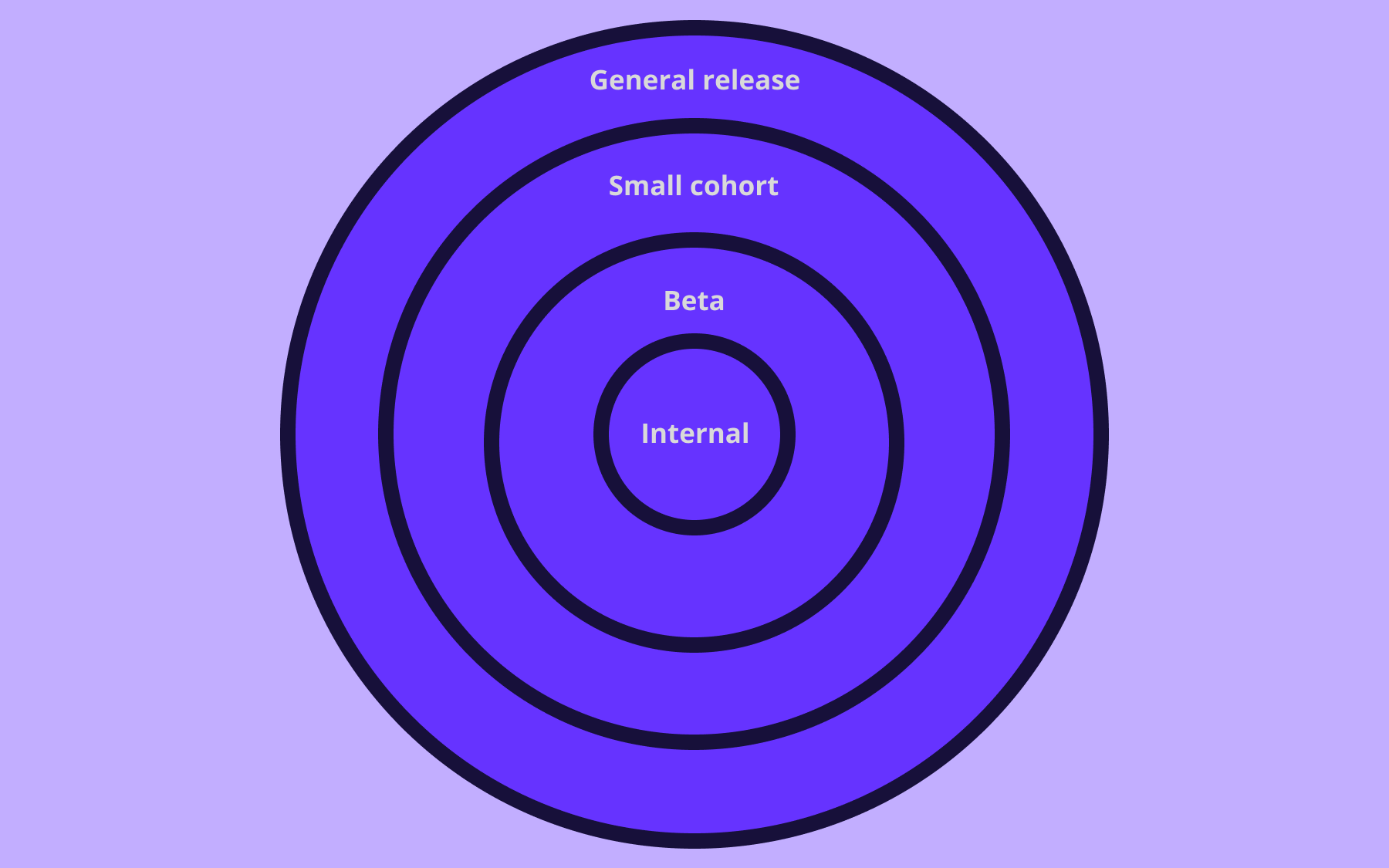
A feature can be deployed and enabled only for the development team, then expanded to internal testers, then to a percentage of users, then to everyone. Each stage provides feedback that improves confidence before the next expansion.
Managing risk in production
Feature flags act as a safety net, allowing teams to disable problematic features instantly without rolling back deployments. If a newly released feature causes issues—performance problems, unexpected errors, or negative user feedback—turning off the flag removes the problem immediately.
This capability reduces the risk associated with frequent merges to the main branch.
Developers can be bold about committing work because they know any issues can be contained quickly. The blast radius of problems shrinks from everyone using the software to the managed segment of users with the flag enabled, or to zero users if the flag is turned off.
When to use trunk-based development
Trunk-based development works best for teams practising CI/CD who want their deployment frequency to match their development velocity.
If you’re aiming for the elite performance tier, with multiple deployments per day, trunk-based development is essentially required. However, it’s actually a suitable option for several business types and teams:
- Small to medium teams with experienced developers
- Startups prioritising rapid iteration
- Organisations building microservices
- Teams willing to invest in automated testing and feature flag infrastructure
Small to medium teams with experienced developers find the model natural.
When developers trust each other’s judgment and maintain high standards independently, the lack of long-lived branch isolation doesn’t create problems.
Startups prioritising rapid iteration benefit enormously.
The ability to get code in front of users quickly, learn from their reactions, and iterate means startups can validate assumptions before burning through their runway. The tight feedback loops accelerate product-market fit.
Organisations building microservices often prefer trunk-based development within each service repository.
The small, focused scope of microservices aligns well with small, frequent commits. Teams can deploy individual services independently, maximising flexibility.
Teams willing to invest in automated testing and feature flag infrastructure find that the investment pays dividends across all their development work.
These capabilities don’t just enable trunk-based development; they improve code quality and deployment confidence regardless of branching strategy.
When to use Gitflow
Gitflow may be appropriate for teams with scheduled release cycles where predictability matters more than speed. When your customers expect releases on a known schedule, and surprise deployments could cause problems, Gitflow’s deliberate pace becomes a key feature.
Here are the teams that should lean towards Gitflow:
- Organisations maintaining multiple versions simultaneously
- Businesses in heavily regulated industries
- Larger teams where isolation helps manage parallel workstreams
- Teams working on complex projects with substantial interdependencies
Organisations maintaining multiple versions simultaneously often need Gitflow’s clear branch structure. If you’re supporting version 2.3 while developing version 3.0, having explicit branches for each version simplifies the mental model.
Heavily regulated industries sometimes require extensive approval processes before code reaches production. Gitflow’s release branches provide natural gates for these approvals, with clear separation between “in development” and “approved for release”.
Larger teams where isolation helps manage parallel workstreams may find value in Gitflow’s structure.
When different teams work on features that could interfere with each other, the isolation of separate branches can prevent accidental disruption—though this benefit must be weighed against the cost of eventual integration.
Complex projects with substantial interdependencies sometimes benefit from coordinated releases where multiple features ship together. Gitflow’s release branch provides a staging area for assembling these coordinated changes.
Conclusion
Neither trunk-based development nor Gitflow works for every organisation. The choice depends on your team’s size, release cadence, regulatory environment, and development culture. Focus on matching your branching strategy to your actual needs.
That said, modern software development teams are increasingly favouring trunk-based development for its alignment with CI/CD practices and its support for rapid iteration.
DORA research consistently shows that elite-performing teams integrate code frequently, deploy continuously, and maintain short lead times—all characteristics that trunk-based development enables naturally.
Feature flags make trunk-based development practical for teams that might otherwise hesitate. By decoupling deployment from release, flags remove the primary objection that incomplete features could affect users. With flags in place, teams get the benefits of continuous integration without the risks of premature exposure.
If your team is considering trunk-based development, Flagsmith provides the feature flag infrastructure you need to make the transition safe. With flexible deployment options, including on-premises hosting for security-conscious organisations, Flagsmith helps development teams ship faster while maintaining control over what users see and when.

































OpenTelemetry, without the vendor lock-in: Introducing full observability for Open Source and Self-Hosted Flagsmith customers