Alpha vs. Beta Testing: What’s the Difference and When Should You Use Each?


Every piece of software passes through two very different kinds of testing before it reaches the people who'll actually use it: an internal check by the team that built it, and a messier gauntlet of real usage out in the wild.
The confusion over alpha vs. beta testing usually comes down to two questions: which check happens where, and who does it?
Get the sequence or the scope wrong, and you either ship bugs your own development team should have caught, or you launch without ever learning how real users behave with your product.
This article breaks down alpha testing vs. beta testing in plain terms, covers when to run each, and looks at how feature flags let modern teams manage both without maintaining separate builds or testing environments.
What is alpha testing vs. beta testing?
Alpha testing and beta testing are two distinct phases in the product development lifecycle, run at different points, by different people, under different conditions.
Alpha comes first and is internal. Beta comes after and is external. Here's what each one actually involves.
What is alpha testing?
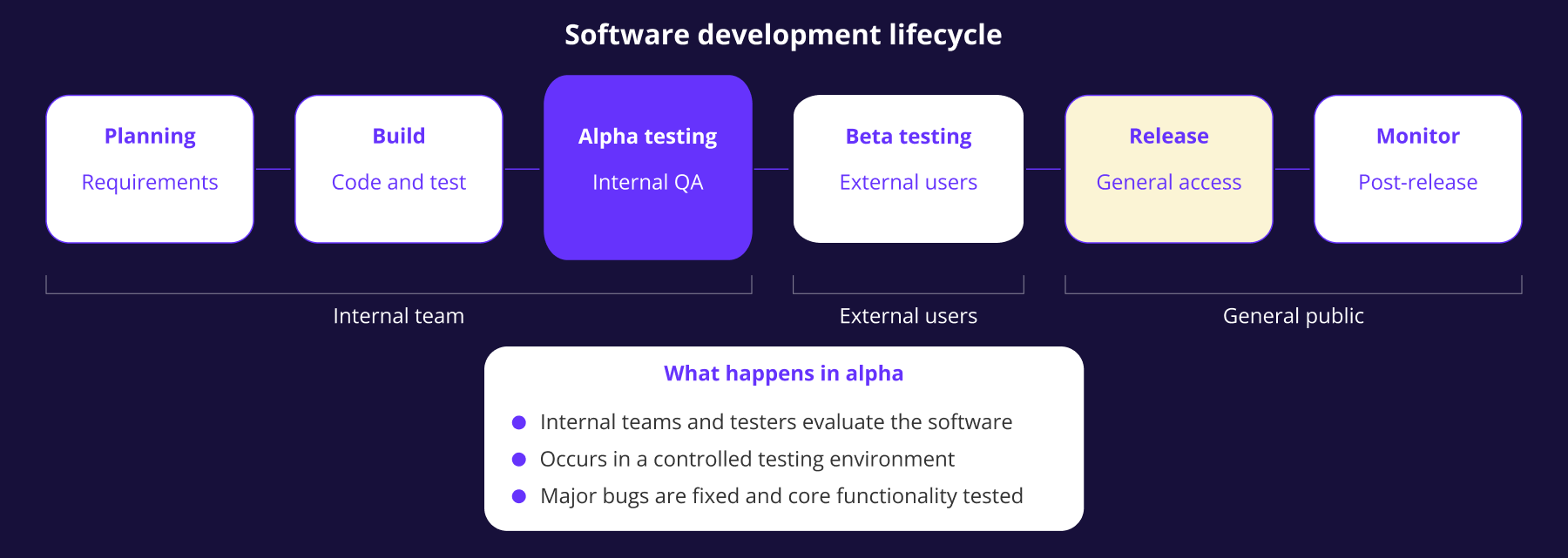
Alpha testing is the phase where your own development team and internal testers evaluate the software before it goes anywhere near external users. It happens in a controlled testing environment, often on hardware and configurations the team already controls.
The people running alpha testing understand the product's architecture and its known weaknesses.
The goal of alpha testing is to catch major bugs and confirm core functionality works as intended, using a mix of black box testing and white box testing, rather than to gauge whether real users like the experience.
Alpha testing typically overlaps with the tail end of the development cycle, once new features are stable enough to test as a whole but before the software is feature complete enough for outsiders to use unsupervised.
What is beta testing?
Beta testing hands a near-finished beta version to external users—actual customers, public beta testers, or a curated group outside the internal team—who use it in real-world conditions rather than a lab setting.
Because beta testers aren't familiar with the product's internals, they interact with it the way your target market actually will: unpredictably, and often in ways the development team never anticipated.
Beta testing focuses on usability issues and how real user expectations differ from what your team assumed, which is exactly why it happens after alpha, not instead of it.
Beta testing is sometimes confused with user acceptance testing (UAT), a separate process where stakeholders confirm the software meets agreed acceptance criteria before formal sign-off. UAT checks contractual acceptance; beta testing checks real-world usability.
Key differences between alpha and beta testing
Strip away the terminology, and alpha testing vs. beta testing comes down to five practical differences: who tests, where, how, for how long, and what they're looking for.
Both testing phases exist to catch problems before an external release, and both feed into the same product development lifecycle.
What changes is who's positioned to identify bugs: internal employees who know the product too well to be surprised by it, or real users who don't know it at all.
Open beta testing vs. closed beta testing
Beta testing itself isn't a single format. Most teams choose between two approaches, depending on how much control they want over who gets in and what beta feedback they're chasing.
Open beta testing invites a large, unrestricted audience—sometimes anyone who signs up. It generates a high volume of real-world usage data across a wide range of devices and use cases, but triaging that volume of user feedback is genuinely hard, and the signal-to-noise ratio can be poor.
Closed beta restricts access to an invited group that resembles your actual target audience. It's slower to build a large sample, but the feedback tends to be more focused because testers are accountable and engaged with the pre-release version they've been given.
Neither format is inherently better; they have different use cases:
- Open beta testing suits a consumer product where volume matters.
- Closed beta suits software where the feedback needs to come from a specific target market, not just anyone willing to try a beta version.
Running alpha and beta testing with feature flags
In most alpha and beta testing models, like the one described above, the two testing stages are separated into different builds or environments: one for internal testers, another for external testing.
In practice, most teams don't need two codebases to run two testing phases.
Feature flags let you run alpha and beta testing against the same release, at different levels of exposure, without redeploying anything.
From internal flag to segmented beta rollout
Instead of shipping a separate alpha build, you wrap the new feature in a flag and enable it only for internal employees during the alpha phase, while everyone else sees the current, unchanged experience.
Once alpha testing is done and every core workflow behaves as expected, you don't rebuild or redeploy for beta. Instead, you extend the same flag to a defined group of external testers using segment-based targeting, based on plan tier, account attributes, geography, or any other trait you already track.
A segment rule is a more precise version of the open-versus-closed beta choice above. Rather than a blunt invite list, a segment lets you target the exact slice of your target audience you need feedback from, whether that's enterprise accounts on a specific plan or users in a single region.
A closed beta becomes a segment rule. An open beta becomes a flag enabled for everyone. Both run through the same mechanism, and neither needs a dedicated testing environment to maintain.
Percentage rollouts and kill switches
Once beta feedback looks solid, the move to general availability doesn't have to be a single, all-at-once switch.
Expanding a flag's rollout percentage gradually—from 5% of users to 25%, then 100%—lets you watch for critical bugs and critical defects at each stage before they reach your full user base. This pattern is sometimes called a canary release, and it turns the boundary between beta and final version into a controlled slope instead of a cliff edge.
If something goes wrong at any stage, a kill switch enables you to disable the feature in seconds rather than shipping an emergency patch. That capability changes the risk calculation for how aggressively you expand a beta, especially as rolling back doesn't require a redeployment.
Alpha testing, beta testing, and general availability become stops on one continuous rollout, not three disconnected events separated by branch merges and build pipelines, once you've decoupled deployment from release.
Measuring alpha and beta testing with real data
Bug reports and feedback forms tell you what testers noticed, but they don't tell you what most users actually did, and testers who bother to fill in a form are rarely a representative sample of your target market.
Pairing a flag-gated rollout with an analytics platform closes that gap.
Instead of relying only on manually collecting feedback, you can measure error rates, engagement, and conversion for the exact segment exposed to the beta version, and then compare it against everyone still on the current experience.
Flagsmith's A/B testing functionality works this way: a multivariate flag controls who sees which variant, while your existing analytics platform receives the event data. Flagsmith is also building an experiment statistics feature, coming soon as an Enterprise beta, that's designed to report lift and a credible interval for each variant directly inside the dashboard. None of this replaces beta feedback. It gives you a second, more objective source of truth to weigh against it.
Alpha testing vs. beta testing: which do you need?
For anything beyond a trivial change, you need both alpha and beta testing, run in that order.
Skipping alpha means external testers hit bugs your own team should have caught first, which wastes their goodwill and your credibility. Skipping beta means you never learn how actual users behave with the product, however thorough your internal testing was.
What varies is scope and duration. A small iteration on an existing feature might need a few days of alpha and a short, closed beta with a handful of testers. A new product or a high-risk change justifies weeks of alpha testing and a longer beta, run in stages as you expand from a single segment to a wider rollout.
The question is how much alpha testing and beta testing your specific release actually warrants, and whether the feedback from both is shaping future development or just getting filed away.
Conclusion
Alpha testing and beta testing solve different problems. Alpha catches what your own team can find when they already know where to look, while Beta catches what real users encounter in real-world conditions.
Treat both testing phases as sequential, not optional—that's what increases your chances of finding every critical defect in a controlled environment, as opposed to finding it in production, after an official release, with your target audience watching.
Feature flags remove the infrastructure overhead of running parts of each phase: there are no separate builds and no dedicated beta environment, just a flag you can target, expand, roll back, or switch off.
Sign up to Flagsmith and run your next alpha and beta phase against a single codebase, from the first internal flag to full rollout.
Alpha vs. beta testing FAQs
Does every product need both alpha and beta testing?
Most products benefit from both, even when the scope is small. Skipping alpha risks exposing external testers to bugs your own team should catch first, while skipping beta means you launch without ever seeing how actual users, rather than internal employees, behave with the product.
How long should a beta test run?
There's no fixed answer, but most closed betas run for four to eight weeks—long enough to collect meaningful feedback, short enough to avoid tester drop-off. Open beta testing aimed at a broader goal, like stress-testing infrastructure, sometimes runs longer.





























































OpenTelemetry, without the vendor lock-in: Introducing full observability for Open Source and Self-Hosted Flagsmith customers