7 Testing Environment Best Practices for Reliable Releases


A shaky testing environment costs you more than a failed test run. Following the right testing environment best practices is what separates a test that tells you something useful from one that just tells you the environment is broken again.
This guide explains what a testing environment actually is, the core practices that keep one reliable, and how to extend those same principles into production without letting testing become a bottleneck or a budget problem.
Whether you're setting up your first dedicated QA environment or trying to tame one that's drifted out of sync with production, the practices below apply regardless of your stack or team size. We'll also look at where feature flags fit into a modern testing strategy, including how they can reduce how many environments you need in the first place.
What is a testing environment?
A testing environment is a dedicated setup, separate from a developer's local machine and from production, used to run and validate software before it ships. It typically includes its own servers, databases, toolset, and configuration, so tests reflect how the software will actually behave rather than how it behaves on just one developer's machine.
Most teams work with a handful of distinct environments across the software development lifecycle:
- Development environment – Where developers write and run code locally or in a shared sandbox, with fast feedback prioritised over realism.
- Testing or QA environment – A more controlled space where testers and automated suites run functional, integration, and regression tests against a build.
- Staging environment – Configured to match production as closely as possible, used as a final check before release.
- Production environment – The live environment your users interact with.
Some teams add dedicated performance, security, or integration testing environments on top of these, especially once a single shared QA environment starts to bottleneck multiple teams at once.
You'll also see the term "test bed" used, usually to describe a narrower, lower-level environment set up to test one specific component or integration rather than the whole application.
Why you need a set of testing environment best practices
An unreliable test environment doesn't just slow you down. It actively misleads you.
A test that fails because of a stale dependency or a misconfigured network setting looks identical, at first glance, to a test that failed because the code is actually broken. Chasing down which one you're looking at wastes developer time and erodes trust in the test suite itself.
That trust gap has a cost. Quality assurance and development teams that can't rely on their test environment start second-guessing every failure, which slows down every release that depends on it.
Left unaddressed, this kind of instability increases development costs across the board, not just within QA. Getting the fundamentals of test environment management right is a critical component of shipping software reliably, not a background task you get to once everything else is done.
There's also a developer productivity cost that's easy to underestimate.
Every hour spent debugging an environment issue instead of an actual code issue is an hour not spent moving the product forward. Multiply that across a testing team and a development team both waiting on the same flaky environment, and the effect on overall development costs compounds quickly.
A proper test environment isn't a nice-to-have. It's the safety net that makes every other testing practice worth doing at all.
Software testing environment best practices
The following practices apply to almost any test environment, whatever your stack, team size, or how mature your continuous testing practice already is. Together, they're what turn a fragile, ad hoc setup into a reliable testing environment your whole team can trust.
Mirror production configuration as closely as you can
The closer your test environment matches production, the more confidence you can place in what it tells you.
Matching operating systems, dependency versions, and network configurations are just as important as matching the application code itself. A test that passes against a different database version or a looser firewall rule than production runs isn't really testing production behaviour.
Cloud-based environments have made this far easier to maintain than physical infrastructure ever did.
Instead of manually rebuilding a server to match a spec sheet, you can define the target configuration once and provision environments from it repeatedly, which keeps parity from silently drifting over time.
Isolate every environment from every other one
Test environments shouldn't share databases, credentials, or infrastructure with production, or with each other. Without isolation, one team's testing effort can quietly corrupt another team's results, or worse, touch real production data.
A performance test that floods a shared database can invalidate a colleague's functional tests that are running at the same time, and neither of you will know why your results suddenly look wrong.
Isolated environments also make it much easier to reason about a failure. If an environment is dedicated to one purpose, a failure in it points to one place, rather than forcing you to rule out three other teams' changes first.
Automate environment provisioning
Manually configuring an environment by hand is slow and it invites human error: a missed dependency, a wrong environment variable, a configuration step nobody remembers to document.
Infrastructure as code and containerisation solve this by turning environment setup into something repeatable and version-controlled, so spinning up a new environment looks the same on a Tuesday as it did the previous Friday.
Automated provisioning also makes ephemeral environments practical. Instead of maintaining a handful of permanent environments that everyone queues for, you can spin one up for a specific test cycle and tear it down when it's done, which directly helps with the management of resource usage and cost.
The gain compounds when multiple teams are testing at once.
Without automation, a shared environment becomes a queue, with one team's testing efforts blocked until another team finishes theirs. On-demand provisioning removes that bottleneck entirely, since each team gets its own short-lived environment instead of competing for the same one.
Manage test data deliberately
Stale or unrepresentative test data is one of the most common reasons a passing test doesn't mean what you think it means. Effective test data management means generating synthetic data that reflects real-world scenarios, masking or anonymising any production data you do use, and refreshing test data on a defined schedule rather than letting it accumulate quietly for months.
Poor test data management doesn't just produce bad test results.
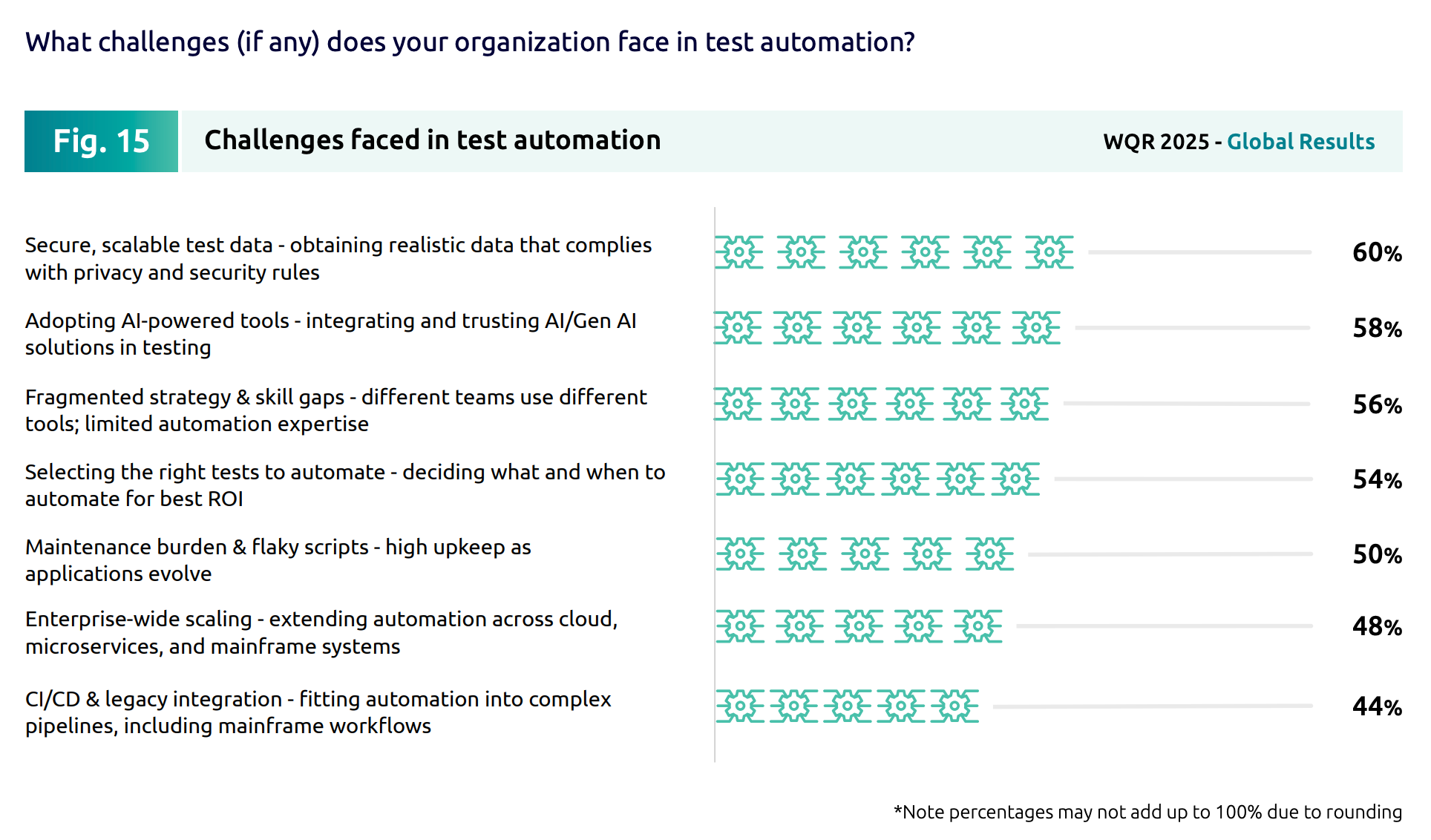
Capgemini's World Quality Report 2025-26 found that 60% of organisations struggle with secure, scalable test data, making it one of the biggest barriers standing in the way of real test automation maturity. Treat test data with the same rigour you'd apply to test environment configuration itself.
Put environment configuration under version control
Application code lives in version control systems for good reason: changes are visible and reviewable, and mistakes are easy to walk back.
Environment configuration deserves the same treatment, which is really just configuration management applied properly. When a network setting or a dependency version changes outside of version control, you get configuration drift—a gap between what an environment is supposed to look like and what it actually looks like, that's often only discovered once it causes a failure nobody can explain.
Tracking configuration changes the same way you track code changes means drift gets caught in review, not in production.
Monitor environments continuously
An environment that's quietly degrading, running low on resources, or partially unavailable can invalidate an entire test cycle without anyone noticing until the results start looking strange.
Continuous monitoring of environment uptime, resource usage, and test results themselves catches this early, before a struggling environment costs you a day of testing effort on results nobody can trust.
None of this needs to be elaborate. Basic uptime and resource checks, paired with alerts when a threshold is crossed, catch most of the failures that would otherwise go unnoticed until someone escalates a "flaky test" that was never actually flaky.
Document environment setup and ownership
A proper test environment needs a clear record of what it's for, who owns it, and how it's configured. Without this, testing teams and developers end up guessing which environment is safe to use for what, or duplicating work because nobody can tell whether an environment already exists for their use case.
Keep environment details current as they change, not just accurate at the point they were first written down. A document that was correct six months ago but hasn't been touched since is often worse than no document at all: it creates false confidence.
Production testing environment best practices
No pre-production environment, however carefully maintained, perfectly replicates real user behaviour, real traffic patterns, and real production data. As a result, more teams now extend testing deliberately into production settings, rather than treating production as a place testing should never touch.
Progressive or staged rollouts are the core technique here. Instead of releasing a change to everyone at once, you release it behind a feature flag to a small percentage of real traffic, or to an internal team first, and watch how it behaves under real conditions before expanding exposure gradually.
If something looks wrong, you turn the flag off, rather than running a full rollback.
It also changes how much environment parity actually has to be perfect. Because the risky part of a change stays hidden behind a flag regardless of small quirks between staging and production, a parity gap that would otherwise be a real problem becomes far less consequential. You get that safety margin from the flag, not from environment parity being perfect.
Testing in production this way does introduce an uncertainty around governance, however: as real users can now be exposed to in-progress work, moving a flag from a test state toward general availability needs role-based access control over who can make that change, and an audit log of when and why they did.
A proper production testing strategy needs both, not just a mechanism for turning features on and off.
Flagsmith has built the Experimentation feature on top of this same flagging model, to let teams run structured experiments against real traffic rather than just staged rollouts.
Reduce environment sprawl instead of managing more environments
Every long-lived environment that gets created to test one in-progress feature is another thing to configure, monitor, and eventually decommission. Over time, that adds up to real infrastructure costs and more surface area for configuration drift to creep in.
Flagging incomplete work and shipping it dark to an environment that already exists is a genuine alternative to provisioning a new isolated environment for every feature branch.
The code goes out, but nobody sees it until the flag says otherwise, which means it can sit safely in staging, or even production, without needing a dedicated space of its own. It's one of the more direct ways to reduce infrastructure costs without changing how your team already works.
It isn't a complete replacement for dedicated environments. Load testing and security testing, in particular, still benefit from their own isolated setup, since you don't want an in-flight feature flag muddying results you need to trust in isolation.
For the everyday case of testing a feature that isn't ready for every user yet, though, flagging it into an existing environment removes a meaningful share of the sprawl and can noticeably shorten development cycles.
Self-hosted test infrastructure for regulated teams
Most of the tooling built around test environment management is SaaS-only, which is a real constraint for teams working under compliance requirements, in air-gapped networks, or with strict data-residency rules.
Sending test data, or the tooling that manages test environments, through a third party's cloud isn't always an option, whatever the tool promises.
Self-hosted, open-source alternatives give those teams the same environment management and flagging capability without routing test or production data through infrastructure they don't control. It's a smaller detail than the practices above, but for regulated industries, it's often the one that decides whether a given approach is usable at all.
It doesn't mean self-hosting is the right call for every team. It adds operational overhead of its own, since you're now responsible for maintaining the infrastructure a SaaS vendor would otherwise handle.
For teams without a hard compliance requirement, that trade-off usually isn't worth making. The point isn't that self-hosted is inherently better; it's that having the option matters for the subset of teams who genuinely can't use SaaS-only tooling.
Common test environment challenges
Even with good practices in place, a few problems tend to recur:
- Configuration drift caught too late. Continuous monitoring and version-controlled configuration catch this before it causes a failure that takes hours to trace back.
- Budget constraints limiting how many environments you can run. Ephemeral, on-demand environments cost less than permanent ones sitting idle between test cycles.
- Inconsistent test data undermining confidence in results. A scheduled data refresh, paired with masking for anything derived from production, keeps test data from quietly becoming a liability.
None of these are one-off fixes. Treat test environment management as a continuous improvement effort, not a project with an end date, and most of these problems get caught early rather than becoming incidents.
Conclusion
A reliable testing environment comes down to a few consistent habits: matching production closely, isolating environments from each other, managing test data deliberately, and keeping configuration under version control.
Extending those same principles into production with feature flags closes a gap that no amount of pre-production setup can fully close on its own, letting you validate real changes against real conditions before everyone sees them.
If you want to test changes safely against real traffic before rolling them out to everyone, sign up for Flagsmith and see how feature flags fit into your existing testing process.
Testing environment best practices FAQs
What's the difference between a test environment and a staging environment?
A test environment is typically used earlier in the software development process, for functional, integration, or regression testing during active development. A staging environment sits closer to production, configured to match it as closely as possible, and is usually the last environment a change passes through before release.
How many test environments does a team actually need?
There's no fixed number. Most teams need at least a development, a QA or testing environment, and a staging environment, with dedicated performance or security testing environments added as needed. The right number depends on team size, release frequency, and how much you can offset with ephemeral environments and feature flags rather than permanent ones.
What is a test bed?
A test bed is a narrower, lower-level environment set up to test one specific component, integration, or piece of hardware, rather than an entire application. It's often used interchangeably with "test environment" in casual usage, but strictly refers to a more focused setup.


























































OpenTelemetry, without the vendor lock-in: Introducing full observability for Open Source and Self-Hosted Flagsmith customers