How Feature Flagged AI Workflows Turn Risky Releases Into Reversible Ones


A demolition crew doesn't just blow up a building and hope for the best. They map load-bearing walls, wire explosives to specific charges, build predictive models, and collapse the structure in a controlled sequence from a safe distance.
Feature flags do the same job for the AI systems your engineering teams ship: control the exposure, not the ambition.
You don't want to be the engineering team that ships AI-generated code the other way: one merge, one deploy, every user exposed at once, and a rollback that means redeploying instead of flipping a switch.
AI has moved the release bottleneck to deployment: code gets written faster than ever, and whether you trust it becomes the constraint.
By feature flagging AI workflows, you can give every change a blast radius you set on purpose, instead of one you discover in an incident channel—without slowing AI coding agents down.
A development process that is built around occasional, carefully reviewed merges won't necessarily keep up with an agent that can ship new code paths all day, every day. Instead, you need runtime control, after the code is already in production, not just before.
What are AI feature flags?
A feature flag is a runtime if/else statement, evaluated against a configuration file or a feature flag service instead of hardcoded into your source code. Feature flags evaluate against live context every time a user hits that code path, decoupling deployment from release: you can ship a code path to production, leave it dark, and turn it on for whoever you choose, whenever you choose (feature toggles and feature switches are the same mechanism under a different name).
That mechanism hasn't changed with AI. What's changed is how much it's needed.
Deterministic code fails in predictable ways. You can reproduce a bug, write a test for it, and trust that the test stays green.
If the software you're developing has AI-empowered features, it won't always behave that way. A prompt template, a model version, a retrieval source, or a piece of agent-authored logic can pass every check in staging and still produce different output the moment it meets a real user with a real, messy request.
GitHub's own 2025 Octoverse report found that its Copilot coding agent alone opened more than a million pull requests in the five months after launch—a volume of AI-authored change no human-scale review process was built to absorb.
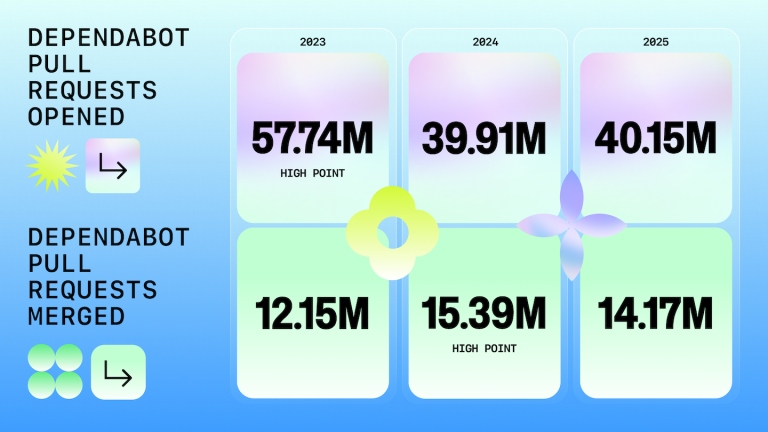
Even before coding agents, GitHub's data showed the pattern: Dependabot opened over 40 million automated pull requests in 2025, but only around 14 million were merged—roughly one in three fixes ships in the same month it's proposed.
Test AI models against a fixed test suite and you learn the model still runs. You don't learn how it behaves once real users start feeding it inputs nobody scripted, or how an AI-powered feature reads on an unfamiliar user interface under real load.
A feature flag closes that gap: it enables you to evaluate a new code path against a small, real slice of traffic before you find out how it performs against all of it.
Now that agents generate new code faster than any human, you can move beyond just wondering whether to use feature flags with AI and start working out how an AI agent can create feature flags without you losing your grip on what ships.
Why AI-generated code raises the stakes on every release
An engineer writing code by hand manages their own risk. They know which service is fragile and write accordingly.
An AI agent doesn't carry that judgement. It follows instructions and produces output at a volume no code review process was built to manage. A hundred lines can be produced as easily as five, and the blast radius grows with every merge.
Authorship gets fuzzy along the way. When an agent writes the first draft and a human edits, reviews, and merges it, who wrote the code is less important than whether it's safe to expose.
You also start building flag debt: more code ships, more flags get created to gate it, and without a lifecycle attached to each one, stale flags start piling up behind the features they were meant to protect.
Meanwhile, multiple teams and agents working the same codebase at once means more merge conflicts and more code changes landing in the same files on the same day.
Feature flags allow those changes to ship independently: neither team's incomplete feature has to block the other's, as neither is fully live until someone turns it on.
If you use a trunk-based development strategy and merge straight to a shared branch multiple times a day, keep incomplete features invisible until they're ready.
An agent that commits that often needs the same discipline as a human: new code paths hidden behind a flag, not exposed the moment the merge lands. Skip that step and trunk-based development just increases the speed at which broken features reach your users.
Treat every AI-authored change the way a demolition crew treats a charge in the wall: wired to its own switch, tested at a scale you chose, never live for your entire user base by accident.
Feature flags, AI agents, and safe deployment
To deploy AI code and use AI agents safely, you need the runtime control that feature flags provide.
- A kill switch enables you to disable problematic features the moment they misbehave—no redeploy, no waiting on a continuous integration and continuous deployment pipeline to run again.
- With targeting rules, you can decide exactly who meets a new code path first: your own team, a beta segment, a single region, or a certain user tier before it reaches your entire user base.
- Progressive rollouts embed control into your process. Internal users see a change first. Then a small percentage. Then a wider one, each stage gated by the same guardrail metrics you'd watch for any release: error rates, latency, the business metrics that tell you whether the feature is actually working, not just running.
By combining runtime control with a staged exposure process, you ensure a merge is a release you can walk back cleanly, at whatever stage it started going wrong. Code deployment stops being the finish line—a feature is done once it's been exposed, watched, and proven safe at every stage, whether the code behind it came from a person or an agent.
We've been talking about flags an AI agent creates around its own code change, whether or not that change has anything to do with AI at all. However, when it comes to AI feature flags, you also need to be aware of feature flagging AI-powered features—a chatbot, a recommendation engine, an AI search function, or a model swap.
A new AI feature shipping to production for the first time needs the same containment as a coding agent refactoring a payment flow.
How to let your AI agent create feature flags
Many teams skip this part, but it's the part that actually changes how safely the code AI generates ships.
You need to flag by default: any code change an agent proposes that touches production behaviour comes with a flag attached, not as an afterthought bolted on before deploy, but as part of the same change.
- The agent proposes the flag alongside the code. When an AI agent generates a new code path, it also defines the flag that gates it—defaulted off, or restricted to internal users, and never live to everyone by default.
- The flag gets a type, an owner, and an expiry. Release, experiment, or operational: the flag configuration should say to which it applies. It should also name who's accountable for the flag and when it's due for review. This act helps prevent flag debt from becoming technical debt in six months' time.
- A human approves the rollout plan, not every line. Four-eyes approval is truly valuable here. The reviewer isn't re-reading the agent's source code line by line; they're checking the targeting rules, the rollout stages, and the guardrail metrics the flag will be judged against.
- Role-based access scopes who can do what. An agent can be used to create a flag and propose a rollout plan. Ramping that flag past a defined threshold, or touching a global kill switch, remains a decision that someone needs a certain level of access to make.
- Every flag configuration change gets logged. Audit trails are more, not less, important once an agent is one of the things capable of proposing production changes. You want a record of who (human or agent) changed what, and when.
Here's a rough example of what an agent-created flag configuration looks like: the level of detail to capture in the config file the moment a flag is created, not weeks later during an audit:
flag:
  key: "exp_checkout_ai-upsell-copy_202609"
  type: experiment  # release | experiment | ops
  owner: "team-checkout"
  created_by: "agent:code-assistant"
  expires: "2026-12-01"
  default_state: false
  targeting:
    - segment: "internal-users"
      state: true
    - segment: "beta-cohort"
      rollout_percentage: 5
The mechanism that connects a coding agent to a feature flag management platform in the first place is usually the Model Context Protocol (MCP), an open standard that lets an AI assistant call external tools instead of just describing what it would do.
An agent working through an MCP-connected flag service can create the flag, assign it to a segment, and hand the rollout plan to a human for approval, all inside the same workflow that produced the code change.
You can also give your AI agents direct access to your code through your terminal with a command line interface (CLI). Thanks to the CLI, your terminal acts as a bridge between your agent and your code, giving you similar results to if you used an MCP.
Agent-proposed, human-approved should be your default. An agent quietly ramping its own flag from 5% to 100% while nobody is watching isn't a workflow you should trust, regardless of how clean the guardrail metrics look.
Naming conventions are necessary as well. A flag key like exp.checkout.ai-upsell-copy.202609 tells the next engineer — or the next agent — what type of flag this is and when it should be revisited, without anyone opening the configuration file to find out.
The best practices for AI-powered feature flag management
Teams that implement feature flags effectively share a few consistent flag best practices. Without them in place, managing feature flags gets harder, not easier, once an agent is creating them.
- Test in production, deliberately. Staging can't replicate the input distribution a real user throws at an AI feature. Flags let you expose new code to internal users or a narrow segment inside production itself, without opening the door to your entire user base.
- Watch operational feature flags as closely as release ones. Monitor a flag that exists purely as a kill switch for a fragile dependency to the same level as a flag gating a new feature, as both can fail when nobody's watching error rates and feature behaviour in production.
- Scope access to what a role is accountable for. Not everyone who can create a flag should be able to modify a global kill switch or ramp an experiment past the halfway point. Having flag controls that map to actual responsibility catches mistakes before they reach a production environment, whether a human or an agent triggered the change.
- Schedule flag audits instead of waiting for a cleanup sprint. AI agents generate flags faster than most teams build up the discipline to remove them. A recurring audit, even a short one, is what keeps feature flag management from becoming technical debt.
- Keep flag evaluation data structured and queryable. When a flag evaluates, log which variant a user saw and connect that to your actual business metrics. A flag should be more than a simple on/off switch, instead being a feedback loop you can learn from.
- Loop in the people outside engineering who'll actually use the flag. Multiple teams touch a feature lifecycle long after the code ships: support fields the user feedback and product owns the rollout call. An agent won't know either context unless someone builds it into the workflow. Manage features and manage flags as shared infrastructure between those teams, not a tool that lives solely inside a pull request.
Take these tips into account when picking a feature management platform for a team building AI-powered features, but be conscious that there is more to it, such as whether you want self-hosting for data residency or OpenFeature support.
Check out Flagsmith's guide to choosing feature flags for AI companies for more guidance.
How to optimise AI feature experimentation strategies
As mentioned, you can also benefit from feature flag experimentation when releasing AI features. For example, experiment flags and multivariate testing aren't new tools, but AI features make them even more valuable.
A prompt template, a system message, or a model choice can all sit behind a flag value instead of a hardcoded constant, making the comparison of two versions of an AI feature a targeting change, not a full code deployment.
Run one prompt variant against a control group and a second against another segment, then measure response quality, task completion, and the downstream business metrics a chatbot or recommendation feature was built to move.
Then go further with targeting rules and tailor which variant a user sees by plan tier, geography, industry, or behaviour—personalisation stops being a separate system bolted onto experimentation and harnesses the same targeting logic.
AI also helps on the analysis side. Pattern recognition across large volumes of flag evaluation data can surface a winning variant faster than a person watching a dashboard, and flag a guardrail breach as well.
What it can't do responsibly, yet, is decide unsupervised which variant should win and ramp it to your entire user base. Setting the hypothesis and the guardrail thresholds—and deciding when to end an experiment—is still a human job… at least for now.
However, bear in mind that A/B testing an AI feature asks more of your test features than a standard UI experiment. Two variants of a button either look different or they don't. Two variants of a model response can both look reasonable in isolation and still differ in ways a simple conversion metric won't catch—response quality, tone, factual accuracy, latency, and more.
How to reduce release risk with AI feature flags
The discipline required is clear, but you will need to form habits to make it stick. Here are a few steps to take:
- Default every AI-authored code change to flagged, off, or restricted, never live on merge.
- Stage every rollout, watching guardrail metrics at each step, before feature exposure reaches your entire user base.
- Keep a kill switch within one click of anyone on call, so a broken feature is a flag flip, not a hotfix deploy.
- Put flag audits in the calendar—agents create flags faster than anyone remembers to retire them.
What's changed is the volume of code arriving at your door and the speed it arrives at. A safety net you could just check occasionally, when a handful of engineers shipped by hand, becomes load-bearing as soon as agents are generating at least part of what reaches your codebase.
Treat this as an operating rhythm, not a one-time setup. A feature flag management platform enforces the mechanics—the targeting rules, the audit logs, the RBAC, the kill switch that actually works when someone reaches for it—but the discipline of using it consistently, on every AI-authored change, is a habit your development teams need.
Conclusion
Feature flags have plenty of value to teams not using AI to code, or shipping AI features, but they become vital as soon as AI is part of your development process.
When an agent can write in minutes what used to take a sprint, the only thing standing between that speed and an incident is making sure each change ships behind a switch you control.
Wire the charge. Model the impact. Then decide, on your terms, when the rest of the wall comes down.
If you want to see what a flag-by-default workflow looks like with an AI agent wired directly into flag management, sign up for Flagsmith and connect it to your coding agent of choice.
Feature flags AI FAQs
What is the best AI feature flag platform?
It depends on what your engineering teams actually need—self-hosting for data residency, an open-source core you can audit, advanced governance features, or a direct MCP integration so a coding agent can create and manage flags without leaving its workflow.
Flagsmith's dedicated guide to choosing feature flags for AI companies, linked above, breaks down the criteria in detail.
Why use machine learning feature flags in continuous delivery pipelines?
Inside a continuous integration and continuous delivery pipeline, a flag sits between a model being deployed and a model going live.
That gap lets a team run a new model version against a narrow segment, watch latency and output quality settle, and only then widen exposure, instead of every deploy doubling as a release to everyone at once.
Can AI fully automate feature flag rollouts?
AI can automate the mechanical parts—proposing a flag, staging a rollout, pausing or reverting when a guardrail metric breaks its threshold—but it shouldn't automate the judgement call to expand a rollout past a meaningful threshold or remove a kill switch. A person should be accountable for that decision.





























































OpenTelemetry, without the vendor lock-in: Introducing full observability for Open Source and Self-Hosted Flagsmith customers