

What Is E2E Testing? A Practical Guide for Engineering Teams


End-to-end (E2E) testing is the closest thing to watching a real user work through your product, from the moment they land on it to the moment they get what they came for.
E2E testing gives you the information you need to catch any failures that slip past the other layers of software testing: the login that works fine in isolation but breaks when the session cookie meets a real database, for example, or the checkout that passes every unit test but fails the moment a payment provider responds a few hundred milliseconds late.
Most teams don't get the balance right on the first try. Some skip E2E testing until something breaks in production and forces the question. Others try to cover every edge case through the user interface (UI) and end up with a suite that's slow and flaky, and gets ignored by the engineering team.
This guide covers how E2E testing fits alongside unit and integration testing, how the process works in practice, how to choose a framework, and what separates a reliable E2E testing strategy from one that just generates noise.
It also covers a practical, often-overlooked piece of that reliability puzzle: how feature flags affect the stability of your E2E suite as your application keeps shipping.
What is E2E testing?
E2E testing is a software testing methodology that validates a complete application workflow from a user's perspective, exercising every integrated component along the way: the user interface, backend services, application programming interfaces (APIs), databases, and any third-party systems the application depends on. Instead of checking whether one function returns the right value, an E2E test asks a bigger question: does this entire system do what a real user needs it to do, end to end?
One end is the user interface—the part of the application a person actually touches. The other end is the persistence layer, typically a database, though it might also be session storage or local browser storage.
An E2E test starts at the first end, drives the application the way a user would, and confirms the result all the way through to the other end.
A test for a sign-up flow, for example, doesn't just check that a form submits. It confirms the account gets created, the correct data lands in the database, and a follow-up action, such as a login with the new credentials, actually works.
That full-stack scope is also what separates a genuine E2E test from other product tests. If one drives the interface but mocks the API or backend service behind it, it's a useful test, but it isn't E2E.
A true E2E test talks to the real domain logic and the real persistence layer, as that's how you catch the failures that only appear when every piece is actually connected.
Why use automated end-to-end testing?
Unit tests confirm that individual functions behave correctly. Integration tests confirm that a handful of components work together. Neither can tell you whether a user can actually complete a real task in your application, because neither exercises the full path a user takes.
E2E testing closes that gap, which explains why most serious testing methods include it alongside unit and integration testing.
You can also automate that coverage, rather than running manual testing. A manual tester can run through a login test or checkout flow once, and then again after every release, but that gets slower and less reliable as the application grows.
An automated E2E test runs the exact same real-world scenario every time, at whatever frequency your pipeline calls for, without human error creeping into the testing process.
That consistency enables teams to catch integration bugs before a real user does, rather than after a support ticket confirms one made it through.
Automated testing isn't free. Writing detailed test cases that reflect real user journeys, standing up test environments that behave like production, and maintaining tests as the interface changes all take engineering time.
So, which journeys deserve E2E coverage, which tool fits your stack, and how do you keep a suite reliable rather than letting it rot? First, you need to understand the basics of running an end-to-end test.
How does E2E testing work?
The mechanics vary, but the underlying process is fairly consistent across teams and testing tools. E2E testing sits at a specific point in the software development lifecycle: after code is written and lower-level tests have already passed, but before a release goes out.
Here are the things to think about to get your E2E testing set up.
Test planning and environment setup
The first step of E2E testing is mapping the important stages in the customer journey, such as (though it can be any workflow specific to your product):
- Signing up
- Logging in
- Completing a purchase
- Updating account settings
Each journey gets broken into test scenarios and test cases, with the expected outcome documented at each step.
In parallel, teams set up a test environment that mirrors production as closely as possible, complete with the databases, APIs, and external systems the real application needs.
When genuine production data can't be used, teams substitute realistic test data instead—getting this consistently right is its own discipline, covered in our guide to testing environment best practices.
Choosing tools and writing test cases
With scenarios mapped, the next decision is which framework and automation tools will actually run the tests. That choice affects everything downstream, from how fast the suite runs to how much maintenance it needs later, so we cover it in a section further down this guide.
Execution, result validation, and defect resolution
Once written, test cases run against the test environment, either on demand or as part of a continuous integration and continuous delivery (CI/CD) pipeline.
Each run produces test results that get compared against the expected outcome for that scenario. When a test fails, the job isn't done: someone needs to work out whether it caught a genuine defect or whether the test itself needs updating, fix whichever is true, and re-run the test to confirm the fix holds.
By repeating that feedback loop continuously, you keep your E2E suite trustworthy rather than just having it as a box-ticking exercise.
E2E testing vs unit and integration testing
Software testing works in layers, with each layer catching a different category of problem.
This relationship is usually described as the testing pyramid: a large base of fast, cheap unit tests, a smaller middle layer of integration tests, and a small number of E2E tests at the top.
Whether you are running unit or integration tests, they are usually fast enough to run constantly and specific enough to point straight at the broken line of code, so it makes sense to lean on them heavily.
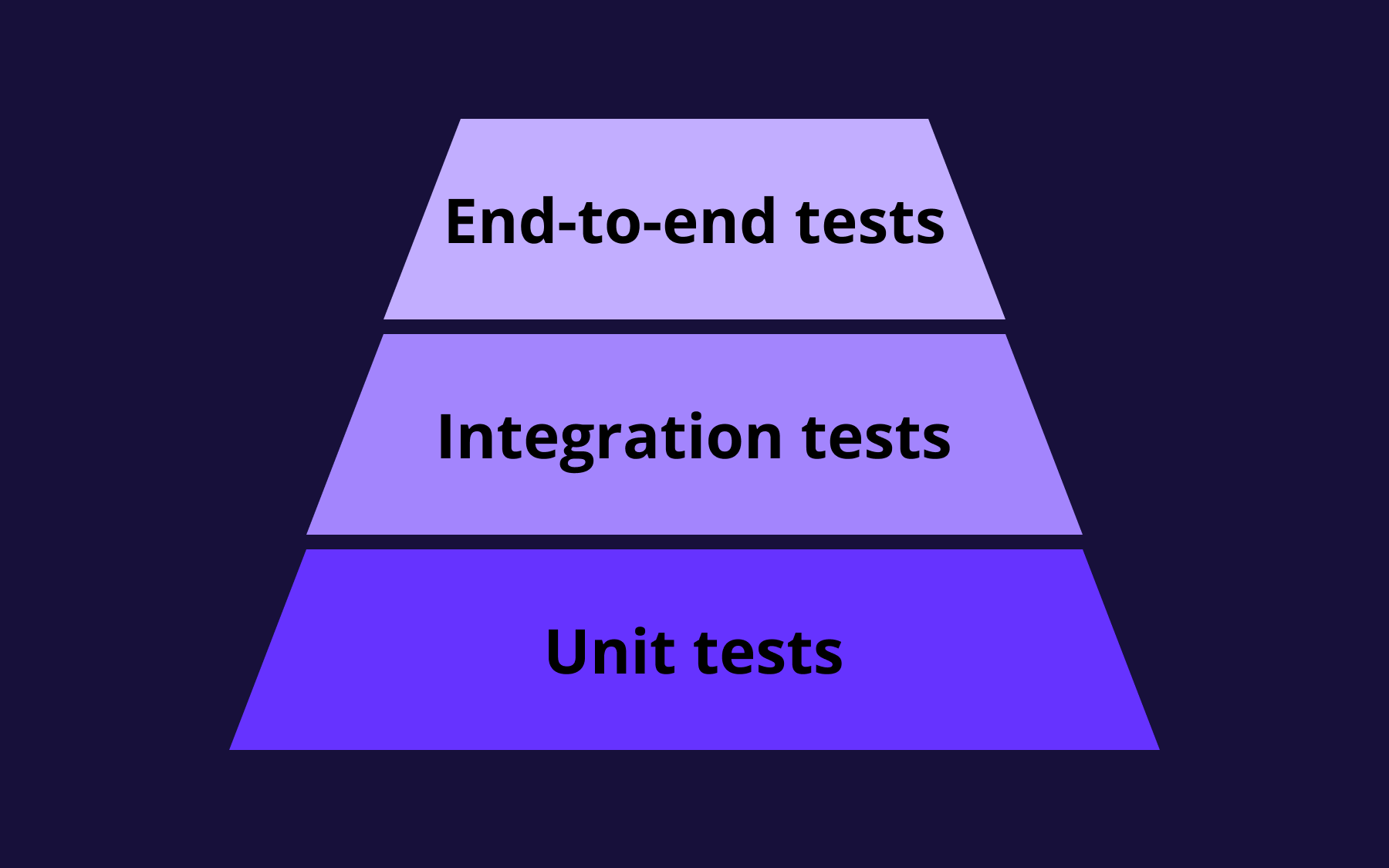
E2E tests are slower and more expensive to write, run, and maintain, precisely because they touch so much of the entire system at once. Most teams aim for a small number of high-value E2E tests covering critical user journeys, rather than trying to replicate exhaustive test coverage at the top of the pyramid.
However, E2E testing should not be an optional part of your process. Unit and integration tests can pass while a real user still can't finish signing up, because the failure lives in how the pieces behave together in a live environment, not in any one piece on its own.
That blind spot is one only E2E testing covers. It's also why many teams lean on their E2E suite to double as a regression testing platform, rerunning the same critical journeys after every change to confirm nothing that used to work has quietly broken.
Horizontal vs vertical E2E testing
E2E testing generally falls into one of two categories. Most mature testing strategies use both.
- Horizontal E2E testing follows a single workflow across multiple systems, checking that each one hands off correctly to the next. A customer placing an order is a good example: payment gets processed, inventory updates, a confirmation email goes out, and the order shows up in the fulfilment queue, all as one continuous test.
- Vertical E2E testing validates a single application across its own internal layers, from the user interface down through the API and backend logic to the database itself. A user registration test that checks the form, the API request it triggers, the backend processing, and the database write is a vertical test.
Vertical tests are often quicker to build and a useful starting point, since they stay within one application's boundaries. Horizontal tests take more setup but catch the failures that only show up when multiple systems have to agree with each other, which is exactly where a lot of real-world production bugs hide.
How to choose an E2E testing framework?
Start with your application type. Testing tools built for web applications don't necessarily extend cleanly to mobile apps, and a tool built around native mobile automation won't help you test a REST API.
Match the framework category to what you're actually testing before comparing specific products within that category.
From there, weigh a few practical factors:
- Coding vs low-code. Framework-based tools give engineers full control over test logic and are usually the better fit for teams with strong development skills and complex scenarios. Low-code or codeless platforms lower the bar for non-engineers to contribute test cases, which is an important consideration if your quality assurance (QA) teams include people who aren't writing code day to day.
- Waiting and synchronisation. Tests that rely on hard-coded pauses are slower and less reliable than tools with genuine auto-waiting, which check for a condition to be true before moving on rather than guessing at a fixed delay.
- Parallel execution. A framework that can run tests in parallel across browsers or devices cuts total test execution time significantly, which is valuable once a suite grows past a handful of tests.
- Maintenance overhead. Ask how the tool handles UI changes. Frameworks that rely purely on fragile selectors need manual updates every time the interface shifts, while tools with more resilient element-matching reduce that burden—though they rarely eliminate it entirely.
For web applications, options like Playwright, Puppeteer, Cypress, Selenium, and WebdriverIO remain common choices, each with different strengths and limitations when it comes to control and setup speed.
Appium and comparable tools cover native mobile apps, and Robot Framework is a common choice when teams want an open-source automation framework with a more readable, keyword-driven syntax that non-programmers can follow.
Match the category to your stack, trial it against one real user journey, and judge it on how much upkeep it requires once the first UI change lands.
E2E testing services for complex enterprise software projects
E2E testing looks different once an application spans multiple teams, multiple integrated systems, and years of accumulated functionality. A handful of things change at that scale.
There are simply more integrated components to account for: internal services, third-party APIs, legacy systems that predate the current team, and integrations that different teams own separately.
Keeping test environments in sync across all of them, so that a test run means the same thing whichever team is looking at it, becomes its own ongoing project rather than a one-off setup task.
Coordination becomes a bigger factor, too. When multiple teams touch overlapping parts of the same application, someone needs to own which critical user journeys get E2E coverage, how test cases get maintained as ownership shifts between teams, and how failures get triaged without every team assuming it's someone else's test to fix.
Some organisations respond by bringing in specialised E2E testing services or QA partners rather than building all of that capability in-house.
A testing service with existing tooling and experience across complex, multi-system projects can accelerate coverage that would otherwise take an internal team much longer to build from scratch, particularly for enterprise software with a lot of surface area to cover quickly.
Even so, an external service doesn't remove the need for engineering ownership of the highest-risk journeys: the teams building the software are still best placed to decide which workflows actually matter enough to test end to end, and outsourcing test writing without that internal clarity tends to produce broad but shallow coverage rather than a strategy that reflects real business risk.
What is the most reliable E2E testing strategy?
The most reliable E2E testing strategies hinge on a handful of practices:
- Prioritise critical user journeys. Reliability starts with restraint. Cover the paths that would actually hurt the business if they broke—login, checkout, core account actions, and anything tied directly to revenue—rather than trying to test every possible interaction through the UI. A focused set of tests that always passes for the right reasons beats a huge analysis nobody fully trusts.
- Use stable selectors. Selectors tied to visual styling or generated class names break constantly as the interface evolves. Dedicated test attributes or accessibility-based selectors survive far more UI changes.
- Keep tests isolated. Each test should set up its own data and run independently of every other test. Tests that depend on state left behind by a previous test produce cascading failures and block parallel execution.
- Run tests in parallel. If you execute tests in parallel across environments, you cut total run time and get feedback to developers faster, particularly as the number of tests grows.
- Use production-like test environments and realistic test data. A test environment that doesn't resemble production will pass tests that fail for real users. Realistic, well-managed test data prevents both false passes and confusing, hard-to-reproduce failures.
Even with every one of these best practices in place, one unreliable factor tends to survive: the application's own release state can shift underneath the test while it runs.
A test written against yesterday's rollout percentage can fail today for no reason related to a genuine bug, simply because the feature it's exercising is being released to a different slice of users than it was the last time the suite ran.
However, you can tackle that release-management problem with feature flags.
Using feature flags for a more reliable E2E testing strategy
Feature flags are a mechanism that lets you control which users see a piece of functionality, independent of when that code gets deployed—the same decoupling of deployment from release that underpins most feature-flag workflows.
Once a codebase uses flags to manage releases, the flags end up affecting E2E testing whether a team plans for it or not, because a flag's state becomes part of the application behaviour a test is exercising.
Used deliberately, flags remove a specific, common source of flakiness. Used carelessly, they add one.
For a deeper look at how feature flags support testing more broadly, including production experimentation and enterprise governance, see our guide to feature flag testing.
How to run E2E tests safely with feature flags
The safest way to run E2E tests against flagged functionality is to stop treating the live rollout percentage as the source of truth for what a test should see.
Instead, override the flag's state for a specific test identity—what Flagsmith calls an identity override—or for the whole test environment, so every run starts from a known, fixed configuration rather than whatever a gradual rollout happens to look like at that exact moment.
With a tool like Flagsmith, that override can live at the environment or identity level, meaning your E2E suite gets a stable, predictable flag state to test against without touching the rollout settings real users are subject to.
The best practices for integrating feature flags into E2E testing
Good feature toggle management habits keep flag-gated code from becoming a source of test debt.
- Test both states of any flag that's mid-rollout—the current default and the new behaviour—rather than only testing whichever one happens to be live when the suite runs, as a test that only covers the old path won't catch a regression in the flagged one.
- Keep flag configuration for test and CI environments separate from production, so a test run never risks changing what a real user sees.
- Merge flagged code to your main branch as it's built, rather than leaving it on long-lived feature branches with their own drifting test setup. You can also benefit from trunk-based development here, as code hidden behind a flag can merge safely long before it's finished, and the E2E suite running against trunk stays green throughout.
How to avoid flaky E2E tests using feature flags
Flaky tests often get the blame when the cause is actually non-deterministic release state: a test failure caused by a user landing in a different flag variant or rollout bucket than the last run—often because an A/B test or a gradual rollout is running underneath it—rather than by an actual defect.
Deterministic flag overrides remove that variable entirely. When a test's flag state is fixed rather than sampled from a live rollout, a failure indicates that something in the application actually broke, not that the test got unlucky with which cohort it landed in this time.
That distinction has a direct impact on the perception of test reliability: it's the difference between a suite engineers trust and one they start dismissing as flaky.
Conclusion
E2E is the part of your testing strategy that answers a key question unit and integration tests can't: does the whole system actually work the way a real user experiences it?
To set up effective E2E tests, you need to be deliberate about scope, choose tools that match your application and team, and treat test maintenance as an ongoing job rather than a one-time setup cost.
Pay attention to how your own release process, including feature flags, affects what your suite sees on any given run.
Flagsmith lets you control exactly what an E2E test sees by overriding flag state for a specific identity or environment, so your suite tests real behaviour instead of chasing a moving rollout target.
Sign up for Flagsmith to see how deterministic flag control fits into your own E2E testing strategy.
E2E testing FAQs
What's the difference between E2E testing and user acceptance testing (UAT)?
E2E testing is a technical verification that the whole system works correctly, usually run by engineers or QA teams as part of the development process. User acceptance testing is a separate, later step where actual users or business stakeholders confirm the software meets their needs, typically once E2E testing has already passed.
How long does E2E testing take to run?
It depends on the size of the suite and whether tests run in parallel. A small, focused set of tests covering critical user journeys might run in minutes; a large, sequential suite can take considerably longer.
Keeping the suite focused on high-value journeys and running tests in parallel are the two biggest ways you can keep that time manageable.
What is the most reliable E2E testing strategy for a small team without a dedicated QA function?
Start narrow: pick one or two critical user journeys, such as login or checkout, and get those passing reliably in CI before adding more. A small suite that runs consistently is worth more than a large one that fails intermittently for reasons nobody has time to chase down.





























































OpenTelemetry, without the vendor lock-in: Introducing full observability for Open Source and Self-Hosted Flagsmith customers
















































