Mobile A/B Testing: A Complete Guide for App Teams


Mobile A/B testing is the practice of showing different versions of a screen, flow, or feature to different app users, then measuring which version performs better against a metric you care about.
It's an extension of testing on the web, but mobile devices have different mechanical constraints: app store review, version fragmentation across your installed base, traffic split unevenly across iOS and Android, and push notifications that behave nothing like a web banner.
This guide covers what mobile A/B testing involves, why it is different from web testing, how to run a test properly, and how to test something as concrete as your onboarding flow.
I also break down the tool categories mobile teams reach for, including feature flagging platforms, so you can work out which one fits your team.
What is mobile A/B testing?
At its core, mobile A/B testing works the same way as A/B testing: you randomly assign app users to a control group and one or more variants, then measure the effect on a metric you've chosen in advance, whether that's activation, retention, or revenue per user.
If you're new to the statistical mechanics behind that process, like hypotheses, sample size, statistical significance, and confidence intervals, that general guide linked above covers the fundamentals in more depth.
What makes A/B testing mobile apps distinct is how much surface area it covers. A/B testing for mobile apps isn't limited to a button colour or a headline; it stretches across the user interface, onboarding screens, pricing and paywall placement, push notification copy and timing, and backend logic a user never sees directly.
Anywhere your app makes a decision that affects a mobile user's behaviour, there's a plausible test hiding behind it.
Why is A/B testing harder on mobile than on web?
Mobile A/B testing is harder than web testing because a mobile app doesn't behave like a web page: a change only reaches a user once they've downloaded a new build, and until then, they're running whatever code shipped in their last update—also known as the version-fragmentation problem.
On the web, everyone hits the same server on every page load, so a change is live for the whole audience the moment you deploy it.
On mobile, a meaningful share of your installed base sits on an older binary that never received the code path you just shipped, and there's no way to force an update.
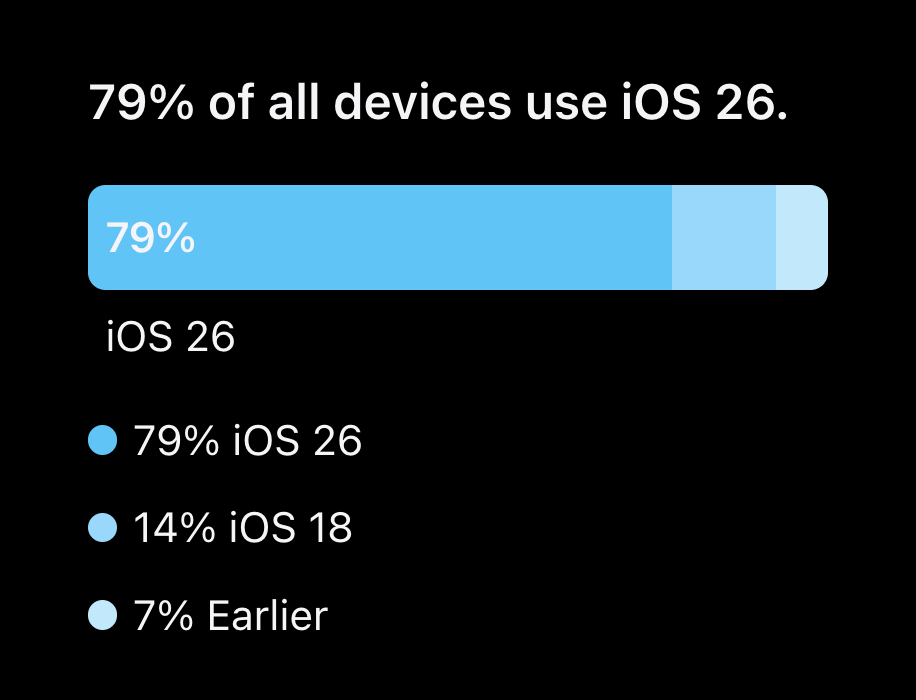
Even iOS, one of the fastest-updating mobile ecosystems, is affected: Apple's own usage data shows 21% of iPhones in use are still running iOS 18 or an earlier release, not the current major version.
Anything you want to test that isn't already sitting in the current binary, behind a flag or a remote config value, needs a new release and relevant app store approval before it can be tested at all.
The app store reviews add another delay on top of that, and even a small copy change can mean a multi-day wait if it isn't already flag-driven—which pushes teams toward testing what they can control through configuration rather than what they'd ideally test.
Traffic is also arguably more fragmented on mobile: instead of one web property, you're splitting a smaller user base across iOS and Android, each with its own release cadence and behaviour.
Apple's App Tracking Transparency (ATT) limits how much a cross-app advertising identifier can tell you, too, so bucketing needs a stable, first-party user ID rather than an identifier for advertisers (IDFA) that many users have opted out of sharing.
How mobile A/B testing works
Mechanically, most mobile A/B testing runs on the same infrastructure as a feature flag rollout. A software development kit (SDK), whether it's built for iOS, Android, React Native, or Flutter, requests the current flag and config state from a server as soon as the app opens or the user reaches the relevant screen.
The server checks which segment the user belongs to and applies whatever percentage split you've configured, then returns the variant that the user has been assigned.
The app then renders whichever version it's been told to show, without any code on the device deciding the outcome itself.
From there, the app fires events for whatever actions are important to your test, such as a screen view, a button tap, a completed purchase. Those events flow to an analytics tool, not to the flagging platform, which is an important distinction. A feature flag or remote config system is very good at bucketing users and delivering the right variant reliably, but it typically isn't a statistics engine.
Most teams pair it with a separate analytics tool to calculate whether a difference between variants is statistically significant, rather than expecting the flagging platform to tell them.
Do you have enough users to run a mobile A/B test?
Not every app has enough daily active users to reach statistical significance in a reasonable timeframe, something you should take into account before you design a test around traffic your app doesn't have.
The number of users you need per variant depends on your baseline conversion rate and the size of the effect you're trying to detect. For a lot of apps, that number comes out bigger than their current traffic can produce in a reasonable window. If you can only achieve low traffic volume per variant, a formal split test can take months to produce a result you can trust, if it ever does.
In that scenario, a staged rollout to a specific user segment is often more useful than forcing a statistical test.
Ship the change to a small segment, watch guardrail metrics and qualitative feedback, then expand gradually. You won't get a p-value, but you'll get a real signal without waiting on traffic you don't have.
How to run effective mobile A/B testing campaigns
Running a mobile A/B test well follows a consistent process, regardless of which tool sits underneath it. Here are some steps to follow to make sure your mobile testing gets results:
- Write a specific hypothesis. Name the metric you expect to move and the cohort you expect it to move for. For example: new-install users in their first session will complete onboarding at a higher rate if permission requests move to the end of the flow.
- Test one variable at a time. Changing the onboarding copy and the permission-request timing together tells you the combination worked, not which change did the work.
- Decide your percentage split and target segment. Most tests don't need to touch every user; a defined segment, such as new installs on a specific app version, keeps the blast radius contained.
- Account for app store release cadence. A test tied to a new binary needs review time and a staged rollout before it can start. A flag- or config-only test carries no such constraint and can start as soon as you flip it.
- Run for a full one-to-two-week cycle minimum. Anything shorter risks catching a skewed slice of weekday or weekend behaviour.
- Avoid peeking at results early. A test that looks like a clear winner after two days can flip completely by day ten, once more data has smoothed out early noise.
- Set a kill switch. If crash rate or uninstalls climb, or revenue starts to slide, roll the variant back instantly rather than waiting for the test's planned end date.
How to A/B test mobile onboarding flows effectively
Most of the pieces you need for a test already exist in your current binary, which makes onboarding one of the most concrete places to see mobile A/B testing in action.
It's also one of the highest-leverage areas: the global average app onboarding completion rate sits at just 8.4% after 30 days, meaning the overwhelming majority of new users never make it through. Here's what that test looks like end to end.
- Start with your hypothesis
Start with a hypothesis about where users are dropping off. For example, that moving the account-creation step after the first meaningful action, rather than before it, will increase how many new-install users reach activation.
Target a new-install segment specifically, so existing users don't get pulled into a flow they've already completed.
- Set up a multivariate flag
From there, set up a percentage-split multivariate flag where each variation maps to a different onboarding screen set: the number of screens, the copy on each one, and when permission requests appear.
Because the screens and logic for each variation already exist in the binary, the flag simply controls which set a given user sees, rather than shipping new code.
- Track your primary metric
Track a single activation or completion event as your primary metric, whatever action tells you a new user has actually reached value rather than just clicked through screens. Run the test for a full weekly cycle, then compare completion rates across variants.
- Roll out the winner
Once you have a winner, roll it out to every new install by adjusting the flag rather than shipping a new build.
You get an instant, config-driven rollout —an advantage that breaks down the moment a variant needs logic or screens that don't exist yet in the binary users are running. In that case, you're back to a normal release cycle, app store review included.
The best practices for mobile app A/B testing
A handful of practices consistently separate mobile A/B tests that produce trustworthy results from ones that just produce noise.
- Test one variable at a time. Bundling several changes into one release only tells you the combination worked, not which part made the difference.
- Bucket users on a stable, first-party ID. An advertising identifier limited by App Tracking Transparency leaves gaps in your data; a user ID your own backend controls won't.
- Check version eligibility before you launch. Because of version fragmentation, not every active user runs a binary that can even see your test. Confirm what share of your base is eligible before you calculate expected impact.
- Run tests long enough to cover a full weekly cycle. Stopping early because the numbers look good on day three is one of the most common ways teams convince themselves of a result that isn't real.
- Set guardrail metrics that trigger an automatic pause. Crash rate and uninstall rate need a threshold that pulls a variant back automatically, and revenue needs one too, without waiting for a human to notice.
- Document every result, including the losses. If you don't record losing tests, they may get retested blindly a year later by someone who's forgotten it already failed.
A/B testing tools for mobile apps: the main categories
Rather than one universal tool doing everything, most teams running A/B testing for mobile apps draw from a mix of four categories, depending on who owns the test and what infrastructure they already have.
Engineering teams often start from what they already use for releases; growth and marketing teams start from wherever their analytics already lives.
Here's what each category is for, including where feature flagging tools for mobile fit, and where they don't.
Feature flagging and remote config platforms
This category covers tools that let engineering teams wrap app behaviour in a flag and target it to a specific user segment, splitting traffic by percentage—the same infrastructure a team already uses for safe rollouts and kill switches, repurposed for testing.
The strength of this category is that it unifies release management and testing under one system, and changes ship instantly through configuration rather than an app store resubmission, provided the behaviour being tested already exists in the current binary.
The honest limitation: this category typically doesn't come with a built-in statistics engine or a dashboard that tells you whether a result is statistically significant.
Most teams running feature-flag-driven tests still pair the flag with a separate analytics tool to interpret the results.
Flagsmith sits in this category. It gives product and engineering teams feature flags, remote config, segment-based targeting, and percentage-split multivariate testing, with SDKs across iOS, Android, React Native, and Flutter, plus an open-source, self-hosted deployment option for teams that weigh vendor lock-in or data residency heavily.
It's a genuinely useful way to bucket mobile users and run a test, just not a replacement for whatever tool you already use to analyse the result.
Dedicated mobile experimentation platforms
These are tools built primarily to run and analyse experiments, and they usually bring more statistical rigor out of the box than a flagging platform does: sequential testing and multiple-metric handling, plus dashboards built specifically to answer whether a result is real. Some also include a visual editor that enables non-engineers to change simple UI elements without a code change.
The honest limitation is cost and scope. This category tends to get expensive as experiment volume grows, and a visual editor doesn't help with backend logic or anything gated behind app store review; it only reaches what's already rendered on screen.
If your team is running a high volume of experiments and leaning on built-in statistical reporting, this category earns its cost, whereas for teams running a handful of tests a quarter, it's often more than they need.
Product analytics platforms with built-in experimentation
Some product analytics platforms have added an experimentation layer on top of the event data and cohorts they already collect, so teams can target and measure a test using the same instrumentation they use for everything else.
The advantage is obvious: no duplicate event tracking and a test result that sits next to the rest of your product analytics rather than in a separate tool.
The main limitation is that this route usually only makes sense if you're already committed to that analytics platform. Bolting on an experimentation layer to justify a platform you weren't already using tends to cost more than it's worth.
Behavioral analytics and session-replay companion tools
This last tool category doesn't run experiments. Session replay and funnel-analysis tools explain the behaviour behind a result: why users dropped off at a specific onboarding screen, or what they did in the seconds before abandoning a checkout.
That context is useful regardless of what other tools you use. A test result tells you a variant won or lost; a behavioural analytics tool helps explain why, which helps inform you of what to test next, not just what won or lost the first experiment.
Which mobile A/B testing tools increase in-app revenue?
You won't get more in-app revenue from a tool alone. The lift comes from what you actually test—pricing, paywall placement, checkout friction, and the flow between onboarding and purchase—combined with a reliable way to measure revenue per variant rather than relying on a hunch.
In practice, most product teams use a feature-flagging or dedicated experimentation tool that supports percentage-split targeting on a monetisation surface, paired with an analytics tool that tracks revenue events specifically.
There's no single winning tool here. Instead, focus on making sure your measurement is solid enough that a revenue difference between variants reflects a real change in user behaviour, not sampling noise or a tracking gap.
Choosing the right tool for your team
The right tool usually comes down to three questions:
- Who owns the test: an engineering team already managing releases through flags, or a growth team that lives in an analytics dashboard?
- Do you already have an analytics stack a test can plug into, or do you need built-in statistical reporting because you don't?
- How much do vendor lock-in and uptime dependency matter to your organisation, alongside data residency?
For teams where that last question carries real weight, an open-source, self-hostable option inside the feature-flagging category is worth weighing against a fully hosted alternative.
Plenty of teams don't stop at one category, either; combining a flagging platform for bucketing and delivery with an existing analytics tool for measurement is a common setup, rather than expecting one platform to do everything.
Conclusion
Mobile A/B testing rewards teams who respect what makes mobile different from web: version fragmentation and app store review, plus a user base you can't refresh on demand the way you can a web page.
Get the process right—hypothesis, segment, percentage split, guardrail metrics, and a full test cycle—and it becomes one of the more reliable ways to learn what actually improves your app.
Flagsmith's core platform won't run your statistical analysis for you, and it isn't a visual page editor. Its Experimentation feature adds an opt-in built-in statistics engine on top, but that's a separate layer from the standard flagging and remote-config workflow in this guide.
What it does give you is the feature-flagging, remote-config, and percentage-split testing layer that most mobile experimentation stacks need somewhere: a way to bucket mobile users, target specific segments, and ship the winning variant instantly by adjusting configuration rather than shipping a new build.
Sign up for Flagsmith to see how that fits alongside whatever analytics tool you're already using to measure the result.
Mobile A/B testing FAQs
What sample size do I need for a mobile A/B test?
It depends on your baseline conversion rate and the size of the effect you're trying to detect: smaller expected effects and lower baseline rates both push the required sample size up. If your daily active users can't clear that number per variant within a few weeks, a staged rollout to a specific segment is usually more realistic than a formal test.
Can I A/B test my mobile app without a dedicated experimentation platform?
Yes. A feature flag or remote config tool can handle the bucketing and delivery side on its own. Pair it with an existing analytics tool to calculate significance, as most flagging platforms don't include that as a built-in feature.
Is mobile A/B testing affected by Apple's App Tracking Transparency?
It affects any test that relies on a cross-app advertising identifier to bucket or track users: many users decline that tracking. It doesn't affect tests that bucket users on a stable, first-party ID collected directly by your app, which is why most mobile A/B testing setups have moved toward that approach regardless of ATT.



























































OpenTelemetry, without the vendor lock-in: Introducing full observability for Open Source and Self-Hosted Flagsmith customers