

The 7 Key Phases of the Software Development Lifecycle


If you've spent any time working on a software development project, you've heard of the software development lifecycle (SDLC), whether in a planning meeting or a job description.
It refers to something every working software team has to do to be effective, from a two-person startup to a large enterprise engineering org.
This guide covers what the software development lifecycle actually is, its seven key phases (with a diagram), the most common SDLC models, and practical ways to optimize the lifecycle, including where feature flags fit in.
What is the software development lifecycle?
The software development lifecycle is a structured process that development teams use to plan, design, build, test, deploy, and maintain software applications.
Rather than leaving each software development project to chance, the SDLC breaks the work into a defined sequence of phases, each with its own goals and outputs, so a team can move from an idea to working software predictably and repeatably.
The lifecycle is a framework, not a specific technique: it applies whether your team follows a rigid, sequential software development methodology or a fast-moving, iterative one. What changes between models is how the phases are ordered, grouped, and repeated.
Think of the SDLC as the shared skeleton underneath every software development process. A waterfall project and an agile one are both still moving through planning, design, development, testing, deployment, and maintenance. They just structure the journey between those points very differently, which is why understanding the phases themselves matters more than memorizing any single model.
Why you should use the software development lifecycle
A defined lifecycle gives everyone involved in a software development project the same map to follow.
Project managers and business analysts can estimate scope and rough timelines against a known structure, with a clearer read on likely cost.
Development and operations teams get a shared reference point for where a feature actually is in its progress, which is especially valuable once more than a handful of people are involved, particularly for teams working on software that underpins core business processes.
It also enables teams with risk management. As the process is structured into phases, requirements get reviewed before code gets written, and code gets tested before it reaches a production environment. Problems surface while they're still cheap to fix rather than after launch.
Without a defined lifecycle, complex software development projects tend to drift: requirements get missed, scope creeps up, communications get confused, and security flaws slip through simply because there was no phase to catch them.
Even a small team benefits from knowing which phase a piece of work is actually in, since that's what makes it possible to work out whether a release is on track or running behind.
The seven phases of the software development lifecycle
Most SDLC models share the same seven key phases, even when they group or label them slightly differently. Here's what each one actually involves.
1. Planning phase
The planning phase sets the project scope, rough goals, and resourcing before any design work starts, and ties the project back to wider business goals so it's clear why the work matters.
It's where a team decides what's realistically achievable, sketches a timeline, and identifies the risks worth planning around from the outset.
At this stage, teams usually also settle who owns the project day to day. Skipping or rushing this phase is a common reason for later phases to run over budget or over time.
2. Requirements analysis
Business analysts and stakeholders define what the software actually needs to do at the requirements analysis stage, distinguishing genuine user requirements from nice-to-haves.
The output is usually formalized in a software requirement specification, along with any supporting software specifications for individual features, giving later phases a fixed document to be checked against.
Getting this phase wrong is expensive, since a misunderstood requirement can ripple through design, development, testing, and deployment before anyone notices, sometimes not surfacing until a user finally sees the finished feature.
3. Design phase
The design phase translates approved requirements into a system architecture and technical design. It covers both the high-level structure of the application and the detailed design document specification for individual software components, giving software engineers a clear blueprint to build from rather than improvising as they go.
This stage is also where teams flag how existing systems will integrate into the software being developed, as at this point they're still cheap to plan around instead of becoming surprises during the development-phase.
4. Development phase
Software developers write the actual code during the development phase, working from the design produced in the previous phase.
Code quality stays high as multiple people contribute to the same codebase through code reviews and consistent use of version control systems, and obvious problems get caught before they reach testing.
It's usually the longest single phase on a complex software development project, and the one most sensitive to unclear requirements slipping through from earlier stages.
5. Testing phase
Quality assurance confirms the software works as intended and is safe to ship during the testing phase, turning a working build into genuinely functional software people can rely on.
- Unit testing checks individual pieces of code in isolation.
- Integration testing confirms those pieces work correctly together.
- System testing validates the whole application end to end, catching bugs and security vulnerabilities before they reach real users.
- Regression testing checks that new changes haven't broken existing functionality.
- Performance testing measures how the software behaves under expected and peak load.
- Security testing looks for vulnerabilities an attacker could exploit.
- Smoke testing runs a quick check on a new build to confirm it's stable enough for further testing.
Some teams also run a round of user acceptance testing here, bringing in real users or a close proxy for them to confirm the software actually meets what was asked for.
6. Deployment phase
At the deployment phase, the software is released into the production environment.
Increasingly, this happens through automated CI/CD pipelines rather than manual release steps, which reduces the chance of human error creeping in at the exact moment code goes live.
It's also the phase where the gap between code that works in testing and code that works under real traffic becomes obvious, meaning it carries a disproportionate share of a project's overall risk.
7. Maintenance phase
The maintenance phase covers everything that happens after launch: continuously monitoring the live system, gathering user feedback and customer feedback, and continuing to fix bugs or ship improvements.
It's easy to treat this as an afterthought, but most software spends far more of its life in maintenance than it ever spends in the earlier phases, which makes it worth planning for with the same rigour as the rest of the lifecycle.
Software development lifecycle diagram
A software development lifecycle diagram is usually drawn as the seven phases connected in sequence, each one feeding into the next: planning, requirements analysis, design, development, testing, deployment, and maintenance.
What differs between teams is what happens at the end of that sequence.
Some diagrams draw it as a straight line, ending at maintenance, which fits a traditional software development approach where each software development project runs through the phases once, largely from start to finish. Others draw it as a genuine loop, with an arrow curving from maintenance back to planning, showing that the next release, or the next iteration, starts the cycle again rather than treating the project as finished.
Which shape you use is a useful, quick way to tell which development life cycle model a team actually follows.
- A straight line points to waterfall.
- A tight, repeating loop points to iterative or agile development.
If you're explaining the SDLC to a non-technical stakeholder, sketching this loop is often more effective than describing the phases in words.
Here are two software development lifecycle diagrams to copy:
Straight line
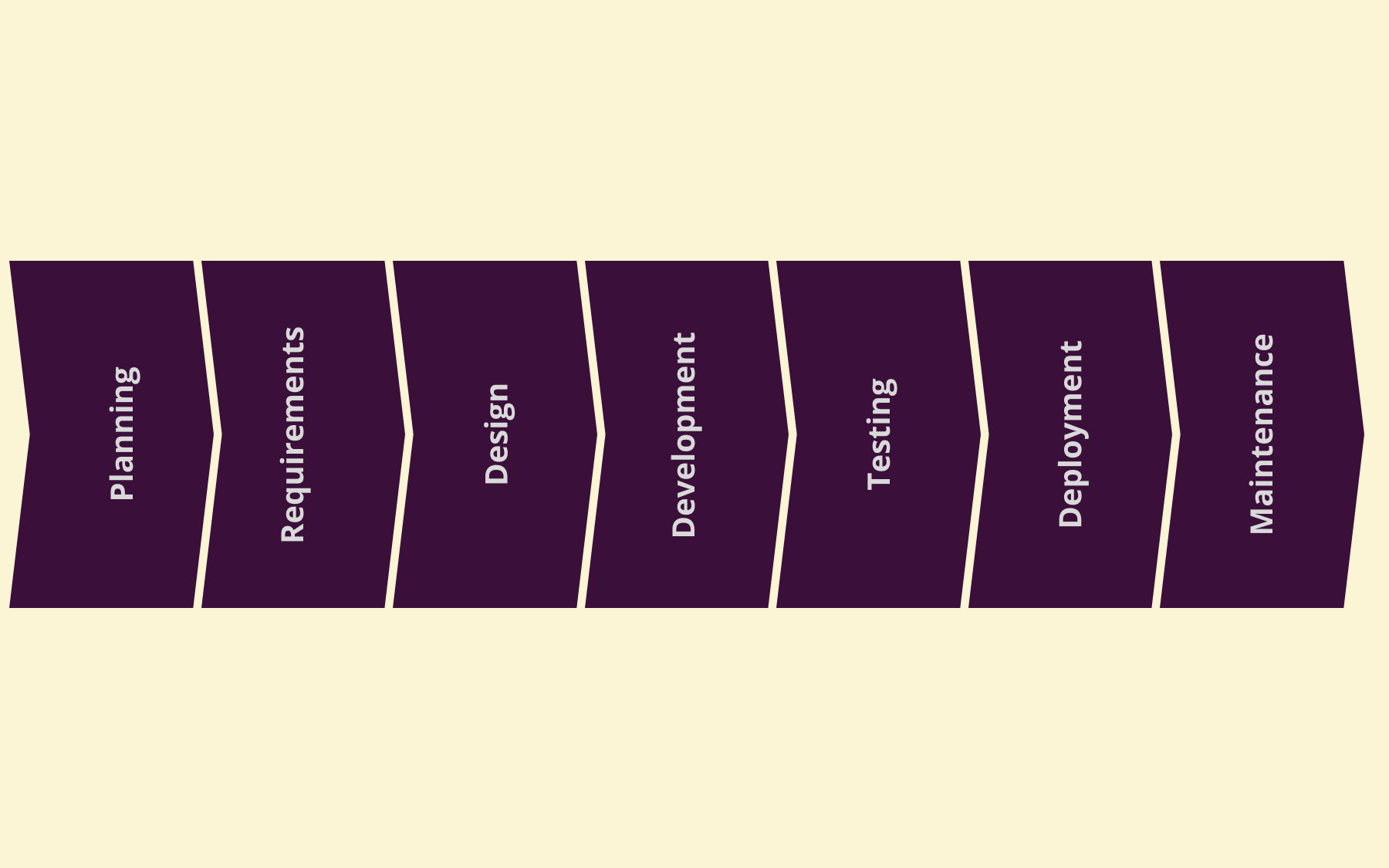
Repeating loop

Popular SDLC models
Every SDLC model organizes the same seven phases differently. Here are the ones you'll run into most often.
Waterfall model
The waterfall model runs the phases strictly in sequence, with each one finishing fully before the next begins. It suits projects with fixed, well-understood requirements, where changes mid-project are rare and expensive to accommodate.
Iterative model
The iterative model builds the software in repeated cycles, releasing working software components early and refining them across subsequent iterations, which makes it easier to catch design problems while they're still cheap to fix. You're not waiting for a single, final release to find out something doesn't work.
Spiral model
The spiral model combines the iterative approach with a strong emphasis on risk analysis at each pass. It's aimed at large and complex projects, where the cost of an unmanaged risk is high enough to justify the extra process overhead of formally assessing it every cycle.
Agile model
The agile model breaks work into short sprints with continuous evaluation, favouring rapid development cycles over a single, upfront plan. It suits teams that expect requirements to change as they learn more, and where regular stakeholder feedback is genuinely available.
DevOps
DevOps merges development and operations teams into one continuous cycle, rather than handing work between separate teams at the deployment phase.
It leans heavily on automation and CI/CD to shorten the gap between writing code and delivering working software into production, which is partly why it pairs so naturally with the optimization practices in the next section.
Different SDLC models suit different software development projects, and there's no universal best choice. Traditional software development still has a place for stable, well-specified projects, even though agile and DevOps dominate most rapid development cycles today.
How to optimize the software development lifecycle
To optimize your SDLC, you need to think about tightening specific, practical levers within whichever model you already run.
- Automate repetitive checks. When tests, security scans, and deployments run automatically, software engineers spend their time making judgement calls instead of following manual, repeatable steps, while quality assurance stops being the sole gatekeeper of software quality.
- Shift security testing earlier. Catching security flaws and security vulnerabilities during development is dramatically cheaper than catching them in a late-stage testing phase, let alone after release.
- Keep documentation current. A software requirement specification or design document specification that goes stale mid-project throws off the assumptions the design phase was built on.
- Use code reviews consistently. Combined with disciplined version control practices, code reviews keep code quality high as a team, and its codebase, grows.
- Track progress with real metrics. Cycle time and defect rate indicate to project managers where a software development project is actually slowing down, rather than them relying on gut feel. It becomes easier to justify investing in better development tools where the data shows a genuine bottleneck.
- Decouple deploying code from releasing it to users. Decoupling deployment from release covered in more depth in the next section, but it's one of the highest-leverage changes you can make to reduce the risk of your deployment phase.
None of these are one-off fixes.
Optimizing your SDLC is an ongoing habit than a project, not a finish line to cross, and revisiting these levers every few releases is a better move than getting any single one perfect on the first attempt.
Reducing deployment and maintenance risk with feature flags
Even a well-optimized SDLC still carries inherent risk once a change reaches real users. No amount of planning, design, or testing perfectly predicts how software behaves under genuine production traffic, which is why the deployment and maintenance phases tend to be where things go wrong, even in mature teams.
Feature flags address this by separating the deployment code from the release of it.
The code ships to the production environment as normal, but stays invisible until it's switched on. You can switch it on gradually, or for a limited group of users first, rather than for everyone at once.
If something misbehaves, turning the flag off is faster and far less disruptive than a full rollback, which reduces the risk of the deployment phase without slowing down planning or testing earlier in the cycle.
Feature flags are not a substitute for a well-run SDLC. They help specifically at deployment and maintenance, but don't replace solid requirements analysis, thoughtful design, or thorough testing earlier on.
What they add is a safety net for the one phase where theory meets real users, which is exactly where youll encounter uncertainty, even during the most carefully planned runs.
The same principle extends into the maintenance phase. Once a feature is live, flags let you keep adjusting who sees it, roll a change back to a smaller group without a redeploy, or retire an experiment cleanly once you've gathered enough user feedback to make a call.
You stop reacting to maintenance requirements and start actively steering the quality of your software.
Conclusion
The software development lifecycle gives teams a shared, structured way to plan, build, test, deploy, and maintain software, rather than leaving each software development project to improvisation.
Optimizing it is as much about managing risk at every phase as it is about moving faster – which is especially true during deployment and maintenance, where a change first meets real users.
If you want to reduce that risk in your own releases, sign up for Flagsmith for free and start separating what you deploy from what you actually release to users.
Software development lifecycle FAQs
What's the difference between the SDLC and agile?
The SDLC is the overall framework of phases: planning, requirements analysis, design, development, testing, deployment, and maintenance.
Agile is one specific software development methodology for moving through those phases, organized around short sprints and continuous evaluation. Every agile project follows the SDLC; not every SDLC project is agile.
Who's involved in the software development lifecycle?
Different roles oversee different phases.
- Project managers and business analysts typically drive planning and requirements analysis.
- Software engineers and software developers own design and development.
- Dedicated testers or the developers themselves handle the testing phase.
- Operations teams take a bigger role from deployment onward.
How long does the software development lifecycle take?
There's no one answer, since it depends heavily on project scope and which model you're using.
A small, well-specified feature might move through all seven phases in days under an agile model, while a large and complex project under a more traditional software development approach can take months or longer to reach deployment.





























































OpenTelemetry, without the vendor lock-in: Introducing full observability for Open Source and Self-Hosted Flagsmith customers
















































