

Feature Flag vs. Feature Branch: What's the Real Difference?


Both feature flags and feature branches help developers and teams reduce the risk of shipping new code, enabling them to work on new features without breaking things for everyone else.
The main difference between a feature branch and a feature flag is that they intervene at completely different points in the software development lifecycle, so they can't be treated as interchangeable.
This article breaks down what each one actually does, where they overlap, and where they don't. You'll get a quick comparison table, a clear way to decide which one you need depending on the work you're doing, and a look at the mistakes teams make when they combine the two carelessly.
What's the difference between a feature flag and a feature branch?
Most of the confusion around feature flags vs. feature branches comes from treating them as two competing ways to solve the same problem, so here are quick definitions of each:
- A feature branch is a version control practice.
- A feature flag is a runtime control mechanism.
Now let's go into a bit more detail.
A feature branch is a separate branch in your version control system, created from your main branch, worked on in isolation, then merged back once it's reviewed and tested.
It controls what code enters your main codebase and when. Once a feature branch merges and that code deploys, the branch's job is done. It has no further impact on your codebase.
A feature flag is a conditional statement wrapped around a piece of code that enables you to switch something dictated by the code on and off, managed by a feature flag system or feature management platform at runtime.
It controls what happens once code has reached production, including who sees a new feature and when, and whether it stays visible at all. For example, you can turn a flagged feature on for 5% of users and then instantly disable it a few hours later if something looks wrong, without having to touch the codebase again.
It's about timing. Feature branches manage risk before code merges. Feature flags manage risk after code deploys.
A team that only branches code has no way to control feature exposure once code ships. A team that only flags still needs somewhere to develop and review code before it reaches the main branch. Most engineering teams benefit from using both at different stages of the same release.
How feature branches work
The feature branching workflow is familiar to almost anyone who has used Git. A developer creates their own branch off the main branch, writes code for a new feature, and keeps that work isolated from the rest of the team until it's ready.
Once the feature is built, the developer opens a pull request, and the code goes through code reviews. If it passes, it merges back into the main branch.
This approach is understandably popular, as it makes the following possible:
- Parallel development – Multiple developers can work on different features at the same time without stepping on each other's changes.
- Isolated testing – You can run automated tests against a feature branch before it ever touches the main codebase.
- Clean abandonment – If a feature doesn't work out, you can delete the branch without leaving a trace in the main branch's history.
However, don't let your branches stick around too long. The longer a feature branch lives separately from the main branch, the further it drifts from what everyone on your team is building, and the more painful the eventual merge becomes. Long-lived branches may not cause merge conflicts immediately, but could become a problem eventually.
Branch hygiene is more a coordination problem than a tooling problem. Distributed version control systems like Git handle the mechanics of branching and merging without much trouble. What they can't do is force a team to merge often, keep branches small, delete old branches efficiently, or resist the temptation to bundle several loosely related changes into one long-running branch because it's easier than opening separate pull requests. The discipline has to come from the development process itself.
Alone, feature branching has its limits. Once your code merges and deploys, the feature branch can't influence what reaches your production environment. If a newly deployed feature misbehaves, your options are to roll back the whole deployment or rush a fix forward.
Neither option is fast, nor will it give you the kind of real-time control you'd actually want once real users are involved.
How feature flags work
Feature flags—also called feature toggles—are conditional statements in your code that check an external configuration file or feature management platform to decide which code path to execute.
Instead of a feature's behaviour being locked in at deploy time, it becomes something you can change on the fly, without a redeploy—making feature flags a great tool for risk management.
Feature flags can be used in a number of different ways, but a few common uses show up across many feature flag systems:
- Release toggles hide unfinished or new functionality behind a flag so incomplete features can merge into the main branch without being visible to users.
- Ops toggles function as kill switches, letting you instantly disable problematic features under load or failure conditions without needing to make a change to the code.
- Permissioning toggles expose a feature to specific segments, such as internal users or premium users, ahead of a wider rollout.
- Experiment toggles serve different versions of a feature to different user groups to measure impact, as with A/B testing.
The appeal of feature flags is that you get granular control over feature exposure after code reaches production: you can gradually roll a feature out to more of your user base as confidence builds, you can instantly disable problematic features without touching the deployment pipeline, and you can test features in an environment with real user behaviour.
However, technical debt management is key. Every flag your team creates adds a conditional branch to your code, and every conditional branch you don't clean up eventually becomes a stale flag that you may forget the initial purpose of.
Here's a webinar where we explain how you can use AI to manage and minimise feature flag debt:
Feature flags need the same kind of discipline as any other piece of configuration: someone has to own each one, and someone has to remove it once its job is done.
Feature flags also change how you test. Once wrapped in a feature flag, a feature has two states to verify instead of one: on and off. Code paths that only ever run with a flag disabled can hide bugs that surface the moment you flip it.
For your team to get real value from feature flags, you need to test both states deliberately, rather than assuming the disabled path is safe by default just because it's the norm.
Feature flag vs. feature branch: the key differences
Everything in the feature branch column happens before code reaches production, and everything in the feature flag column happens after.
Here are the key differences between the two, highlighting that it all stems from where each one sits in your development process.
A decision you make about a feature branch is effectively final once code merges and deploys. A decision you make with a feature flag can change as many times as you like, in real time, based on what you're actually seeing in the production data rather than what you predicted in a staging environment.
When to use feature branches
A feature branch is the right tool when you need to isolate in-progress code from the rest of your team. Feature branches are common in day-to-day development work, from building new functionality and fixing a bug that touches multiple files, to refactoring a chunk of the codebase that isn't safe to expose halfway through.
Use feature branches when:
- Multiple developers are touching related code – Separate branches enable each person to make progress without their changes colliding with someone else's mid-edit.
- Code needs review before it's trusted – Reviewing code on a pull request is a far better option, if you have it, than reviewing code that's already live.
- You need to run automated tests in isolation – Verifying functionality on a feature branch, before it reaches the main codebase, catches problems while they're still simple to fix.
- The work might get abandoned – You can delete an experimental approach that doesn't pan out cleanly if it never left its own branch.
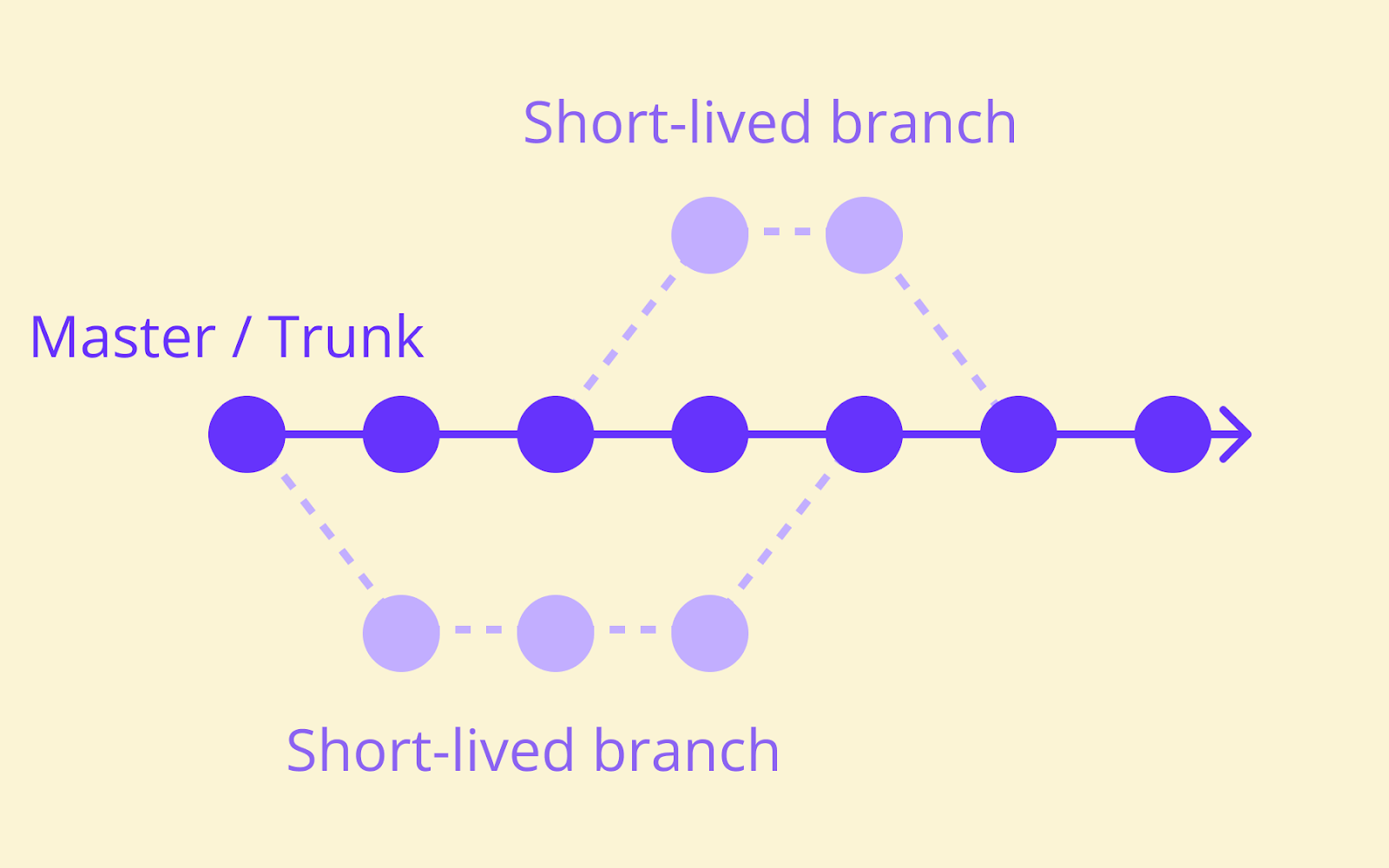
Just don't let branches live too long. Short-lived feature branches, merged back into the main branch at least daily, cause dramatically fewer merge conflicts than branches left open for weeks.
Consider using trunk-based development practices to keep branches short, merge often, and rely on something else—usually a feature flag—to keep unfinished work hidden from users once it's merged.
When to use feature flags
Feature flags give you control that extends past the moment your code deploys so you can manage what real users experience, not what enters your codebase.
Feature flags are the right tool when:
- You want a gradual rollout – Enable a new feature for a small percentage of your user base first, then expand to more once you know it performs the way you expect.
- You need to target specific users – Turn a feature on for internal users first, or make it available only to premium users, without maintaining separate code paths.
- You want production testing with a safety net – Test features against real production data and real traffic patterns, something that staging environments can't truly replicate.
- You need an instant kill switch – If a newly released feature performs badly, disable it immediately instead of scrambling to redeploy an older version.
- You're running an experiment – Serve different variants to different segments and measure how each feature performs before committing to one broadly.
You don't have to adjust your deployment pipeline: feature exposure becomes a decision you can make and unmake in real time, separate from the mechanics of deploying code.
Can you use feature flags and feature branches together?
Yes, and many engineering teams do.
The fact that feature branches and feature flags solve different problems in the software development lifecycle makes them complementary rather than competitive.
Branches handle coordination during development, keeping multiple branches from colliding while code changes are still in progress, while flags handle exposure after deployment. One enables better development coordination while the other reduces production risk.
Combining the two effectively enables engineering teams to shorten release cycles and improve software delivery without taking on more risk. A typical combined workflow looks like this:
- Create a short-lived feature branch for the new functionality, ideally scoped to something that can merge within a day or two.
- Wrap the new code in a feature flag, set to off by default, so the feature stays hidden even after the branch merges.
- Merge into the main branch once code reviews and automated tests pass—even if the feature itself isn't finished, since the flag keeps it invisible.
- Deploy code to production with the flag still off. Deploying and releasing become two separate decisions instead of one.
- Enable the flag for internal users first, then a small percentage of your real user base, watching for problems as you go.
- Roll out gradually to the entire user base, or roll back instantly by flipping the flag off if something looks wrong.
By combining feature flags and feature branches into this development workflow, your continuous integration and continuous delivery process will be effective at scale.
Short-lived feature branches keep your main codebase merge-conflict-free, since nobody's waiting weeks to reconcile diverging changes. Feature flags keep half-finished work invisible to users without blocking anyone else's ability to merge and deploy.
You get the coordination benefits of separate branches during development, and the release-time control of flags once code reaches production, without the coordination overhead that comes from either practice on its own.
Common mistakes when combining feature flags and feature branches
The two practices work well together, but combining them badly can reintroduce the same risks they're each meant to reduce. Here are a few things to watch out for:
- Stale flags after a long merge – If a feature branch takes weeks to merge, the flag wrapping it often outlives its usefulness before the code even reaches users. Clean up flags as part of finishing a feature, not as a separate chore nobody owns.
- Treating flags as a substitute for testing – A feature flag limits blast radius; it doesn't replace code reviews or automated tests. Shipping untested code behind a flag only delays when you discover the bug.
- Flag sprawl with no ownership – As teams add more feature flags, it becomes easy to lose track of which flags are still doing anything. Without a clear owner and a retirement plan for each flag, a feature flag system turns into technical debt instead of a safety mechanism.
- Falling back into long-lived branches out of habit – By adopting feature flags, you don't automatically fix bad branching habits. If your developers keep working on separate branches for weeks at a time regardless, you're carrying the coordination overhead of long-lived branches and the maintenance overhead of flags, without benefitting from either.
To get the most out of combining feature branches and feature flags, you need to be disciplined with both: short-lived branches, flags with a clear purpose and a clear expiry point, and code reviews and automated tests that still happen regardless of what's hiding behind a flag.
Use a simple naming convention. A flag name that includes the team that owns it, the type of toggle it is, and roughly when it was created makes it far easier to spot candidates for cleanup during a quarterly review, instead of relying on someone's memory of a feature shipped eight months ago.
DORA's software delivery performance research has repeatedly found that teams with fast, frequent deployments also tend to have the lowest change failure rates, while low performers tend to score poorly across both. Keeping branches short and flags disciplined supports throughput and stability at the same time, instead of trading one for the other.
How Flagsmith supports both feature branches and feature flags
To start using feature flags alongside your feature branches, you don't need to abandon your existing Git workflow.
A feature management platform like Flagsmith sits alongside your branching strategy rather than replacing it—you keep your pull requests, your code reviews, and your CI/CD pipeline exactly as they are, and add real-time control over what happens after code deploys.
In practice, that means flags you can toggle without a redeploy and segmentation so you can target internal users or specific customer groups before a wider release.
It also means role-based access controls, so it's clear who can change a flag in production and when they did it. For teams in regulated environments like banking or healthtech, that audit log is as important as the flag mechanics: you need to know exactly who enabled a feature, and when, as it's often a compliance requirement, not just a convenience.
Flagsmith is open source, and you can self-host it if your environment requires it, or use the hosted version if it doesn't—you're not locked into your initial choice of deployment model the way some proprietary platforms do.
It also supports OpenFeature, the open standard for feature flagging, so you don't need to rewrite your flag logic if you ever want to change feature management platform providers.
Flagsmith gives you the control feature branches were never designed to provide once your code reaches production. If you want to see how that works with your own setup, you can sign up for a free account and connect it to your existing pipeline in a few minutes.
Conclusion
Feature flag vs. feature branch was never really an either/or question. Feature branches manage the risk of code entering your main codebase; feature flags manage the risk of that code reaching real users.
Short-lived branches keep your development process fast and merge conflicts rare. Flags keep you in control of feature exposure long after deployment, with an instant kill switch if something goes wrong.
To get the most out of both, treat them as complementary parts of the same release process, not competing philosophies, while ensuring your team has the discipline to keep branches short and flags clean. If you're ready to add that runtime layer of control to your existing branching strategy, sign up for Flagsmith and see how it fits into your pipeline.
Feature flag vs. feature branch FAQs
Is a feature flag the same as a feature toggle?
Yes, feature flags and feature toggles refer to the same practice: a conditional statement that controls whether a piece of code executes, evaluated at runtime rather than fixed at deploy time. Different teams and vendors favour one term over the other, but the underlying mechanism is identical.
Do feature flags replace the need for feature branches?
No. Feature flags control what happens after code deploys; they don't provide a workspace for isolating and reviewing in-progress code the way feature branches do. Most teams that adopt feature flags still use short-lived feature branches for development—the two work together rather than one replacing the other.
How long should a feature flag stay in the code before it's removed?
It depends on the flag type. Release toggles, used to hide a new feature during rollout, should typically be removed within a few weeks of reaching 100% of the user base, once you're confident nothing needs rolling back.
You will keep most ops toggles and kill switches in your codebase permanently, since their job is ongoing risk management rather than a one-time release.





























































OpenTelemetry, without the vendor lock-in: Introducing full observability for Open Source and Self-Hosted Flagsmith customers
















































